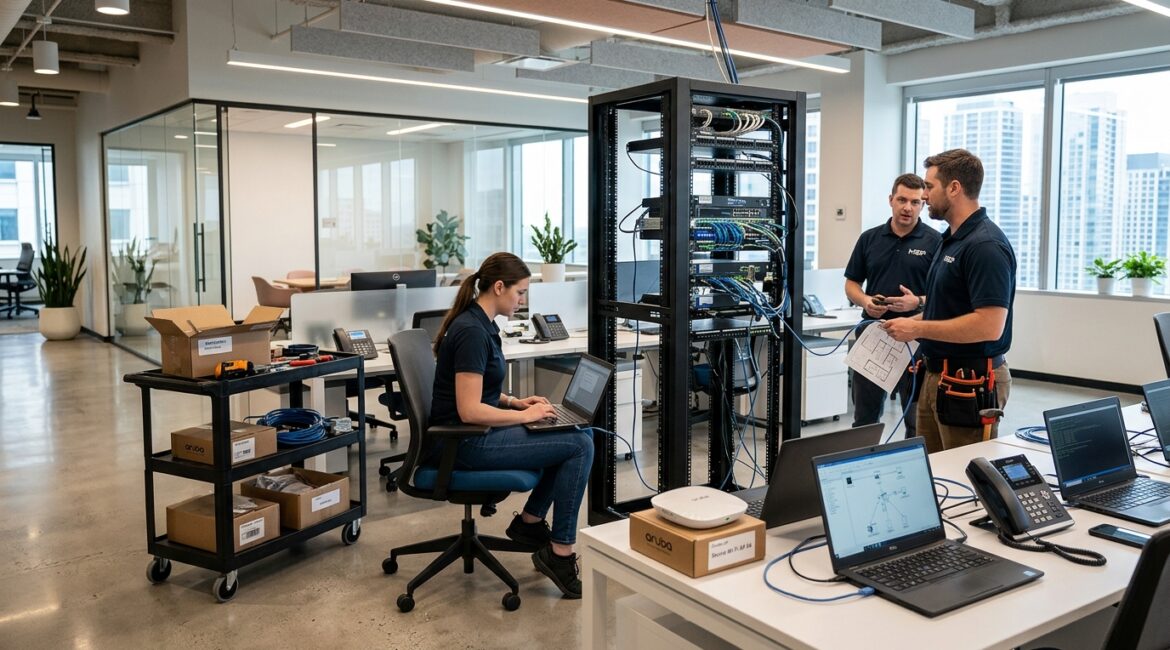
To reduce technology downtime during an office move, plan the technology portion of the relocation well before the furniture starts moving. The businesses that avoid major disruption usually map their critical systems early, coordinate internet and phone cutovers in advance, and test the new environment before the first workday in the new space.
Office moves often look like facilities projects, but the real business risk usually sits in the technology details. If your internet is not active, phones are not forwarding, printers are not mapped, or line-of-business software cannot connect, your team may be physically in the new office but still unable to work.
Why office moves create more downtime than expected
Most downtime during a move does not come from one dramatic failure. It usually comes from a series of smaller misses that stack up. A circuit is delayed, a firewall is still boxed up, a copier vendor arrives late, or a key employee cannot access a shared drive.
For a 25-person professional services firm, even half a day of disruption can be expensive. If average loaded labor cost is $40 per hour, four hours of lost productivity can cost roughly $4,000 before you count missed client work, delayed billing, or leadership time spent troubleshooting.
Manufacturers, nonprofit organizations, and accounting or legal firms often feel this impact differently:
- Manufacturers may lose access to ERP systems, shipping tools, production printers, or warehouse scanners.
- Nonprofits may struggle with donor databases, shared files, and phone access during fundraising or program delivery.
- Professional service firms may lose billable time if staff cannot reach document systems, email, or remote meeting platforms.
Start planning technology earlier than you think
A good rule is to begin technology planning at least 60 to 90 days before the move, and earlier if you are changing internet providers, phone systems, or office layout. In Southeast Wisconsin and Northeast Illinois, carrier lead times can vary more than many businesses expect, especially for dedicated circuits.
One of the first steps is building a clear inventory of what is actually moving. If you do not have that list yet, our article on how to create a business technology inventory that actually helps is a practical place to start.
Key items to identify early
- Internet circuits and provider installation dates
- Firewall, switches, wireless access points, and rack equipment
- Desk phones, conference room systems, and fax alternatives
- Printers, copiers, postage systems, and specialty devices
- Servers, storage, and backup appliances
- Line-of-business applications that depend on local network access
- Vendor contacts for telecom, copier, access control, and cabling
This is also the time to decide what should not move at all. An office relocation can expose aging hardware, unsupported software, and messy cabling that should have been replaced years ago. Moving unstable equipment into a new office often carries old problems into a new setting.
Map the business systems that cannot go down
Not every system needs the same level of urgency. Your move plan should identify what the business must have available on day one, what can wait a day or two, and what can be retired.
Examples of day-one critical systems
- Email and Microsoft 365 access
- Internet connectivity and secure Wi-Fi
- VoIP phones or call forwarding
- Shared files and document management
- Accounting, scheduling, or ERP platforms
- Printing for shipping, invoicing, or client documents
For example, a Kenosha nonprofit may be able to delay setup of one training room display, but not access to donor records or finance systems. A small manufacturer may tolerate delayed setup of guest Wi-Fi, but not shipping workstations or barcode label printers.
If your business depends heavily on connectivity, build redundancy into the move plan. Our post on business internet redundancy explains why a backup connection can prevent a single carrier delay from turning into a full operational stop.
Use a staged move instead of a single cutover when possible
Many businesses assume the move has to happen all at once. In reality, the lowest-risk approach is often to stage the environment in phases. That gives your team time to test the new office before everyone is relying on it.
What staged preparation looks like
- Install internet and network equipment before move weekend
- Configure firewall, switches, and wireless in advance
- Label every cable, workstation, phone, and printer by destination
- Test conference rooms, scanners, and print workflows ahead of time
- Move noncritical teams or departments first if practical
- Keep key systems available from the old office during transition
This approach is especially useful for firms with hybrid staff. If some employees can work remotely during the transition, you can reduce pressure on move day and focus first on the departments that must be onsite.
Coordinate vendors like they are part of your operations team
Office move downtime often comes from vendor gaps, not internal mistakes. Your internet provider, structured cabling company, phone vendor, copier company, building management team, and security integrator all affect whether your technology is ready.
Do not assume these groups are aligned unless someone is actively coordinating them. A move plan should assign owners, dates, dependencies, and escalation contacts.
Questions to confirm with vendors
- What is the committed install date, not just the estimated date?
- Who has building access and when?
- Are there demarc, cabling, power, or rack prerequisites?
- Will numbers port before or after the move?
- Who tests service activation and signs off?
- What is the fallback plan if installation slips?
This matters even more if your business works across multiple sites. Standardization helps keep moves simpler and lowers support confusion. Our article on technology standardization explains why consistent equipment and configurations make transitions easier to manage.
Protect productivity, not just equipment
Businesses often focus on whether devices arrive safely, but the bigger question is whether employees can actually do their jobs. A computer on a desk does not help if the user cannot sign in, print, reach shared folders, or connect to the applications they need.
Before the move, create a short checklist for employee readiness:
- Can each person log in from the new office network?
- Are printers assigned correctly by team or department?
- Do conference room tools work for internal and client meetings?
- Are remote workers and branch users affected by any network changes?
- Do employees know where to get help on move day?
A law office, for example, may have all laptops delivered and powered on by 8:00 a.m., but still lose half a day if document management shortcuts fail or scan-to-email is broken. Those are small issues individually, but they slow down the whole office.
Test the new environment before employees arrive
Testing is where good plans become real. The best time to find a problem is before the first employee sits down and before the first client call starts.
At minimum, test these items
- Internet speed and failover behavior
- Firewall security policies and VPN access
- Wi-Fi coverage in offices, conference rooms, and common areas
- Phone calls in and out, voicemail, and call routing
- Access to shared files, cloud apps, and line-of-business tools
- Printer and scanner functions
- Backup job status and monitoring alerts
It is also wise to validate your recovery options before the move. If something goes wrong, you need confidence that systems and data can be restored quickly. For a deeper look, see our article on how to create an IT disaster recovery plan for your business.
Have a move-day support plan
Even well-run moves need live support. Someone should be assigned to triage issues, communicate status, and keep leadership informed. Without that structure, small problems become distracting and expensive.
A practical move-day support plan includes
- A primary technology lead and backup contact
- A simple issue tracking list
- Priority order for fixing business-critical problems
- Clear communication to employees on how to report issues
- Vendor escalation contacts available in real time
For many organizations, the first four hours after opening are the most important. Quick resolution during that window can prevent a full day of lost output.
Think beyond move day
An office relocation is also a chance to improve your environment instead of simply recreating the old one. Better wireless coverage, cleaner network design, stronger security controls, and updated equipment can reduce support issues for years after the move.
This is where proactive planning pays off. Rather than treating the move as a one-time event, treat it as a point to review lifecycle, resilience, and future growth. A business that is expanding in Kenosha or adding staff across Southeast Wisconsin may need a technology design that supports the next three years, not just the first Monday in the new office.
Conclusion
Reducing technology downtime during an office move comes down to early planning, clear priorities, vendor coordination, staged setup, and real testing. When those pieces are handled well, your move becomes a controlled transition instead of a scramble.
If you’re ready to strengthen your technology, reduce risk, and plan for the future, contact Platinum Systems to schedule a technology strategy discussion. We can help you evaluate your move plan, identify hidden risks, and build a transition approach that supports the way your business actually operates.