

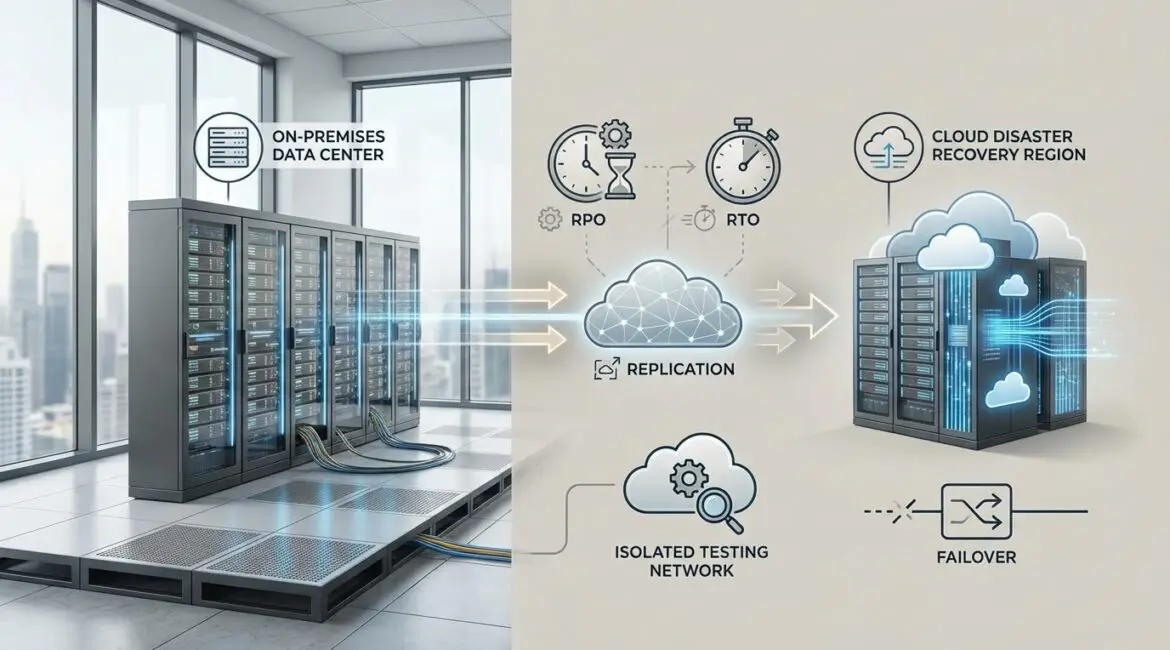
Disaster Recovery as a Service is a cloud-based way to keep your applications and data available after an outage, cyberattack, or natural disaster by replicating systems to a provider and failing over when needed. It works by continuously copying data and machine images from your environment to a secondary site in the cloud, then orchestrating a controlled recovery when the primary site is down. In practice, DRaaS replaces a self-built secondary data center with an on-demand recovery environment and tested runbooks.
Why DRaaS exists and what problems it solves
Business continuity used to require maintaining a second data center, duplicating hardware, networking, licensing, and staffing. That model is expensive and often under-tested. DRaaS addresses those gaps by providing elastic recovery infrastructure, automation for failover and failback, and reporting that supports audits and cyber insurance requirements.
The drivers are both operational and geographic. A manufacturer with plants in the U.S. Midwest might worry about tornado-season power loss; a financial services firm in London may prioritize resilience against regional carrier outages; a healthcare provider in Florida may plan around hurricanes; and a retailer with warehouses in California may include wildfire risk. DRaaS is designed to keep core services running even when a particular city, campus, or data center is unavailable.
What Disaster Recovery as a Service includes
DRaaS is not just storage. It is a managed set of technologies and processes that deliver a measurable recovery outcome. Providers typically bundle several capabilities:
Replication and backup foundations
Most DRaaS platforms continuously replicate virtual machines, physical servers, databases, or file systems to a cloud-based recovery site. Replication can be near-real-time for low data loss tolerance, or periodic for less critical systems. Many providers also include immutable backup or integration with a backup product to help recover from ransomware or accidental deletion.
Recovery orchestration
Orchestration is what turns copied data into a working environment. It defines boot order, dependency mapping, IP address changes, DNS updates, firewall rules, and application scripts. For example, a three-tier app might require database first, then application servers, then web front ends. Orchestration reduces manual steps and helps meet strict recovery time objectives.
Runbooks, testing, and reporting
Regulators and internal risk teams expect evidence that recovery plans work. DRaaS usually provides scheduled test failovers, isolated “bubble” networks for non-disruptive testing, and reports that document RPO, RTO, and test results. These artifacts are useful for ISO 27001, SOC 2, HIPAA, PCI DSS, and internal board reporting.
Managed services and monitoring
Some offerings are self-service portals, while others are fully managed. Managed DRaaS includes 24/7 monitoring, alerting, patch guidance for recovery components, assistance with runbook updates, and support during incidents. For organizations with small IT teams, managed service often provides the fastest path to consistent outcomes.
How Disaster Recovery as a Service works, step by step
Although vendor implementations differ, most DRaaS deployments follow a repeatable lifecycle.
1) Assess critical systems and define RPO and RTO
Start by ranking applications by business impact: revenue, patient safety, legal exposure, and operational dependency. Then define:
- RPO (Recovery Point Objective): maximum acceptable data loss measured in time, such as 15 minutes.
- RTO (Recovery Time Objective): maximum acceptable downtime, such as 1 hour.
These targets determine replication frequency, network bandwidth, and whether warm or hot standby is required.
2) Connect environments securely
Your production environment connects to the DRaaS provider using VPN, private interconnect, or carrier-grade circuits. In North America, organizations often use dedicated links into cloud regions in Virginia, Ohio, Oregon, or Quebec; in Europe, common landing zones include Dublin, Frankfurt, London, Paris, and Amsterdam; in APAC, Sydney, Singapore, Tokyo, and Mumbai are frequent choices. The goal is to balance latency, sovereignty requirements, and regional risk.
3) Install agents or configure hypervisor replication
Replication may be agent-based (installed on servers) or hypervisor-based (integrated with platforms like VMware). The configuration defines which volumes replicate, retention points, compression, encryption, and bandwidth throttling so production performance remains stable.
4) Create recovery plans and dependency maps
Recovery plans group systems into application stacks, set boot order, define network mappings, and specify post-boot scripts such as starting services, remounting storage, or validating database consistency. Many teams also define “minimum viable service” plans, which restore only the systems required to take orders, route calls, or deliver patient care while secondary applications come online later.
5) Run test failovers regularly
Testing is where DRaaS provides major value. A good test restores systems into an isolated network, validates application logins, checks key workflows, and measures actual RTO against targets. Tests should be scheduled after major application releases, infrastructure changes, and security events like domain controller updates.
6) Fail over during an incident
When a disruption occurs, the team triggers failover through the DRaaS console or with provider assistance. Traffic is redirected using DNS changes, load balancers, SD-WAN policies, or BGP routing. During ransomware events, teams often choose a clean recovery point and bring systems up in a quarantined segment for verification before reopening access.
7) Fail back and resume normal operations
After the primary site is restored, DRaaS supports failback by synchronizing data changes from the recovery site to production and then switching traffic back. The best implementations treat failback as a planned project with change control, validation steps, and communication to stakeholders.
Common DRaaS architectures
DRaaS can be tailored to budget and recovery needs:
- Pilot light: critical components run in the cloud at low cost, and the rest starts during disaster. Good for moderate RTO.
- Warm standby: a scaled-down version of production runs continuously and scales up at failover. Often a balance of cost and speed.
- Hot standby: near full capacity runs continuously with rapid cutover. Highest cost, lowest downtime.
Geography matters. Some organizations choose a different seismic zone or power grid for the recovery region. For example, a company headquartered in San Francisco may replicate to a region in Oregon or Nevada to reduce correlated earthquake risk, while a business in Miami may select a region farther north to reduce hurricane exposure.
Key benefits and tradeoffs
Benefits
- Lower capital expense: no need to build and refresh a secondary data center.
- Faster recovery: automation and pre-built runbooks reduce manual work under pressure.
- Improved testing: regular, auditable tests without major production disruption.
- Scalability: recovery capacity can expand during a disaster and contract afterward.
Tradeoffs and risks to manage
- Network dependency: replication and user access rely on connectivity and routing design.
- Configuration drift: runbooks must track application changes, patches, and new dependencies.
- Shared responsibility: clarify who owns testing, security controls, and incident response steps.
- Data residency: regulated sectors may need specific regions or contractual controls.
What DRaaS costs and what influences pricing
Pricing typically depends on protected capacity (terabytes), number of machines, replication frequency, retention points, and recovery compute reserved for tests and real failovers. Lower RPO and RTO targets generally increase cost because they require more bandwidth, more storage IOPS, and more always-available compute. Managed service, compliance reporting, and premium support also affect price.
To control cost, many teams categorize applications into tiers and apply different protection levels. Customer-facing payment systems might use warm standby, while internal file shares use less aggressive replication and longer RTO.
How to choose the right DRaaS provider
Selection should be driven by measurable outcomes and operational fit.
- Proven RPO and RTO: ask for references in your industry and evidence from real tests.
- Regional options: ensure coverage in the geographies you need, including data sovereignty.
- Security: encryption, MFA, role-based access, immutable backups, and ransomware recovery workflows.
- Orchestration depth: dependency mapping, scripting, DNS and network automation, and API support.
- Testing model: isolated testing, frequency, and the effort required from your team.
- Support during incidents: 24/7 response, named contacts, and clear escalation paths.
Practical implementation tips for a smooth DRaaS rollout
- Start with one critical application: prove recovery in weeks, then expand in tiers.
- Document dependencies: DNS, identity providers, certificates, third-party APIs, and licensing servers often cause surprises.
- Plan for identity and access: ensure administrators can authenticate during outages, including if the primary directory is down.
- Define communication and decision rights: who declares disaster, who triggers failover, and how business leaders are notified.
- Validate from the user perspective: application health checks should include transactions, not just server uptime.
Conclusion
Disaster Recovery as a Service provides a structured, testable way to restore operations after outages by replicating workloads to the cloud and orchestrating a controlled failover when the primary environment is unavailable. With clear RPO and RTO targets, careful regional planning, and regular testing, DRaaS can replace fragile manual recovery processes with predictable results. For most organizations, the best next step is a tiered assessment of critical applications and a pilot recovery test that produces real metrics and confidence for leadership.
Frequently Asked Questions
Is Disaster Recovery as a Service the same as cloud backup?
Is Disaster Recovery as a Service the same as cloud backup?
Disaster Recovery as a Service is broader than backup because it includes automated recovery of complete systems, networking, and application dependencies, not only file or image storage. Backup helps you restore data, while Disaster Recovery as a Service helps you resume operations within defined RPO and RTO targets using orchestrated failover and repeatable testing.
How long does it take to implement Disaster Recovery as a Service?
How long does it take to implement Disaster Recovery as a Service?
A focused Disaster Recovery as a Service pilot for one application stack can often be implemented in a few weeks, depending on network connectivity and dependency mapping. Full rollout across many applications usually takes one to three months or more, driven by testing cycles, runbook refinement, and aligning RPO and RTO targets with budgets.
What should we test during a DRaaS failover exercise?
What should we test during a DRaaS failover exercise?
A Disaster Recovery as a Service test should validate more than server boot. Confirm login and authentication, DNS and routing changes, application transactions, integrations like payment gateways or EDI, and data consistency. Record actual RTO and any manual steps required. Update runbooks immediately so the next test is faster and more reliable.
Does Disaster Recovery as a Service help with ransomware recovery?
Does Disaster Recovery as a Service help with ransomware recovery?
Yes, Disaster Recovery as a Service can support ransomware recovery when it includes immutable backups or multiple recovery points and controlled network isolation during failover. The practical approach is to select a known-clean recovery point, restore into a quarantined segment, validate identity systems and endpoints, then reopen access gradually with monitoring and credential resets.
How do we choose the best region for DRaaS replication?
How do we choose the best region for DRaaS replication?
Choose a Disaster Recovery as a Service region that balances latency, compliance, and correlated risk. Keep it far enough from the primary site to avoid the same power grid or natural disaster zone, but close enough to meet RPO and RTO. Consider data residency rules, carrier diversity, and where your users and partners are located.