To reduce business risk from outdated technology, you need a clear inventory of what you run today, a quantified view of what could break tomorrow, and a prioritized modernization plan that aligns with revenue, security, and compliance requirements. The most effective approach combines rapid risk controls, staged upgrades, and strong governance so critical systems are protected while modernization progresses.
Outdated technology is not just an IT inconvenience. It can drive downtime, cyber exposure, compliance gaps, and escalating costs, especially when vendor support ends or integrations become brittle. Whether you operate a manufacturing plant in the US Midwest, a retail chain across the UK, or a services firm with teams in Singapore and Sydney, the patterns are the same: legacy systems accumulate hidden risk until a disruption forces a rushed, expensive response.
Why outdated technology increases business risk
Legacy systems create risk through three primary channels: operational fragility, security exposure, and strategic drag. Operationally, older platforms are harder to patch, harder to monitor, and often depend on a shrinking pool of specialists. Security teams face unpatched vulnerabilities and unsupported operating systems. Strategically, the business loses speed, because modern capabilities like automation, analytics, and secure remote work are difficult to add.
Geography can amplify these issues. For example, organizations operating in the European Union may face stricter requirements around data handling and breach reporting, while US healthcare providers must account for HIPAA-related safeguards and audit readiness. Multinational companies also encounter data residency, cross-border access rules, and different vendor availability by region.
Start with a risk-based technology inventory
You cannot reduce business risk from outdated technology without knowing exactly what is running, where it runs, and who depends on it. A useful inventory includes applications, infrastructure, endpoints, network devices, SaaS subscriptions, data stores, and integrations. The goal is not an asset list for its own sake, but a decision-ready map of dependencies and exposure.
What to capture in the inventory
- Business owner and technical owner: who approves changes and who executes them.
- Criticality: revenue impact, safety impact, customer impact, and downtime tolerance.
- Lifecycle status: vendor support status, end-of-life dates, and current patch level.
- Data classification: personal data, payment data, IP, regulated data, and retention rules.
- Integration map: upstream and downstream systems, file transfers, APIs, middleware.
- Location: on-premises site, cloud region, or country where data and workloads reside.
If you operate across regions, note where the systems physically sit, such as a data center in Frankfurt, a cloud region in Northern Virginia, or a branch server closet in Toronto. Location affects latency, support options, and regulatory obligations.
Quantify risk so you can prioritize modernization
Modernization backlogs grow when every system is “important.” Use a simple scoring model that ties technology condition to business consequences. Combine likelihood (how probable a failure or compromise is) with impact (financial loss, operational disruption, regulatory exposure, brand damage). This lets you focus on the few changes that meaningfully reduce business risk from outdated technology in the next quarter.
Practical scoring inputs
- Supportability: unsupported OS, database, or middleware receives a high likelihood score.
- Exploitability: internet exposure, known CVEs, weak authentication, flat networks.
- Recoverability: backup frequency, restore testing, RTO and RPO, and DR readiness.
- Business concentration: number of processes and teams blocked if the system fails.
- Compliance exposure: audit findings, required logging, encryption, and retention gaps.
Translate the score into a prioritized roadmap: immediate controls (0 to 30 days), near-term remediation (30 to 90 days), and modernization projects (3 to 18 months). A roadmap makes funding conversations easier because it connects spend to measurable risk reduction.
Apply immediate controls to reduce exposure now
Full replacement takes time, but you can reduce business risk from outdated technology quickly by surrounding fragile systems with modern safeguards. These controls are especially important for systems that cannot be upgraded soon, such as specialized industrial software, older medical devices, or bespoke ERP modules.
- Network segmentation: isolate legacy servers and restrict inbound and outbound traffic to what is required.
- Strong access controls: enforce MFA, remove shared accounts, and apply least privilege with role-based access.
- Virtual patching and WAF: add compensating controls for known vulnerabilities when vendor patches are unavailable.
- Centralized logging: forward logs to a SIEM, set alerts for abnormal authentication and data access patterns.
- Backup hardening: immutable backups, offsite copies, and tested restores to protect against ransomware.
In geographically distributed environments, ensure your controls work consistently across sites, including smaller offices in rural areas where bandwidth and onsite support may be limited. Standardize remote access and avoid ad hoc VPNs that become shadow infrastructure.
Choose the right modernization path
Modernization is not always a rip-and-replace. The best option depends on business criticality, vendor roadmap, integration complexity, and your risk tolerance. The aim is to reduce business risk from outdated technology while preserving continuity.
Common modernization options
- Upgrade in place: safest when a supported version exists and integrations are stable.
- Replatform: move to a managed database or newer OS while keeping core code mostly intact.
- Refactor: redesign key components for resilience, security, and scalability, often with microservices or modular architectures.
- Replace with SaaS: effective for commodity functions like HR, CRM, and ITSM, with attention to data residency in regions like the EU or Australia.
- Retire: eliminate redundant apps, duplicate reporting tools, and unused integrations to cut risk surface area.
A staged approach often works best: stabilize the legacy system with controls, migrate peripheral functions first, then modernize the core when the organization is ready. This reduces the chance of a high-impact cutover failure.
Strengthen vendor and supply chain resilience
Outdated technology risk is tightly linked to vendor dependence. If a vendor ends support, your risk profile changes overnight. Also, legacy products can rely on third-party components with untracked vulnerabilities. Build a process that continuously monitors support timelines, contract terms, and third-party risk.
For organizations in regulated sectors such as finance in New York or London, or critical infrastructure in California or Queensland, document vendor support commitments and incident response expectations. Include SLAs for patch timelines, security notifications, and breach cooperation.
Make compliance and audit readiness part of the plan
Compliance failures often appear first where systems are outdated: weak encryption, missing logs, untracked admin activity, and unclear data flows. Map requirements to controls for each high-risk system. If you operate in multiple regions, align your approach to the strictest applicable rules to reduce complexity.
Examples include aligning access logs and retention policies for EU operations, ensuring appropriate safeguards for US consumer data, and confirming that cross-border transfers are documented. Even when specific regulations differ, the operational requirement is similar: prove control effectiveness and maintain evidence.
Operationalize technology lifecycle management
The most sustainable way to reduce business risk from outdated technology is to prevent “outdated” from accumulating again. Build lifecycle management into normal operations and budgeting. Treat end-of-life dates as predictable events, not surprises.
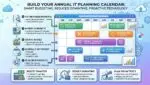
- Lifecycle calendars: track end-of-support for OS, databases, network devices, and major apps.
- Quarterly patch and upgrade windows: schedule predictable maintenance with business stakeholders.
- Architecture standards: approved versions, supported patterns, and security baselines for new projects.
- KPIs: percent of systems supported, patch compliance, mean time to restore, and audit findings trend.
Include finance early. Spreading modernization over predictable cycles is typically cheaper than emergency replacement after an outage or breach. This is particularly important for organizations with multiple sites across North America or Europe where operational interruptions cascade through logistics and customer service.
Prepare your people for change
Legacy risk is partly human risk. A small number of experts may be the only people who understand a decades-old system. Reduce key-person dependency by documenting runbooks, cross-training staff, and building a migration plan that includes knowledge transfer. Support users with clear communications and phased rollouts, especially for customer-facing systems.
For global teams, plan for time zones and language needs. A rollout that works smoothly in San Francisco can struggle in Dublin or Bangalore if support coverage is not coordinated. Use follow-the-sun support during cutovers and ensure incident escalation paths are clear.
Closing thoughts
Outdated technology does not have to be a looming threat. With a risk-based inventory, immediate compensating controls, and a staged modernization roadmap, you can reduce business risk from outdated technology while keeping operations stable and customers confident. Treat lifecycle management as an ongoing discipline, and your organization will be better positioned to meet security, compliance, and growth demands in any region where you operate.
Frequently Asked Questions
What is the fastest way to reduce business risk from outdated technology without a full replacement?
What is the fastest way to reduce business risk from outdated technology without a full replacement?
The fastest way to reduce business risk from outdated technology is to add compensating controls around the legacy system: segment the network, enforce MFA and least privilege, centralize logs with alerts, and harden backups with immutable and tested restores. These steps reduce breach and downtime risk while you plan an orderly upgrade.
How do I prioritize which legacy systems to modernize first?
How do I prioritize which legacy systems to modernize first?
To reduce business risk from outdated technology, rank systems by likelihood and impact. Focus first on unsupported platforms, internet exposed services, and systems that handle regulated data or drive revenue critical workflows. Add dependency mapping so you understand downstream impacts, then convert rankings into a 30, 90, and 365-day roadmap.
Can moving to cloud or SaaS automatically reduce business risk from outdated technology?
Can moving to cloud or SaaS automatically reduce business risk from outdated technology?
Cloud and SaaS can help reduce business risk from outdated technology, but only if configured and governed well. Managed services can improve patching and resilience, yet you still own identity, access, data classification, and monitoring. Confirm data residency needs in regions like the EU, UK, or Australia before migrating.
How do I handle compliance requirements when legacy systems cannot be patched?
How do I handle compliance requirements when legacy systems cannot be patched?
To reduce business risk from outdated technology under compliance constraints, document the exception, apply compensating controls, and maintain evidence. Use segmentation, strict access controls, continuous logging, and virtual patching to address audit concerns. Establish a time-bound remediation plan with milestones so auditors see risk is managed, not ignored.
What metrics should leadership track to ensure legacy risk is decreasing?
What metrics should leadership track to ensure legacy risk is decreasing?
Leadership should track metrics tied to reduce business risk from outdated technology outcomes: percentage of systems on supported versions, patch compliance rates, number of high-risk exceptions, restore test success rate, and mean time to recover for critical services. Add a modernization burn-down chart that shows legacy retirements and upgrades completed each quarter.