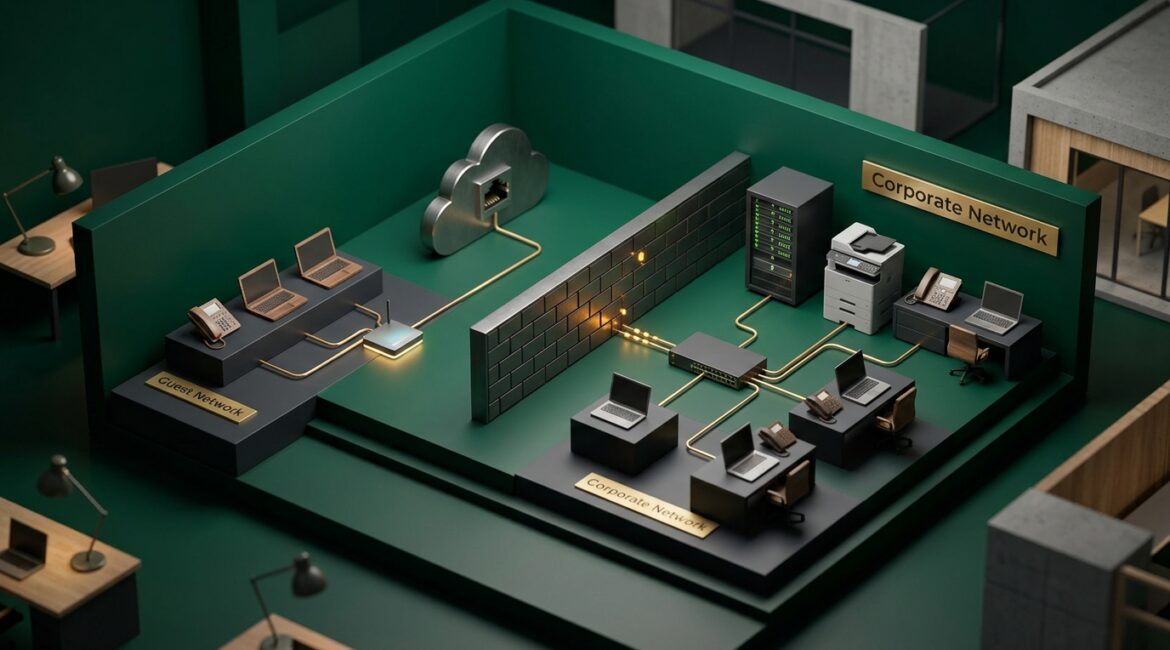
Businesses should separate guest WiFi from corporate networks by putting guests on a completely isolated network that cannot reach company devices, servers, printers, or business applications. The goal is simple: visitors get internet access, while your organization keeps its internal systems private, stable, and easier to manage.
If your guest WiFi uses the same network as employee laptops, phones, or office equipment, you are creating unnecessary risk. A proper setup is usually straightforward for a business-grade network, and it can prevent security problems, performance issues, and support headaches later.
Why guest WiFi separation matters
Guest wireless access sounds harmless. A visitor checks email in your lobby, a vendor joins a meeting, or a donor attends an event at your nonprofit. But every device that connects to your network creates another point of exposure.
When guest traffic is not separated, outside devices may be able to see or interact with internal systems. Even if they cannot access sensitive data directly, they can still create congestion, introduce malware risk, or make troubleshooting much harder.
For example, a manufacturing company in Southeast Wisconsin may have wireless barcode scanners, production workstations, and network-connected equipment on the same environment employees use every day. If a guest device lands on that same network, even accidentally, it adds risk to operations that directly affect output and revenue.
The same applies to a law firm, accounting office, or nonprofit in Kenosha. Guests may only need internet access for an hour, but your staff needs dependable access to files, printers, cloud platforms, and line-of-business tools all day long.
What proper separation actually means
Many business leaders assume a guest WiFi name is enough. It is not. Having two network names, or SSIDs, does not automatically mean the traffic is truly isolated.
Proper separation usually means:
- A dedicated guest wireless network with its own SSID
- Network segmentation that keeps guest devices off the internal business network
- Firewall rules that block guests from reaching corporate resources
- Separate passwords or access methods for guests and employees
- Bandwidth controls so guest streaming or downloads do not slow staff work
- Monitoring and documentation so your team knows how the network is configured
In plain English, guest users should be able to get to the internet and little else.
The business risks of getting it wrong
Security exposure
If guest devices can see internal systems, a compromised phone or laptop could probe your network for weaknesses. That does not mean every visitor is malicious. It means you should not assume every personal device is safe.
This is one reason network design should be reviewed as part of broader technology risk planning. Our article on network visibility explains why knowing what is connected to your environment matters so much.
Performance problems
Guest traffic can affect business productivity. Imagine a professional services firm hosting a training session where 25 attendees connect to WiFi and start downloading materials or joining video calls. If that traffic shares the same path as your staff’s cloud applications, everyone may feel the slowdown.
Even a short disruption adds up. If 15 employees lose 20 minutes dealing with slow systems, that is five hours of lost work in one afternoon.
Support confusion
When networks are loosely configured, troubleshooting takes longer. Staff may report printer issues, slow file access, or dropped connections, while the real problem is poor segmentation or misconfigured wireless settings.
This kind of avoidable complexity often shows up when a business has outgrown consumer-grade equipment. If that sounds familiar, our post on when your business has outgrown consumer technology is a useful next read.
How businesses should separate guest WiFi from corporate networks
1. Use business-grade firewalls and wireless equipment
Consumer routers are rarely designed for secure business segmentation. A proper business setup should allow you to create separate networks, apply firewall rules, manage multiple wireless networks, and monitor traffic.
Common platforms from vendors like Cisco Meraki, Fortinet, SonicWall, Ubiquiti, and Aruba can support this when configured correctly. The brand matters less than the design and ongoing management.
2. Put guest traffic on its own network segment
This is the core requirement. Your guest WiFi should sit on a separate segment, often using VLANs, with rules that prevent access to your internal environment.
Your employee laptops, printers, file shares, VoIP phones, cameras, and servers should not be reachable from the guest side. If guests can browse to a printer web page or discover office devices, the network is not separated well enough.
3. Restrict guest access to internet only
In most cases, guest users need web access and nothing more. Firewall policies should block access to internal IP ranges, administrative interfaces, shared folders, and management tools.
Some businesses also use content filtering or secure DNS on guest networks to reduce abuse and improve visibility. That can help limit risky browsing and simplify incident review if something unusual happens.
4. Set bandwidth limits
Guest access should not compete equally with business operations. Reasonable bandwidth caps can keep streaming, software updates, or large downloads from affecting employee work.
For example, a nonprofit hosting a board meeting in Northeast Illinois may want attendees to have reliable internet access, but not at the expense of staff processing donations or joining video meetings from the main office.
5. Use a different password and change it regularly
Guest WiFi should never share the same password as your internal wireless network. That sounds obvious, yet many small organizations still use one password for everyone because it feels easier.
It is better to use:
- A separate guest password changed on a schedule
- A captive portal for visitor access if appropriate
- Time-limited access for vendors or event attendees
Employees should use a separate, more controlled authentication method whenever possible.
6. Document the setup and review it periodically
Networks drift over time. Equipment gets replaced, internet providers change, offices move, and temporary exceptions become permanent. A guest network that was isolated three years ago may not still be isolated today.
That is why documentation and periodic reviews matter. Our article on network documentation explains why clear records reduce downtime and support better decisions.
Practical examples by organization type
Manufacturer
A small manufacturer may host suppliers, machine technicians, and job candidates on-site. Guest WiFi should be completely separate from production systems, inventory tools, and office workstations. If a technician needs access to a specific machine or vendor portal, that should be granted in a controlled way, not by placing them on the internal network.
Nonprofit
A nonprofit may offer guest access for volunteers, donors, or event attendees. During a fundraiser, dozens of personal phones may connect at once. Separation helps protect donor records, accounting systems, and staff devices while keeping public access available.
Professional services firm
An accounting or legal office may have guests in conference areas, but those visitors should never have visibility into internal printers, shared folders, or document systems. Even a simple misconfiguration could expose client names, device details, or login pages that should stay private.
Common mistakes to avoid
- Assuming a second WiFi name means true separation
- Using the same password for guest and employee access
- Leaving old firewall rules in place after upgrades
- Allowing guest devices to discover printers or internal systems
- Skipping periodic testing
- Relying on consumer networking gear in a growing business
These are usually planning issues, not just technical issues. A well-designed network supports security, reliability, and easier support over time.
What a good guest WiFi strategy costs compared to the alternative
For many small and midsize organizations, properly separating guest WiFi is not the most expensive part of network improvement. If you already have business-grade equipment, it may be largely a configuration project. If your hardware is outdated, replacement costs can still be modest compared to the cost of downtime or recovery work.
A few hours of expert configuration and testing may prevent:
- Staff productivity loss from network slowdowns
- Emergency support time during events or visits
- Security exposure from unmanaged guest devices
- Premature hardware replacement caused by poor planning
That is why guest WiFi should be part of a broader network strategy, not a last-minute add-on for visitors.
Conclusion
To separate guest WiFi from corporate networks, businesses should use a dedicated guest wireless network, isolate it from internal systems, restrict it to internet access, and review the configuration regularly. It is a practical step that protects operations, supports productivity, and reduces avoidable risk.
If your current setup is unclear, or if your network has grown over time without a formal review, it is worth evaluating now before a small issue becomes a larger one. If you’re ready to strengthen your technology, reduce risk, and plan for the future, contact Platinum Systems to schedule a technology strategy discussion.