Businesses should secure accounts used by automated services by treating them as sensitive business identities, not as background technical details. That means limiting what each account can access, protecting its credentials, monitoring its activity, and reviewing it regularly so a forgotten service account does not become an easy way into your systems.
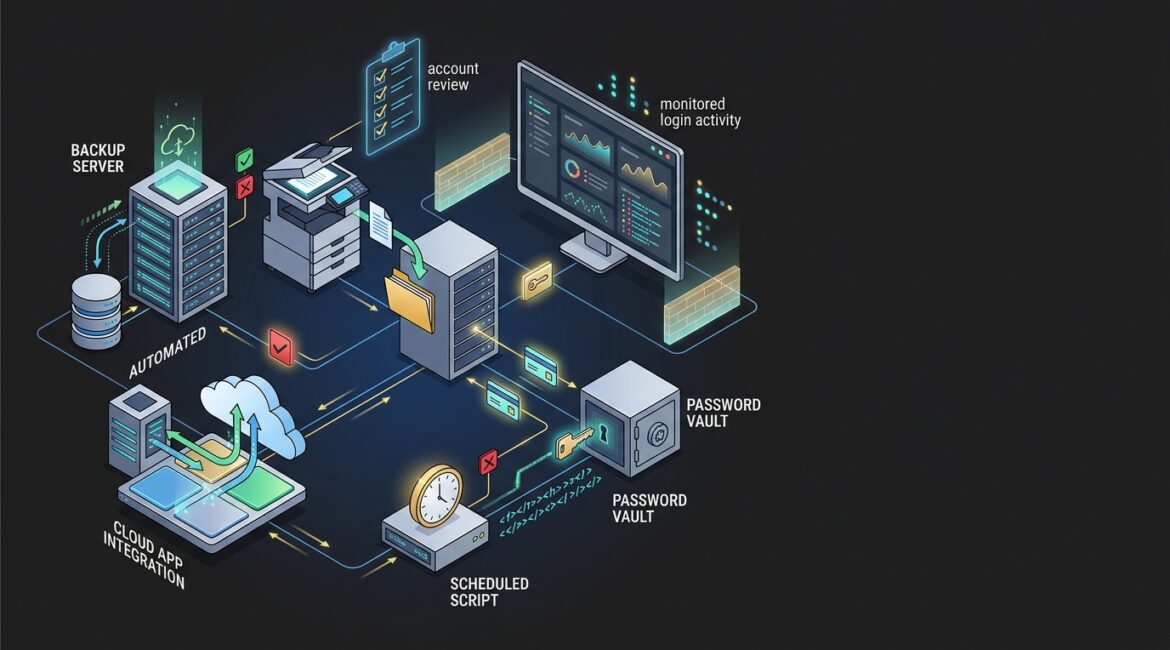
Many organizations have these accounts without realizing how many exist. Backup software, scanners, accounting integrations, manufacturing systems, nonprofit donor platforms, line-of-business applications, and scheduled scripts often rely on accounts that log in automatically behind the scenes.
What are automated service accounts?
Automated service accounts are accounts used by software, scripts, devices, or system processes instead of a person. They help systems run tasks such as moving files, syncing data, sending alerts, starting backups, printing scans to a network folder, or connecting one application to another.
In plain English, these accounts let technology do work without someone typing a username and password every time. The problem is that many businesses set them up once, then forget about them for years.
Why these accounts create real business risk
Service accounts often have broad access because they were created to keep operations moving. If one is compromised, an attacker may gain access to email, file shares, servers, databases, or cloud applications without triggering the same attention as a normal employee login.
They also tend to avoid normal oversight. A former staff member may leave, but the automated account they created keeps running. Passwords may be shared in a spreadsheet, hardcoded into a script, or left unchanged for years.
That creates practical business problems, not just technical ones. A compromised service account in a professional services firm could expose client records. In a nonprofit, it could affect donor data and online giving systems. In a manufacturer in Kenosha or Southeast Wisconsin, it could interrupt production reporting, inventory syncs, or shipping workflows.
The right way to secure accounts used by automated services
1. Inventory every service account
You cannot protect what you do not know exists. Start by identifying every non-human account used by:
- Backup tools
- Line-of-business applications
- Cloud integrations
- Multifunction printers and scanners
- Scheduled tasks and scripts
- Monitoring tools
- Vendor support utilities
- Database connections
For each account, document its purpose, where it is used, who owns it, what systems it can access, and what would break if it were disabled. This is one reason good documentation matters. If your team has not formalized this process, our article on network documentation is a helpful place to start.
2. Give each account the minimum access it needs
One of the most common mistakes is assigning administrator rights because it is faster during setup. That may solve a short-term problem, but it creates long-term exposure.
If a file transfer tool only needs access to one folder, it should not have rights to the entire file server. If a copier only needs to save scans to a specific share, it should not be able to browse finance files. If an accounting integration only needs to read invoices, it should not be able to change user settings.
This principle is often called least privilege. For business leaders, it simply means giving accounts enough access to do their job and nothing more.
3. Do not share human user accounts with automated tools
Automated processes should use their own dedicated accounts. They should not run under a current employee’s login, a former employee’s login, or a generic shared mailbox account that several people also use.
Dedicated accounts improve accountability and make troubleshooting easier. They also prevent a common problem where an employee password change unexpectedly breaks a critical process on a Monday morning.
4. Store credentials securely
Passwords for service accounts should never live in sticky notes, spreadsheets, shared documents, or unprotected script files. They should be stored in a secure business password management platform or an approved secrets management tool.
This matters for both security and continuity. If the one person who knows a backup account password is out sick, on vacation, or no longer with the company, your team still needs controlled access. Our post on enterprise password management explains why secure storage is far better than informal tracking.
5. Use strong authentication where the platform supports it
Some automated accounts cannot use modern sign-in methods the same way employees can. Others can. Where supported, use stronger controls such as certificate-based authentication, managed identities, conditional access, or approved app-based authentication instead of relying only on a password.
For Microsoft environments, this often ties back to identity planning. Businesses using Microsoft 365 and Entra ID should review whether service-related access can be redesigned to reduce password dependence and improve control.
6. Rotate passwords and keys on a schedule
Many service account credentials stay unchanged for years because teams worry about breaking something. That concern is understandable, but leaving credentials in place indefinitely increases risk.
Create a controlled rotation plan. Test the change, update the dependent application, confirm the service works, and document the result. For a small business, even rotating a handful of high-risk service account passwords quarterly or semiannually is far better than never doing it.
A practical example: if a manufacturer has an old warehouse sync account with access to inventory and shipping data, rotating that credential during a planned maintenance window may take one hour of IT time. Compare that with the cost of a compromised account that shuts down order processing for half a day.
7. Monitor service account activity
Service accounts should not be invisible. Log when they authenticate, what systems they touch, and whether their behavior changes.
Watch for signs such as:
- Logins at unusual times
- Access from unexpected locations or devices
- Repeated failed sign-in attempts
- New access to systems the account does not normally use
- Privilege changes
This is where visibility matters. If you cannot see what these accounts are doing, you are relying on luck. Better monitoring supports faster response and fewer surprises.
8. Disable unused accounts quickly
Old service accounts often stay active after software is retired or replaced. That leaves unnecessary access sitting in the environment with no business purpose.
Review accounts on a schedule and remove what is no longer needed. This should be part of broader technology governance and lifecycle planning, not a one-time cleanup.
Common mistakes that cause downtime
Businesses often learn about service accounts only when something breaks. Common examples include:
- A password expires and backups stop running for three days
- A former IT provider created undocumented accounts that no one can identify
- An employee account tied to an integration is disabled during offboarding, breaking payroll exports
- A copier scan-to-folder account loses permissions and front office staff cannot process paperwork
These are not rare edge cases. They are routine operational issues that waste time and create avoidable support costs.
For example, if a 25-person professional services firm loses document automation for half a day, the direct revenue loss may be limited, but the productivity cost adds up fast. Missed deadlines, manual rework, and staff interruption can easily cost more than the time it would have taken to manage the account properly in the first place.
A simple policy businesses can adopt
Most organizations do not need a complicated program to improve this area. They need a clear standard that says:
- Every automated account must have a documented owner
- Every account must have a defined business purpose
- Access must be limited to required systems only
- Credentials must be stored in an approved secure tool
- Accounts must be reviewed on a schedule
- Unused accounts must be disabled promptly
- Changes must be tested and documented
If you already have an annual planning rhythm, include service account reviews in it. Our article on building an annual IT planning calendar shows how recurring technology reviews help reduce preventable issues.
What business leaders should ask their IT team
If you own or lead the business, you do not need to manage these accounts yourself. You do need confidence that someone is managing them well.
- How many automated service accounts do we have?
- Which ones have elevated access?
- Who owns each account?
- Where are the credentials stored?
- How are these accounts monitored?
- When were they last reviewed or rotated?
- Which business processes would fail if one stopped working?
Those questions often reveal whether the environment is being run proactively or reactively.
Conclusion
Accounts used by automated services deserve the same attention as employee accounts, and in some cases more. When they are documented, limited, secured, and reviewed regularly, they support smoother operations and lower risk. When they are ignored, they can create quiet security gaps and expensive downtime.
If you’re ready to strengthen your technology, reduce risk, and plan for the future, contact Platinum Systems to schedule a technology strategy discussion.
Platinum Systems helps businesses across Southeast Wisconsin and Northeast Illinois make practical security decisions that support operations, not disrupt them.