

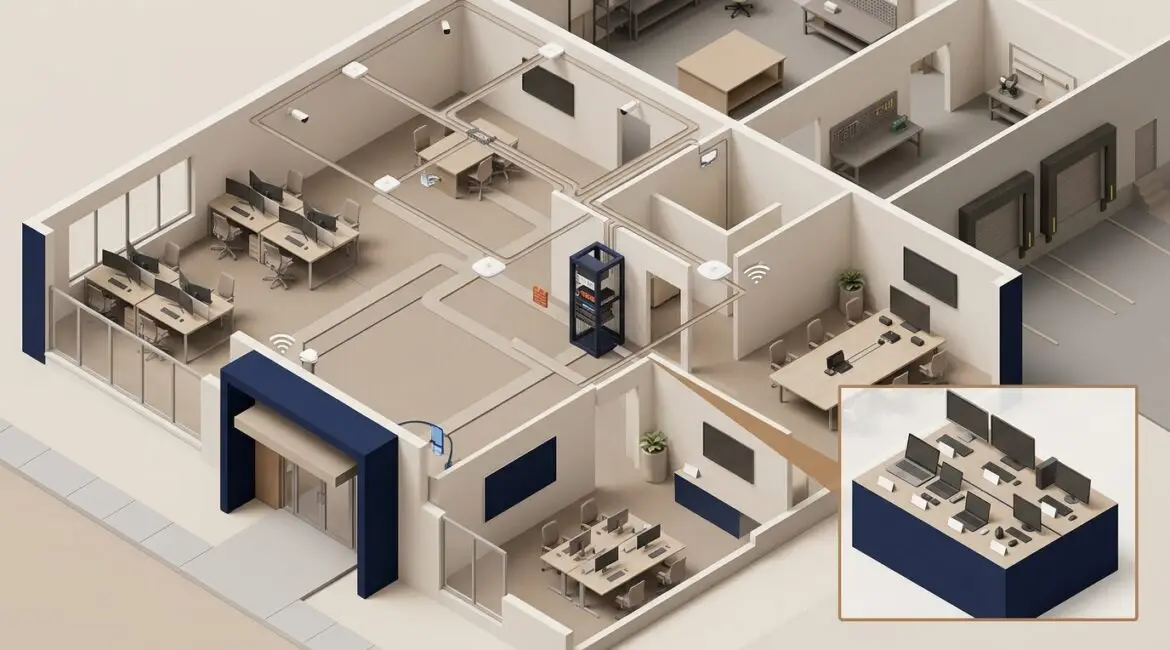
To plan technology for a new office or facility, start early and build the plan around how your business actually operates. The best results come when technology decisions are made before the lease is signed, walls are closed, or move-in dates are locked, because fixing missed details later is usually slower, more disruptive, and more expensive.
Whether you are opening a branch office in Kenosha, expanding a nonprofit program space in Southeast Wisconsin, or building out a manufacturing facility in Northeast Illinois, the goal is the same: create an environment where your team can work reliably, securely, and without constant workarounds.
Start with business operations, not hardware
Many office buildouts begin with a list of devices. That is backwards. Before choosing firewalls, Wi-Fi gear, or conference room equipment, define how the space will be used day to day.
Ask practical questions such as:
- How many employees will work there on day one?
- How many people do you expect in 12 to 36 months?
- Will the site support remote, hybrid, or shift-based staff?
- What systems are essential for operations, sales, production, or client service?
- Will you handle regulated, financial, donor, legal, or health-related data?
- What downtime would cost the business per hour?
A 15-person accounting firm has very different needs than a 40,000 square foot manufacturer with barcode scanners, printers, security cameras, and production equipment. A nonprofit may need reliable guest Wi-Fi, secure donor data access, and flexible meeting spaces for staff and volunteers. The technology plan should reflect those realities.
Build the plan early enough to influence construction and vendor decisions
Technology should be part of facility planning from the beginning, not added in the final weeks. If cabling, internet circuits, access control, camera placement, and equipment room needs are discussed too late, you often end up with avoidable change orders and delays.
We recommend involving your technology advisor during these stages:
- Site selection and lease review
- Architectural planning and floor layout
- Electrical and low-voltage design
- Internet provider selection
- Furniture and workstation planning
- Move timeline and vendor coordination
For example, if a law office signs a lease and only later realizes the building has limited fiber options, the business may face long installation lead times or settle for less reliable connectivity. In some parts of Southeast Wisconsin and Northeast Illinois, carrier availability can vary building by building, so this step matters more than many leaders expect.
Plan the network like infrastructure, not an afterthought
Your network is the foundation for almost everything else. If it is poorly designed, employees feel the impact in dropped calls, slow file access, unstable Wi-Fi, and support headaches.
Key network planning areas
- Internet service: Choose business-grade service with service level expectations that fit your operations.
- Redundancy: If internet downtime would stop revenue, consider a backup connection.
- Cabling: Plan enough drops for workstations, printers, phones, wireless access points, cameras, and future growth.
- Wi-Fi coverage: Design for the actual layout, building materials, and device density.
- Network segmentation: Separate guest traffic, business systems, phones, cameras, and specialized equipment where appropriate.
- Closet and rack space: Make sure switches, firewalls, battery backups, and patch panels have a secure, cooled location.
One missed access point in a warehouse or clinic can create daily frustration. One badly placed network closet can add thousands in cabling costs. This is why a site-specific plan matters.
If reliability is a concern, our readers often find value in how to build a more reliable business network, especially when planning a new location from scratch.
Think through security before employees move in
New offices create a rare opportunity to set things up correctly from day one. That includes both cybersecurity and physical security.
At a minimum, your plan should address:
- User identity and sign-in controls
- Multi-factor authentication for business apps
- Secure Wi-Fi for staff and guests
- Firewall and web filtering policies
- Endpoint protection on laptops and desktops
- Access control for doors, server rooms, and shared spaces
- Camera coverage for entrances, loading areas, and sensitive zones
- Backup and recovery for critical systems and data
A professional services firm may need stronger document access controls and secure email handling. A manufacturer may need to isolate operational equipment from office systems. A nonprofit may need to limit access to donor records and financial systems across staff, contractors, and volunteers.
Security planning also includes deciding who owns each system, who can approve changes, and how vendors will access the environment. That kind of structure reduces confusion later.
Standardize devices and software before purchasing begins
Opening a new site often triggers rushed buying. Different departments order different laptops, printers, monitors, software, and collaboration tools. That creates support problems almost immediately.
Instead, define standards in advance:
- Approved laptop and desktop models
- Docking stations, monitors, and accessories
- Printers and label printers
- Conference room equipment
- Phone system and headsets
- Core business applications
- Security tools and backup tools
Standardization usually lowers support time, simplifies onboarding, and reduces replacement confusion. It also helps budgeting. If you know a typical workstation package costs $1,800 to $2,500 instead of guessing at the last minute, financial planning gets easier.
This is also a good time to decide whether the new office should mirror your existing environment or improve it. If your current setup already causes frequent support tickets, duplicating it in a new location only spreads the problem. Our article on building an IT environment that is easier to manage covers this issue in more detail.
Budget for the full technology picture
Leaders often budget for visible items like laptops and internet, then get surprised by the rest. A realistic office technology budget should include one-time setup costs and ongoing operating costs.
Common one-time costs
- Structured cabling and installation
- Network hardware such as firewalls, switches, and access points
- Battery backup units and rack equipment
- Workstations, monitors, and peripherals
- Conference room systems
- Security cameras and door access systems
- Implementation labor and project management
Common recurring costs
- Internet service
- Cloud software subscriptions
- Security licensing
- Backup services
- Monitoring and support
- Hardware replacement planning
Here is a simple example. If a 25-person office loses access to internet and cloud systems for half a day, the direct productivity cost can easily reach several thousand dollars before you even count delayed orders, missed client work, or overtime. Spending more upfront on proper cabling, failover internet, or better Wi-Fi often makes financial sense.
Coordinate all vendors around one timeline
Office and facility projects usually involve many parties: landlord, general contractor, electrician, cabling vendor, internet carrier, phone provider, security integrator, copier vendor, and internal leadership. Problems happen when nobody owns the full picture.
Your technology plan should include a master checklist with dates, owners, and dependencies. That includes:
- Carrier installation deadlines
- Cabling completion dates
- Equipment ordering and delivery windows
- Firewall and switch configuration
- Device staging and user setup
- Testing of printers, phones, Wi-Fi, and line-of-business apps
- Move-day support coverage
Even a two-week delay in circuit installation can push back occupancy or force staff to work on temporary hotspots. That is why proactive coordination matters.
If your project also involves relocation, read how to reduce technology downtime during office moves for practical move-day planning steps.
Do not forget documentation, testing, and support readiness
A new site is not finished when the lights turn on and employees log in once. It is finished when the environment is documented, tested, and supportable.
Before go-live, make sure you have:
- A current network diagram
- Inventory of devices, serial numbers, and warranty details
- Internet account and vendor contact information
- Admin access stored securely
- Backup verification
- Tested failover procedures where applicable
- Clear support contacts for employees
Without documentation, even simple changes become slower and riskier. If a switch fails six months later and nobody knows what connects where, downtime lasts longer than it should. Good records protect the investment you just made.
Plan for growth, not just opening day
The right technology design should support the next phase of the business, not only the first week in the building. That means leaving room for more users, more devices, and new workflows.
For example, a new office may open with 20 employees but plan to add 10 more within two years. A manufacturer may add connected equipment. A nonprofit may launch a training center and need stronger guest access and collaboration tools. Capacity planning now is usually cheaper than rebuilding later.
If you need a structured way to think about future demand, see what capacity planning means for your IT environment.
Conclusion
Planning technology for a new office or facility works best when it starts early, stays tied to business operations, and covers reliability, security, budget, vendors, and growth together. A thoughtful plan helps you avoid expensive rework, reduce downtime, and give your team a better day-to-day experience from the moment the space opens.
If you’re ready to strengthen your technology, reduce risk, and plan for the future, contact Platinum Systems to schedule a technology strategy discussion. We can help you evaluate your current approach and build a practical plan for your next office, facility, or expansion.