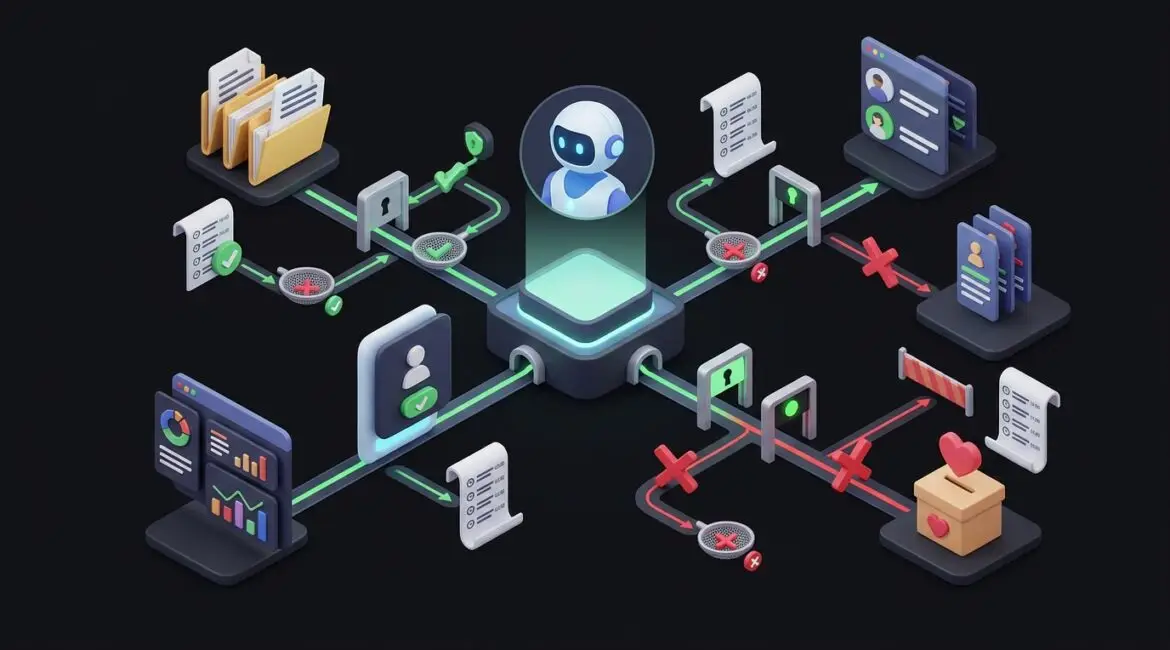
MCP servers can give AI controlled access to business data by acting as a gatekeeper between an AI tool and the systems your company already uses. Instead of letting an AI assistant roam freely through files, email, CRM records, or financial platforms, an MCP server can limit what it can see, what it can do, and how every request is approved and logged.
For business leaders, that matters because the real question is not whether AI can connect to your data. It is whether it can do so safely, predictably, and in a way that supports your operations instead of creating new risk.
What an MCP server does in plain English
MCP stands for Model Context Protocol. You do not need to remember the acronym to understand the business value. Think of an MCP server as a controlled translator and traffic manager between an AI assistant and your business systems.
Without that layer, teams often take the risky shortcut of copying sensitive information into public AI tools. That can expose client records, donor information, pricing details, contracts, or internal documents. An MCP server creates a more structured path.
It can help an AI tool:
- Request only the data it needs for a specific task
- Use approved business applications and data sources
- Respect user permissions and role-based access
- Log activity for review and auditing
- Block actions that should require human approval
In other words, it gives AI access with rules.
Why businesses need controlled access instead of open access
Many organizations are interested in AI for good reasons. Staff want help summarizing reports, answering internal questions, drafting client responses, or pulling information from multiple systems faster. The problem starts when convenience outruns governance.
If an employee connects an AI tool directly to shared folders, email, or cloud apps without clear controls, a simple productivity experiment can turn into a security issue. Sensitive files may be exposed. Old permissions may carry over. The AI may retrieve more information than the user actually needs.
That is why controlled access matters. It helps your business set boundaries before adoption spreads.
This is closely tied to technology governance. If leadership has not decided which data AI can use, which departments can use it, and what approval process applies, the technical setup will not solve the bigger problem.
How MCP servers reduce risk
They limit data exposure
An MCP server can be configured so an AI assistant only accesses a specific knowledge base, folder, database view, or application function. That is very different from broad access to an entire file share or tenant.
For example, a professional services firm may allow AI to read approved project templates and internal procedures, but not HR files, payroll data, or legal correspondence.
They enforce existing permissions
Well-designed implementations can tie access to the user’s identity. If a department manager can view certain reports but not accounting records, the AI should follow those same rules.
This is one reason identity planning matters. Access should be based on who the user is and what they are approved to see, not on what the AI platform technically could reach.
They create audit trails
Business leaders often ask a sensible question: if AI pulls information from our systems, how will we know what it used? An MCP server can help answer that by logging requests, responses, and actions.
That visibility supports compliance, internal review, and incident response. It also helps you spot misuse early, before a bad configuration becomes a larger problem.
They support approval workflows
Some AI tasks should stay read-only. Others may be allowed to take action, but only after a person reviews the request. An MCP server can support that middle ground.
For example, an AI assistant could prepare a vendor onboarding checklist, gather the required documents, and draft the next steps. But a human still approves any change to payment details or account permissions.
Practical examples for real organizations
Manufacturing
A manufacturer in Southeast Wisconsin might want an AI assistant to answer internal questions about machine maintenance schedules, standard operating procedures, and parts inventory. With an MCP server, the AI can be limited to approved maintenance documentation and inventory lookups.
That means technicians get faster answers without exposing pricing files, employee records, or sensitive production data. If even five technicians save 15 minutes a day searching for manuals or process documents, that can return more than 25 labor hours each month.
Nonprofit organizations
A nonprofit serving Kenosha or Northeast Illinois may want AI to help staff find grant guidelines, donor communication templates, and program policies. That can be useful, especially for lean teams.
But donor records, financial statements, and case management notes need tighter protection. An MCP server can separate those sources so the AI only uses approved content. That reduces the chance that a well-meaning employee accidentally exposes confidential information while trying to work faster.
Professional service firms
An accounting firm or law office may want AI to summarize internal procedures, retrieve standard engagement language, or draft client-ready checklists. Those are practical use cases.
At the same time, client tax records, legal files, and trust account details should never be treated like general reference material. Controlled access helps keep those boundaries clear.
What MCP servers do not solve by themselves
An MCP server is useful, but it is not a shortcut around broader planning. If your data is disorganized, overexposed, or poorly classified, AI will inherit those problems.
Before connecting AI to business systems, organizations should review:
- Which data is sensitive, regulated, or confidential
- Who should have access to which systems
- Whether file shares and cloud apps already have permission problems
- Which actions should be read-only versus write-enabled
- How logs will be reviewed and retained
- What vendor and platform security standards apply
That is where foundational work such as data classification becomes important. If you do not know what data is sensitive, you cannot sensibly decide what an AI tool should touch.
Common business mistakes to avoid
Connecting AI to everything at once
It is tempting to start big, especially when vendors promise fast results. In practice, broad access usually creates broad risk. Start with one contained use case and one approved data source.
Ignoring old permission problems
Many businesses already have employees with more access than they need. If AI is layered on top of those weak controls, the problem gets bigger, not smaller.
If this sounds familiar, review your identity and access approach first. Our article on Microsoft Entra ID explains how stronger access controls support safer technology decisions.
Skipping audit and documentation
If no one can explain what the AI can access, who approved it, and how activity is monitored, the project is not ready. Good documentation reduces confusion, speeds support, and makes future reviews easier.
Measuring success only by novelty
The better question is not whether the AI demo looked impressive. It is whether the deployment saves time, reduces repetitive work, and protects the business while doing it.
For example, saving a department 10 hours a week is useful. Saving 10 hours a week while creating a data exposure issue that costs days of cleanup is not.
How to evaluate whether MCP is right for your business
For many small and midsize organizations, the best starting point is not a technical rollout. It is a business review.
Ask questions like:
- What problem are we trying to solve with AI?
- Which systems contain the information needed?
- Is that data accurate, current, and appropriately secured?
- Do we need read-only access, or should actions be allowed?
- What would a mistake cost in downtime, rework, compliance issues, or reputation?
A manufacturer may decide the first use case is maintenance knowledge retrieval. A nonprofit may start with policy and grant document search. A financial or legal firm may limit AI to internal templates before allowing any client-related use.
That kind of phased approach is usually smarter than trying to connect every platform at once. It reduces surprises and gives leadership time to evaluate outcomes.
The business value comes from control, not just access
MCP servers can be a practical way to let AI use business data without handing over unrestricted access. They create a controlled path that can support permissions, logging, approvals, and narrower data exposure.
For business leaders, that means AI can become more useful without becoming a blind spot. The goal is not to open every door. The goal is to decide which doors should open, for whom, and under what conditions.
If you’re ready to strengthen your technology, reduce risk, and plan for the future, contact Platinum Systems to schedule a technology strategy discussion.
Platinum Systems works with organizations that want practical guidance, not guesswork. If you would like help evaluating how AI should connect to your systems, and what controls should come first, we would be glad to help you review your technology strategy.