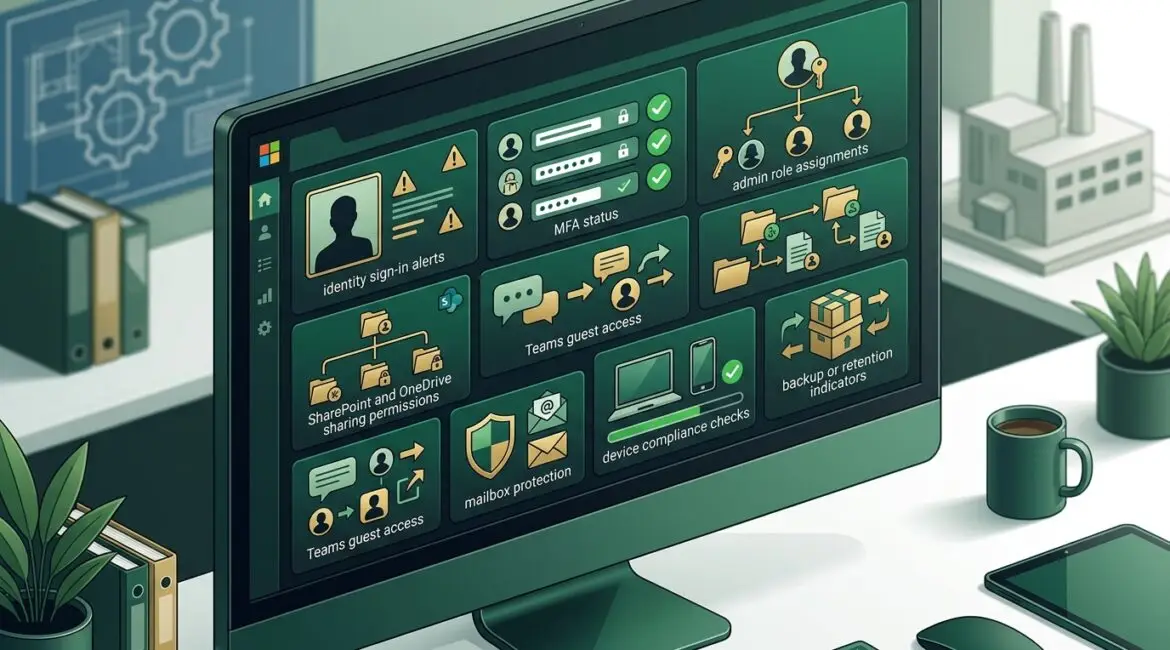
Microsoft 365 tenant security is the collection of settings, policies, identities, and protections that control how your organization uses Microsoft 365 and how well that environment is defended. If your business relies on Outlook, Teams, SharePoint, OneDrive, and Microsoft Entra ID, your tenant is the front door to daily operations, and it deserves regular review.
For many organizations, Microsoft 365 has become the system people touch all day long. That means one weak admin account, one overly broad sharing setting, or one missed alert can create real business problems. A tenant security review helps you catch those issues before they turn into lost time, exposed data, or expensive cleanup.
What a Microsoft 365 tenant actually includes
Your tenant is your company’s private Microsoft 365 environment. It includes user accounts, email, files, Teams data, security settings, device policies, and administrator roles.
Think of it as the digital office building for your business. The tenant holds the doors, keys, filing cabinets, alarm settings, and visitor rules. If those controls are loose, the problem is not limited to IT. It affects finance, operations, client service, and leadership.
Why tenant security matters to business leaders
Most business leaders do not need to know every technical setting. They do need to know whether the business can trust the system that stores email, files, approvals, and internal communication.
Consider a few common examples:
- A manufacturer in Southeast Wisconsin stores vendor pricing, production schedules, and quality documents in SharePoint. If file sharing is too open, sensitive information may be exposed outside the company.
- A nonprofit in Kenosha keeps donor records and board communications in Microsoft 365. If a former employee still has access, that creates privacy and governance issues.
- A professional services firm in Northeast Illinois relies on email for contracts, invoices, and client approvals. If an attacker takes over one mailbox, the result could be payment fraud or reputational damage.
Even a short disruption can be expensive. If 25 employees lose access to email and files for half a day, the cost in payroll, delayed billing, missed client communication, and internal disruption can quickly reach several thousand dollars.
What you should review in Microsoft 365 tenant security
1. Identity and sign-in protection
Start with user identities. Most Microsoft 365 incidents begin with account compromise, not a dramatic system failure.
Review whether:
- Multi-factor authentication is required for all users, especially administrators
- Conditional access policies limit risky sign-ins
- Legacy authentication is disabled where possible
- Passwordless or stronger authentication methods are being considered for the right users
- Sign-in risk and impossible travel alerts are monitored
If you want a deeper look at identity controls, our article on how to use Microsoft Entra ID to improve business security explains how access decisions can reduce risk without making work harder.
2. Administrator accounts and privileged roles
Not everyone should be an admin. Yet many businesses discover years later that too many users have elevated rights, old admin accounts are still active, or shared credentials are still in use.
Review:
- Who has global admin access
- Whether admin roles match job responsibilities
- Whether separate admin accounts are used for IT administration
- Whether shared accounts have been reduced or removed
- Whether privileged access is logged and reviewed
This matters because one compromised admin account can affect the whole tenant. It can change mail rules, delete data, create new users, or weaken protections silently.
3. Email security and anti-phishing controls
Email remains one of the most common paths for fraud, malware, and account compromise. A tenant review should confirm that Microsoft 365 email protections are configured intentionally, not left at default settings.
Look at:
- Anti-phishing and anti-malware policies
- Safe links and attachment protections if licensed
- External email tagging
- Mailbox forwarding rules, especially to outside addresses
- Domain protection such as SPF, DKIM, and DMARC
For organizations handling financial details, legal records, or donor information, email protection should also include secure message handling. Our article on secure email encryption covers when that makes sense.
4. File sharing and collaboration settings
Microsoft 365 makes collaboration easier, but easy sharing without guardrails can create data exposure. This is especially true when teams use SharePoint, OneDrive, and Teams across departments, vendors, and outside partners.
Review whether:
- External sharing is allowed only where needed
- Anonymous links are restricted or time-limited
- Sensitive sites or libraries have tighter access rules
- Guest accounts are reviewed regularly
- Default permissions are appropriate for your business
A law office, accounting firm, or nonprofit board portal may need much tighter controls than a general internal team site. Good collaboration settings should support work without turning every folder into an open door.
5. Data retention, backup, and recovery planning
Many leaders assume Microsoft 365 alone covers every recovery scenario. In reality, retention, deletion, and backup planning need deliberate review.
Ask questions like:
- How long are deleted emails and files recoverable?
- Are retention policies aligned with legal, operational, or donor record requirements?
- Can you recover from accidental deletion, malicious deletion, or sync errors?
- Do you have a separate backup strategy for critical Microsoft 365 data?
This is one reason we often recommend looking at resilience, not just prevention. Our post on building a more resilient Microsoft 365 environment explains that broader planning.
6. Device and app access
Your tenant is only as secure as the devices and apps connecting to it. If unmanaged personal devices can freely access company email and files, the risk goes up quickly.
Review:
- Which devices are allowed to connect
- Whether mobile device management or compliance rules are in place
- Whether unmanaged devices have limited access
- Which third-party apps have been granted access to Microsoft 365 data
- Whether old or unused app permissions have been removed
This is often where convenience quietly creates risk. A helpful app connected three years ago may still have access to mailboxes or files long after the business forgot about it.
7. Logging, alerting, and security visibility
You cannot manage what you cannot see. A tenant security review should confirm that audit logging, alerting, and reporting are enabled and actually reviewed.
That includes visibility into:
- Failed and risky sign-ins
- Admin role changes
- Mailbox rule changes
- File sharing activity
- Suspicious user behavior
This is where tools like Microsoft 365 Security Score can help prioritize improvements. If you have not reviewed that before, our article on Microsoft 365 Security Score is a useful starting point.
How often should you review your tenant?
At minimum, most businesses should review Microsoft 365 tenant security quarterly and after major changes. That includes leadership changes, mergers, new locations, compliance requirements, or shifts to remote work.
You should also perform a review after:
- A suspicious login or phishing incident
- Employee terminations in sensitive roles
- A change in IT providers
- A Microsoft licensing upgrade that adds new security features
- Rapid growth that changed how teams share data
Regular review also helps prevent configuration drift, where settings slowly move away from the approved standard over time.
What business leaders should ask their IT partner
If you are not technical, you do not need to ask for every policy name. Ask practical business questions instead:
- Who can access our Microsoft 365 environment, and how is that controlled?
- How quickly would we know if an account was compromised?
- What data can be shared externally right now?
- Can a former employee still have access anywhere?
- How would we recover from deleted or encrypted Microsoft 365 data?
- Which security improvements would reduce the most risk for the least disruption?
Those questions usually lead to a better conversation than asking whether everything is secure.
Tenant security should support operations, not slow them down
The goal is not to add friction everywhere. Good Microsoft 365 security should help your team work with fewer interruptions, fewer support issues, and fewer avoidable surprises.
When settings are planned well, employees can still collaborate, share files, and work remotely. The difference is that the business has clearer rules, better oversight, and a stronger recovery position if something goes wrong.
Conclusion
Microsoft 365 tenant security is worth reviewing because it affects email, file access, collaboration, compliance, and day-to-day business continuity. A structured review of identity, admin roles, email protection, sharing, recovery, device access, and logging can uncover gaps before they become expensive problems.
If you’re ready to strengthen your technology, reduce risk, and plan for the future, contact Platinum Systems to schedule a technology strategy discussion.
Platinum Systems works with organizations across Southeast Wisconsin and Northeast Illinois to make security decisions practical, manageable, and aligned with business goals.