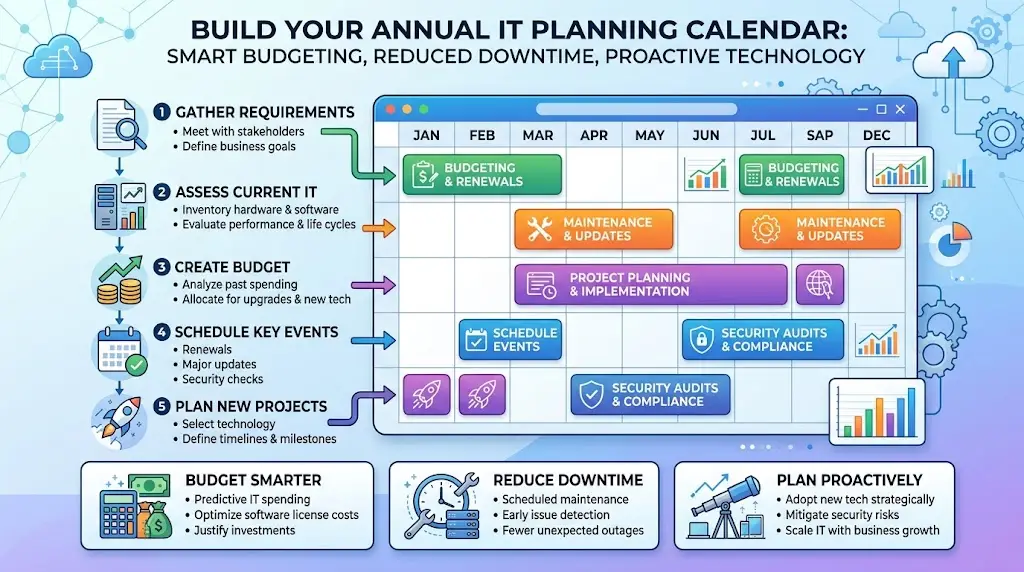
An annual IT planning calendar is a simple way to decide what technology work needs to happen, when it should happen, and who should be involved. It helps your business avoid surprise costs, reduce downtime, and make better decisions before equipment fails, software support ends, or security gaps turn into business problems.
For many organizations, the biggest value is not the calendar itself. It is the shift from reactive IT to planned IT. Instead of dealing with emergencies one at a time, you create a rhythm for budgeting, security reviews, vendor decisions, upgrades, and training.
Why an annual IT planning calendar matters
Most businesses already run on calendars for finance, operations, hiring, compliance, and facilities. Technology should be handled the same way. If it is only discussed when something breaks, the business usually pays more and gets less control.
A practical calendar helps you:
- Spread costs across the year instead of facing one large unplanned expense
- Reduce downtime by replacing aging systems before failure
- Schedule upgrades around slower business periods
- Prepare for renewals, audits, and compliance deadlines
- Coordinate IT work with hiring, expansion, and budget planning
- Keep leadership informed about risk, priorities, and tradeoffs
For example, a manufacturer in Southeast Wisconsin may want server maintenance and network changes scheduled outside production peaks. A nonprofit in Kenosha may need to align software renewals with grant cycles. A law firm in Northeast Illinois may want security reviews completed before client audits or cyber insurance renewals.
What to include in your IT planning calendar
Your calendar should cover more than hardware replacements. Good planning includes the full set of business technology activities that affect cost, risk, and operations.
Budget and forecasting
Set time each year to review expected technology spending for the next 12 to 24 months. This should include devices, software subscriptions, network upgrades, support contracts, cybersecurity tools, backup, cloud services, and project work.
If 15 laptops will reach the end of their useful life next year, replacing them gradually may be far easier than approving a sudden $18,000 purchase after multiple failures. Budget planning turns that kind of surprise into a manageable line item.
Hardware and software lifecycle reviews
Every business should know which devices, servers, switches, firewalls, and business applications are aging out. If you do not already have a schedule, this is a good place to connect your planning process with a technology replacement schedule.
Review:
- Device age and warranty status
- Server and network equipment lifecycle
- Operating system and software support dates
- Performance issues affecting productivity
- Compatibility with newer applications and security controls
Cybersecurity reviews
Security work should be scheduled, not improvised. Your annual calendar should include recurring checkpoints for access controls, phishing protection, backups, patching, endpoint protection, vendor access, and policy updates.
This is also a good time to review whether your business has added too many apps or inconsistent tools. If that is an issue, reducing sprawl can improve both support and security.
Business continuity and recovery planning
Many leaders think about continuity only after an outage. A better approach is to schedule review dates for backup testing, recovery procedures, internet redundancy, email continuity, and incident response exercises.
If your office loses internet for half a day and 20 employees cannot access cloud systems, the cost can add up quickly. At an average loaded labor cost of $35 per hour, four hours of lost productivity is about $2,800 before you count missed orders, delayed service, or client frustration.
For organizations that depend heavily on connectivity, reviewing business internet redundancy as part of the calendar can prevent avoidable downtime.
Employee onboarding, offboarding, and training
Technology planning should follow staffing changes. If your business hires seasonally, expands to a second location, or adds remote employees, the calendar should include time to prepare devices, accounts, access rules, and security training.
That matters for nonprofits, accounting firms, and manufacturers alike. A rushed onboarding process often leads to missing licenses, delayed starts, and access mistakes that create risk.
Vendor and contract management
Keep a schedule for software renewals, telecom agreements, copier contracts, cybersecurity subscriptions, and line-of-business applications. Too many businesses let contracts auto-renew without reviewing cost, usage, or fit.
A calendar reminder 90 days before renewal gives you time to ask practical questions:
- Are we still using this service enough to justify the cost?
- Is there overlap with another tool?
- Has support quality declined?
- Does this vendor still meet our security expectations?
How to structure the year
You do not need a complicated system. Most small and midsize organizations do well with a quarterly structure supported by a few monthly reminders.
Quarter 1: Review and reset
- Confirm business goals for the year
- Review last year’s IT issues, costs, and lessons learned
- Update your technology inventory
- Review cyber insurance or compliance requirements
- Set project priorities and target dates
Quarter 2: Security and resilience focus
- Run a cybersecurity risk review
- Test backups and recovery procedures
- Review internet and email continuity plans
- Update access controls for employees and vendors
- Schedule policy and training updates
Quarter 3: Budget and lifecycle planning
- Identify devices and systems due for replacement next year
- Review software support deadlines
- Estimate project costs for the next budget cycle
- Compare subscription usage to actual need
- Plan infrastructure upgrades during slower periods
Quarter 4: Finalize next year’s roadmap
- Approve budget items and project timing
- Confirm vendor renewals and contract decisions
- Document priority risks that still need attention
- Set a quarterly meeting schedule for the coming year
- Share the plan with leadership and department heads
This kind of structure keeps planning realistic. It also helps avoid trying to do every project at once, which usually creates disruption for staff and frustration for leadership.
Who should be involved
An IT planning calendar should not belong only to the IT department or outside provider. It should reflect how the business actually operates.
Include people responsible for:
- Finance and budgeting
- Operations and workflow planning
- Executive decision making
- Compliance or risk oversight
- Department needs such as production, client service, or development
- Your internal IT lead or managed services partner
When the right people are involved early, technology decisions tend to be more practical. A firewall upgrade, for example, may sound technical, but the real question is whether it reduces downtime risk, supports remote access, and fits the budget.
Common mistakes to avoid
Only planning around purchases
Buying equipment is just one part of the picture. Security reviews, support deadlines, training, and vendor management belong on the calendar too.
Ignoring business seasonality
Do not schedule major changes during your busiest month, year-end close, fundraising season, or production rush unless there is no alternative.
No ownership
Every item should have an owner, even if an outside IT partner does the work. Someone inside the business should still be accountable for timing and decisions.
Failing to revisit the plan
A calendar should be reviewed at least quarterly. New locations, staffing changes, compliance needs, and vendor issues can shift priorities fast.
Start simple and improve each year
Your first annual IT planning calendar does not need to be perfect. Start with the major items that affect cost, security, and operations. That usually means budgeting, replacements, renewals, security reviews, backup testing, and one or two planned improvement projects.
If you need a stronger foundation, it can help to first build a clear inventory of your devices, software, and vendors. From there, the calendar becomes much easier to manage and far more useful.
At Platinum Systems, we have seen that businesses make better technology decisions when they plan on purpose instead of reacting under pressure. If you’re ready to strengthen your technology, reduce risk, and plan for the future, contact Platinum Systems to schedule a technology strategy discussion.
A good IT planning calendar gives leadership visibility, helps teams avoid disruption, and turns technology into a managed business function. If you would like guidance building a practical plan for your organization, Platinum Systems is here to help.
Frequently Asked Questions
What is an annual IT planning calendar?
An annual IT planning calendar is a schedule of recurring technology tasks, reviews, renewals, upgrades, and budget decisions mapped across the year so your business can plan ahead instead of reacting to problems.
What should be included in an IT planning calendar?
Most businesses should include budgeting, hardware replacement reviews, software support deadlines, cybersecurity reviews, backup testing, vendor renewals, employee onboarding needs, and planned technology projects.
How often should an IT planning calendar be reviewed?
It should be reviewed at least quarterly. Monthly reminders can help with renewals and smaller tasks, but quarterly reviews keep leadership aligned on priorities, risk, and spending.
Who should help create the IT planning calendar?
The best calendars involve finance, operations, leadership, compliance stakeholders, and your IT team or managed services provider. Technology planning works better when it reflects real business needs.
Why do small businesses need an IT planning calendar?
Small businesses often feel the impact of surprise costs and downtime more sharply than larger organizations. A calendar helps spread costs, reduce disruption, and make technology decisions with better timing.