

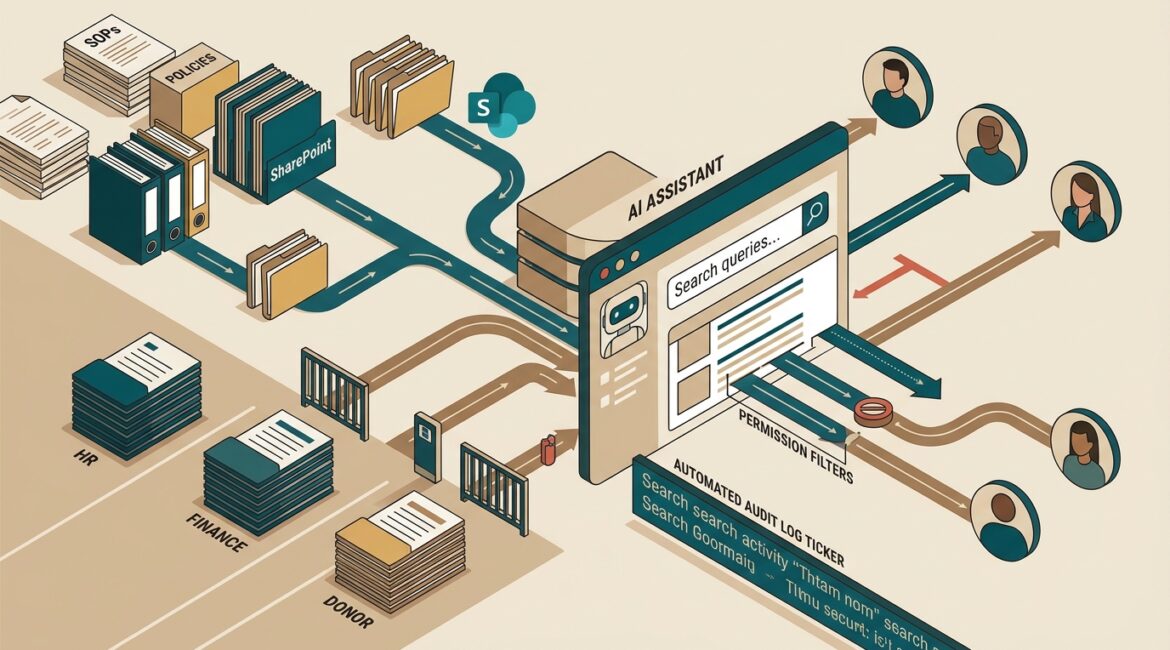
Yes, AI can safely search your internal company knowledge, but only when it is set up with the same discipline you would expect for email, file sharing, and user access. The safe approach is simple in principle: connect it only to approved information, limit what each person can see, monitor how it is used, and put clear rules around sensitive data.
That matters because the convenience is real. Employees want quick answers from policies, procedures, contracts, project notes, donor records, and technical documentation. Business leaders want the productivity gain without creating a new data exposure problem.
What safe internal AI search actually means
When people hear about AI searching company knowledge, they often picture a tool that reads every file in the business and answers any question asked. That is exactly the wrong model to start with.
A safer model treats AI as a controlled assistant, not an unrestricted reader. It should only work inside approved systems and only return information the user is already allowed to access.
In plain English, safe internal AI search means:
- It respects permissions. A staff member in accounting should not see HR files just because they asked a well-worded question.
- It uses approved data sources. Not every shared drive, inbox, or cloud app should be connected on day one.
- It protects sensitive information. Client financials, employee records, legal documents, and donor data need extra handling.
- It keeps an audit trail. Leaders should know what systems are connected, who used the tool, and what controls are in place.
- It follows business policy. The tool should support how your organization already manages risk, not bypass it.
Why businesses want this in the first place
Most organizations have a knowledge problem, not a lack of data. Information exists, but it is scattered across file shares, Microsoft 365, PDFs, project folders, email threads, and line-of-business applications.
A manufacturer in Southeast Wisconsin may have machine setup procedures, quality documents, vendor manuals, and maintenance notes stored in five different places. A nonprofit in Kenosha may have grant requirements, board policies, program procedures, and donor communication templates spread across shared folders and employee inboxes. A professional services firm in Northeast Illinois may spend billable time searching old proposals, engagement notes, and client standards.
Done well, internal AI search can reduce wasted time in a measurable way. If 25 employees each spend 20 minutes a day looking for information, that is more than 40 hours a week of lost productivity. At an average loaded labor cost of $40 per hour, that can exceed $80,000 a year.
The biggest risks to avoid
The danger is not the idea of AI itself. The danger is connecting it to messy, overexposed, poorly governed data.
Too much access
Many businesses already have permission sprawl. Employees have access to folders they no longer need, shared mailboxes are loosely controlled, and old project sites remain open to broad groups. If you layer AI on top of that, it can make existing access problems easier to exploit.
This is one reason data organization and permissions matter before rollout. If your files are not already managed carefully, start there. Platinum Systems often advises clients to review data classification and access rules before enabling new tools that can summarize or retrieve information quickly.
Unapproved data sources
If employees start pasting contracts, HR records, or donor lists into consumer AI tools, your business loses control. That creates compliance, confidentiality, and retention concerns.
A safe plan uses approved business platforms with defined controls, not random public tools chosen by individual staff members.
Inaccurate answers
AI can summarize well, but it can also answer with confidence when the source material is outdated, incomplete, or contradictory. That is not only a technical issue. It is an operational issue.
Imagine a service team following an outdated procedure for client onboarding, or a finance employee relying on an old reimbursement policy. The result could be rework, delays, or customer frustration.
No governance
If no one owns the policy, the rollout, the approved data sources, and the review process, the tool becomes another unmanaged system. That usually leads to inconsistent use, higher support burden, and hidden risk.
Strong governance does not need to be complicated. It just needs clear ownership. For many organizations, that starts with the same principles covered in technology governance.
What a safe rollout looks like
The best deployments start small and stay practical. Instead of asking the tool to search everything, begin with a limited use case that offers clear value.
Good starting examples include:
- Searching internal SOPs and process documentation
- Finding approved HR policies for managers
- Looking up product specifications and quality procedures in manufacturing
- Retrieving grant process instructions for nonprofit program teams
- Summarizing internal knowledge base articles for support staff
Step 1: Clean up the data you already have
If your shared folders are disorganized, your AI results will be disorganized too. Review where important information lives, what is outdated, and who should have access.
This is also where secure storage matters. If your business has not already reviewed how files are stored and controlled, it is worth addressing first. Safe AI search depends on the same foundations as secure file storage.
Step 2: Define approved content sources
Not every system belongs in scope. Start with the sources that are both useful and well managed. For example, that may be a documented SharePoint library, a policy repository, or a structured knowledge base.
Leave out high-risk or poorly organized sources until they are reviewed.
Step 3: Match answers to existing permissions
This is one of the most important controls. If a user cannot open a file directly, the AI tool should not summarize it, quote it, or reveal that it exists.
That sounds obvious, but it needs to be tested carefully.
Step 4: Create usage rules for employees
Employees need plain-language guidance on what the tool is for and what it is not for. That usually includes:
- What information can be queried
- What should never be pasted into prompts
- When a human review is required
- How to verify answers before acting on them
- Who to contact when results seem wrong or access appears too broad
Step 5: Monitor, review, and improve
Rollout is not the finish line. Leaders should review adoption, accuracy issues, permission concerns, and business impact over time.
This is where proactive planning beats reactive support. If the tool saves time but creates confusion, it needs adjustment. If one department gets strong value, that may guide the next phase.
Business examples that make this real
Manufacturer
A 60-person manufacturer uses AI search to help supervisors find machine troubleshooting steps, quality checklists, and safety procedures. Because the system is limited to approved operational documentation, employees get faster answers without exposing payroll or HR files.
If that saves just 10 minutes per shift across multiple supervisors, the annual productivity gain can be meaningful. It also reduces downtime when a line issue needs a documented answer quickly.
Nonprofit organization
A regional nonprofit uses AI search for internal policy lookups, grant reporting instructions, and volunteer onboarding materials. Program staff spend less time asking administrative teams for repeat answers.
At the same time, donor records and confidential case information are excluded or tightly restricted. That balance helps the organization improve responsiveness without relaxing privacy standards.
Professional services firm
An accounting or legal support team uses AI search to find engagement templates, internal procedures, and prior approved language. Staff can work faster, but only if access stays tied to client confidentiality rules.
In firms where every hour matters, even small search improvements can add up. Saving 15 minutes a day for 12 professionals can recover hundreds of hours a year.
Questions business leaders should ask before approving it
- What systems will it search first?
- How does it enforce existing permissions?
- What data is excluded?
- Who owns the policy and oversight?
- How are answers verified for important decisions?
- What logging or reporting is available?
- How will we measure time saved, risk reduced, or support burden added?
If those answers are vague, the project is not ready yet.
Safe AI search is really a data and governance project
Many leaders assume this is mainly a software decision. In practice, it is just as much a data management, access control, and governance decision.
If your organization already struggles with scattered files, unclear ownership, or too many open permissions, AI will expose those weaknesses quickly. That is not a reason to avoid the technology. It is a reason to prepare for it properly.
Businesses that do this well treat internal AI search as part of a longer-term technology strategy. They clean up information, define ownership, reduce unnecessary access, and roll out in phases that make sense for the business.
Conclusion
AI can safely search your internal company knowledge when it is built on controlled access, approved data sources, clear employee rules, and ongoing oversight. The real value is not novelty. It is helping your team find the right information faster without creating unnecessary risk.
If you’re ready to strengthen your technology, reduce risk, and plan for the future, contact Platinum Systems to schedule a technology strategy discussion. We can help you evaluate whether internal AI search fits your environment and how to implement it in a way that supports your business goals.