

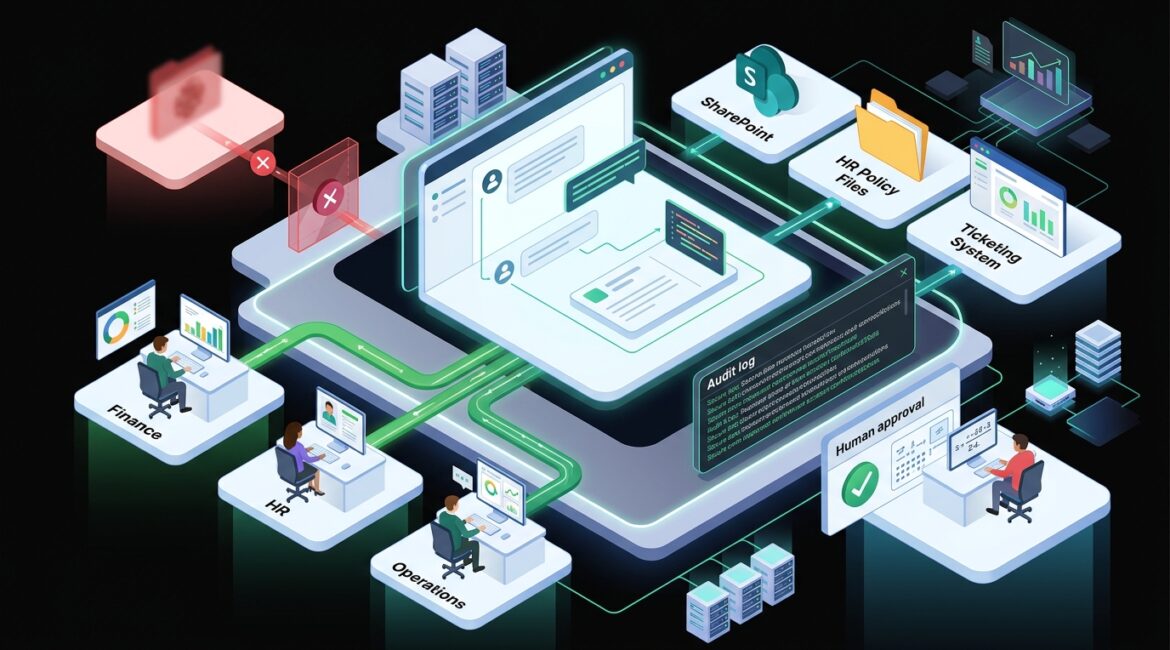
Businesses can build a secure internal AI assistant by treating it like a business system, not a novelty. Start with a narrow use case, control what data it can access, require strong identity and approval workflows, and monitor how it is used from day one.
If that sounds less exciting than turning on a chatbot for everyone, that is the point. A useful internal AI assistant should save time without exposing contracts, donor records, financial data, or client communications.
What an internal AI assistant should actually do
An internal AI assistant is a private tool your team uses to find information, summarize documents, draft routine content, answer policy questions, or help with repetitive internal work. It should operate inside your approved business systems and follow the same security rules as the rest of your environment.
For most organizations, the goal is not to build a custom large language model from scratch. The practical goal is to create a controlled assistant that connects to approved data sources such as Microsoft 365, a document repository, a ticketing system, or an internal knowledge base.
Examples include:
- A manufacturer using an assistant to answer equipment maintenance questions from approved SOPs and safety documents.
- A nonprofit using it to draft grant reporting summaries from internal program notes without exposing donor data to public tools.
- A law or accounting firm using it to summarize internal procedures and prepare first drafts of routine client communications.
That is a very different project from letting employees paste sensitive information into consumer AI apps.
Start with one business problem, not a broad rollout
The fastest way to create risk is to launch an assistant with vague goals like “help everyone work faster.” The safer approach is to pick one or two specific tasks where the value is easy to measure.
Good starting points include:
- Searching internal policies and procedures
- Summarizing meeting notes stored in approved systems
- Drafting standard responses for HR, operations, or IT requests
- Answering internal questions about benefits, onboarding, or expense policies
For example, if a 40-person professional services firm spends 15 minutes per employee each week hunting for internal forms or policy answers, that is roughly 10 hours a week lost. Even a modest assistant that cuts that in half can return meaningful time without touching highly sensitive client files.
Know what data the assistant can and cannot use
This is where many projects go wrong. If you do not classify your information first, you cannot safely connect it to AI tools.
Before deployment, sort business data into simple categories such as:
- Public information that can be shared freely
- Internal information meant for employees only
- Confidential information like contracts, payroll, donor records, legal documents, or financial reports
- Restricted information with regulatory, client, or board-level sensitivity
Your assistant should only access the minimum data needed for its job. A policy assistant may need HR documents but not payroll details. A sales support assistant may need proposal templates but not full accounting records.
If your organization has not done this work yet, data classification is the right place to begin. Platinum Systems has written about data classification for businesses because it gives leaders a practical way to decide what needs tighter control.
Use identity controls and permissions you already trust
A secure internal AI assistant should not create a separate island of access. It should follow the same identity and permission structure your business already uses, ideally through centralized identity management.
That means:
- Users sign in with business accounts
- Multi-factor authentication is required
- Access follows role-based permissions
- Former employees lose access immediately when accounts are disabled
- Admins can review who used the assistant and what systems it touched
If the assistant can answer questions from SharePoint, Teams, file storage, or line-of-business apps, it should only return what that specific employee is already allowed to see. A controller should not get the same answers as an intern. A program manager at a nonprofit should not suddenly gain access to restricted donor files because a chatbot made it convenient.
This is one reason many businesses in Southeast Wisconsin and Northeast Illinois start with platforms tied to Microsoft 365 and Entra ID rather than disconnected consumer tools. The security controls are easier to manage when they align with existing business identity rules.
Choose architecture that keeps control inside the business
There is no single right platform, but there are right design principles. In plain English, you want an AI setup where your business keeps control of data flow, access, logging, and retention.
Look for these core design features
- Private or tenant-level data boundaries
- Clear statements about whether your data is used to train outside models
- Administrative control over connectors and integrations
- Audit logs for prompts, access, and actions
- Retention settings that match your records policies
- Options to restrict file uploads, copy and paste, or external sharing
If a vendor cannot explain where your prompts go, how data is stored, what logs are available, and how access is enforced, that is a warning sign.
This is also where broader governance matters. An AI assistant is part of your technology decision framework, not a side project. Our article on technology governance for small businesses explains why consistent decision-making reduces expensive surprises.
Build guardrails before users start experimenting
Employees will test boundaries, usually with good intentions. Someone will ask the assistant to summarize a sensitive board packet, rewrite a client contract, or analyze a spreadsheet full of employee information. That is why rules need to be in place before launch.
Your guardrails should include:
- Approved use cases with clear examples
- Blocked use cases such as regulated data analysis without review
- Human approval steps for financial, legal, HR, or donor-facing output
- Prompt and output logging where appropriate
- Content review rules for anything sent outside the organization
For a Kenosha manufacturer, that may mean maintenance summaries are allowed, but safety procedure changes require supervisor review. For a nonprofit, grant draft support may be allowed, but donor segmentation recommendations may require leadership approval. For a CPA firm, internal template drafting may be fine, while tax advice generated by AI cannot be sent to clients without human review.
Plan for mistakes, not just success
Even well-designed assistants can produce wrong answers, expose outdated documents, or pull from incomplete sources. That is not only a technical issue. It is an operations issue.
Ask practical questions such as:
- What happens if the assistant references an old policy?
- Who owns the knowledge sources behind it?
- How do users report bad answers?
- Can you quickly disable a connector if a data source should not be exposed?
- How do you investigate suspicious use?
This is similar to other business systems. Reliability comes from maintenance, ownership, and visibility. If your environment already struggles with undocumented systems or inconsistent permissions, fix those issues first. A tool built on messy foundations tends to amplify the mess.
Measure value in time saved, risk reduced, and support avoided
Leaders should evaluate an internal AI assistant the same way they evaluate other technology investments. Do not focus only on subscription price. Measure impact.
Useful metrics include:
- Time saved on repetitive internal questions
- Reduction in help desk or administrative requests
- Faster onboarding for new employees
- Lower risk of staff using unapproved public AI tools
- Better consistency in internal answers and documents
For example, if HR and operations each handle 25 repetitive policy questions a week, and the average interruption takes 8 minutes, that is more than 6 hours weekly. If an internal assistant reduces those interruptions by half, the time savings can offset cost quickly. On the security side, replacing unapproved AI use with a governed internal option can reduce the chance of accidental data exposure, which is often far more expensive than the software itself.
Roll out in phases and review it regularly
Do not launch company-wide on day one. Start with a pilot group, review logs, collect user feedback, and adjust permissions before expanding.
A sensible rollout often looks like this:
- Phase 1: one use case, one department, low-risk data
- Phase 2: add training, refine prompts, improve source quality
- Phase 3: expand to more teams with role-based access
- Phase 4: review cost, usage, and policy compliance quarterly
This phased approach mirrors good planning in other areas of IT. If you want a broader framework for proactive decision-making, review our guidance on building an annual IT planning calendar.
Conclusion
A secure internal AI assistant is possible, but only when the business treats it as a governed system with clear purpose, limited access, and ongoing oversight. The organizations that get the best results are not the ones moving fastest. They are the ones making careful decisions about data, identity, process, and accountability.
If you’re ready to strengthen your technology, reduce risk, and plan for the future, contact Platinum Systems to schedule a technology strategy discussion.
Platinum Systems helps businesses make practical technology decisions that support growth, security, and operational stability. If you would like guidance on evaluating an internal AI assistant or the foundation it depends on, we are happy to help.