

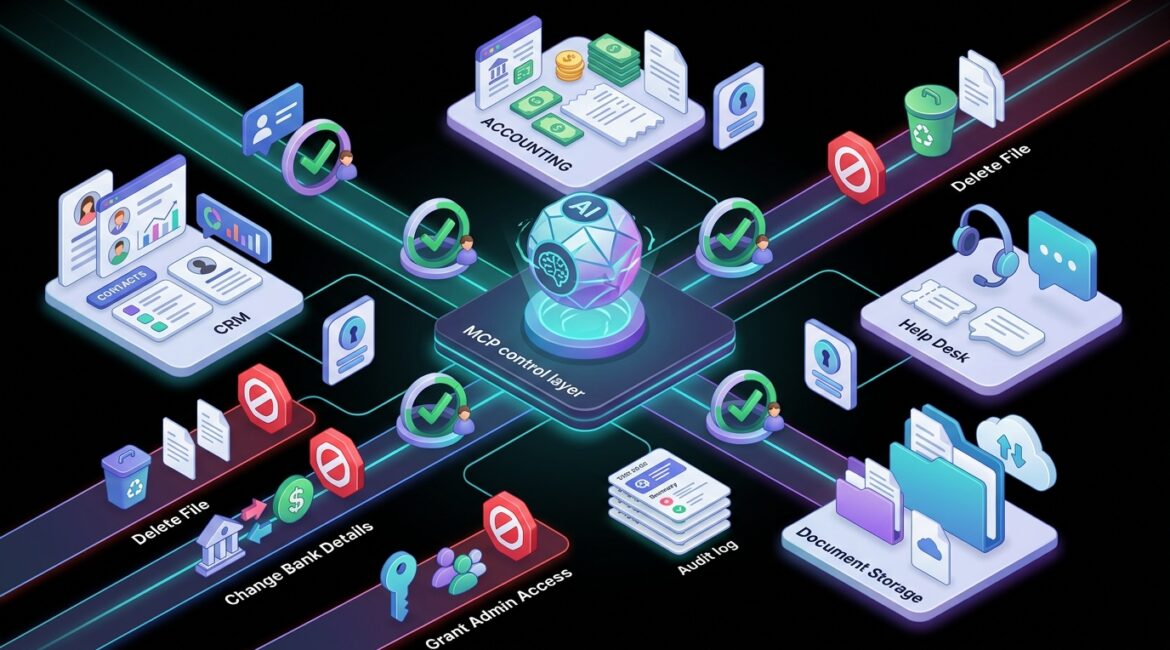
MCP can let AI take actions in business applications safely when it is set up as a controlled middle layer between the AI and your systems. Instead of giving an AI broad access to email, accounting, CRM, or file storage, MCP can define exactly what the AI is allowed to see, do, and request.
For a business leader, that matters because the question is not whether AI can draft an email or summarize a report. The real question is whether it can create tickets, pull financial records, update customer data, or trigger workflows without creating security gaps, bad data, or expensive mistakes.
What MCP means in plain English
MCP stands for Model Context Protocol. In simple terms, it is a structured way for an AI assistant to connect to outside tools and data sources.
Think of it like a receptionist, not a master key. The AI asks for access to a specific function, and MCP helps make sure the request goes through approved channels with the right rules attached.
Without that kind of structure, businesses often end up with one of two bad options:
- Too much access, where the AI can reach systems or data it should not touch
- Too little control, where teams experiment with disconnected tools and create shadow IT problems
A well-designed MCP approach gives you a middle ground. It can support useful automation while still respecting access controls, approvals, and logging.
How AI actions become risky without controls
When people hear that AI can “take actions,” it sounds efficient. It can be. It can also go wrong quickly if the business does not define boundaries first.
Imagine a few common examples:
- A professional services firm asks AI to update client contact records, and it overwrites the wrong fields in the CRM
- A manufacturer lets AI reorder supplies, and the system submits duplicate purchase orders
- A nonprofit uses AI to draft donor emails, but the tool also gains access to sensitive donor notes that should stay restricted
- An operations manager asks AI to reset user access, and the AI triggers a permissions change without proper approval
None of those scenarios require a dramatic cyber incident to become expensive. A few incorrect transactions, one privacy mistake, or a day of cleanup can cost more than the original time savings.
For example, if five employees spend four hours fixing bad CRM updates at an average loaded labor cost of $45 per hour, that is a $900 cleanup event before you count delayed sales follow-up or customer frustration. If accounting has to unwind duplicate vendor payments, the cost climbs further.
Where MCP helps reduce that risk
MCP does not make AI automatically safe. What it does is provide a cleaner framework for controlling how AI interacts with business applications.
1. It limits tool access
Instead of giving an AI open access to Microsoft 365, QuickBooks, Salesforce, SharePoint, or your line-of-business platform, MCP can expose only the approved functions.
That might mean the AI can:
- Read an invoice status
- Create a draft support ticket
- Pull approved inventory counts
- Summarize a project document
But it cannot:
- Change bank details
- Delete files
- Grant user permissions
- Send external messages without review
2. It supports identity and permission checks
Just because an employee can ask an AI for something does not mean the AI should be able to do it. Safe design ties the AI action to the user’s identity and role.
If a staff member in donor relations asks for financial reporting data, the system should respect the same access rules that apply when they log in directly. This is one reason strong identity management matters. If your access model is messy, AI automation will inherit that mess.
Businesses planning these integrations should also think about the basics covered in Microsoft Entra ID for business security, because identity is often the first control point for safe AI actions.
3. It can require human approval for higher-risk tasks
Some actions should never be fully automatic. MCP can help route those requests into an approval step.
For example:
- AI can prepare a vendor payment batch, but a finance manager must approve it
- AI can draft a customer communication, but a team lead must review it before sending
- AI can suggest access changes, but IT must authorize them
This is where business leaders should think in tiers. Low-risk tasks can be automated more freely. Medium-risk tasks may need review. High-risk tasks should stay tightly controlled or manual.
4. It creates logging and accountability
If AI updates a record, opens a ticket, retrieves a file, or triggers a workflow, you need to know what happened. Good MCP implementations can provide logs that show:
- Who initiated the request
- What system was accessed
- What action was attempted
- Whether approval was required
- What result occurred
That audit trail matters for troubleshooting, compliance, and plain common sense. If something goes wrong, your team should not have to guess whether a person, a script, or an AI assistant made the change.
What safe AI action looks like in real businesses
Manufacturer example
A small manufacturer in Southeast Wisconsin might want AI to check inventory levels, flag low stock, and prepare purchase requests. That can save time for operations staff.
The safe version is not “let the AI buy whatever it wants.” The safe version is that AI reads approved inventory data, generates a draft reorder based on preset thresholds, and sends it to a purchasing manager for approval. The business gets faster workflow without giving up financial control.
Nonprofit example
A nonprofit in Kenosha may want AI to summarize donor interactions, draft thank-you messages, and prepare board reporting notes. That can help a lean team do more with limited staff.
But donor systems often contain sensitive giving history and private notes. MCP can help restrict the AI to approved fields, prevent broad data exports, and require review before any mass communication goes out.
Professional services example
An accounting, legal, or consulting firm in Northeast Illinois may want AI to create tasks from client emails, open matters, or summarize project updates. Those are useful actions, but client confidentiality is a major concern.
In that case, safe setup means role-based access, limited connectors, approval for external communications, and clear logging. It also helps to have strong data organization and classification before AI is introduced. If your files and permissions are already chaotic, AI will not fix that. It will move faster inside the chaos.
The business controls that should come before MCP
Before connecting AI to business applications, organizations should make sure a few foundational controls are already in place.
- Clear access control so users only have the permissions they actually need
- Documented application ownership so someone is accountable for each system
- Data classification so sensitive information is identified and handled properly
- Change management so new automations are reviewed before they go live
- Logging and monitoring so unusual activity can be investigated quickly
- Backup and recovery planning in case bad automation changes need to be rolled back
This is also why broader governance matters. If your organization has not defined who approves tools, who owns data, and how technology decisions get made, AI projects can drift quickly. Our article on technology governance for small businesses explains why that structure is so important.
Questions business leaders should ask before approving AI actions
If a vendor or internal team wants AI to take actions in your applications, ask a few direct questions:
- What exact systems can the AI access?
- What exact actions can it take?
- Which actions require approval?
- How are user identity and permissions enforced?
- What data is exposed to the AI?
- What logs are created?
- How do we reverse mistakes?
- Who owns the integration and reviews it over time?
If those answers are vague, the project is not ready.
It is also smart to review whether your current environment is easy to manage. Businesses with too many disconnected apps and unclear ownership often struggle here. If that sounds familiar, SaaS management and application oversight should be part of the conversation before AI automation expands.
What MCP does not solve by itself
MCP is helpful, but it is not a replacement for security planning. It does not fix poor permissions, weak policies, missing documentation, or unapproved software use.
It also does not remove the need for testing. Before AI is allowed to take real actions, businesses should test common scenarios, edge cases, approval flows, and failure handling. A tabletop exercise can help leadership think through what happens if AI sends the wrong message, updates the wrong record, or accesses information it should not.
That kind of planning is usually cheaper than cleanup. A few hours spent designing controls can prevent days of downtime, client confusion, or financial correction work later.
A practical way to think about safe AI adoption
The best way to approach MCP is not as an AI feature, but as part of operational control. If AI is going to interact with your business systems, it should follow the same standards you would expect from an employee, contractor, or software integration.
Start small. Choose one low-risk use case. Define the allowed actions. Limit the data involved. Require approval where needed. Review logs. Then expand carefully if the process proves reliable.
That measured approach usually works better than trying to automate everything at once. It reduces surprises, keeps trust high, and helps leadership evaluate real business value instead of chasing novelty.
Conclusion
MCP can help AI take actions in business applications more safely by limiting access, enforcing permissions, supporting approvals, and creating accountability. For business leaders, the goal should be controlled automation that saves time without creating new risk.
If you’re ready to strengthen your technology, reduce risk, and plan for the future, contact Platinum Systems to schedule a technology strategy discussion.