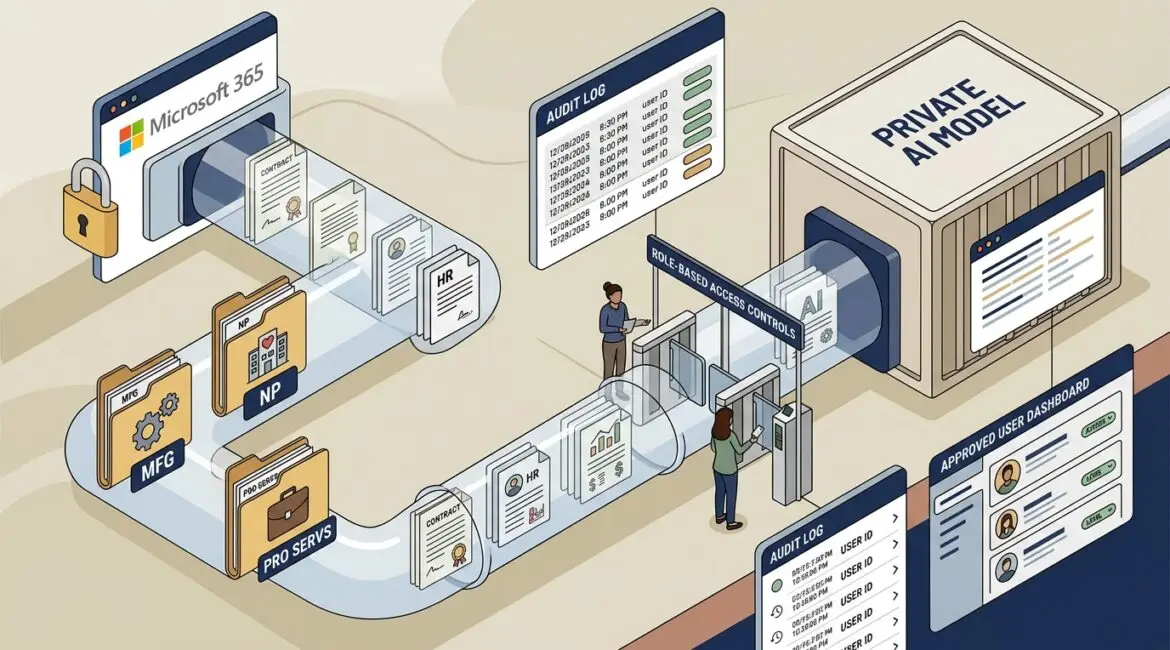
Yes, private AI models can be used with confidential company documents, but only when the system is designed to keep your data inside approved boundaries and under your control. The real question is not whether AI can read sensitive files. It is whether your business can use it without creating new security, compliance, and operational problems.
For many organizations, the answer is yes. A private AI model can help staff find information faster, summarize long documents, draft responses, and analyze internal records while reducing the risk of sending sensitive data into public tools.
What a private AI model actually means
In plain English, a private AI model is an AI system set up so your company’s data is handled in a controlled environment. That may mean the model runs in your own cloud tenant, a private hosted environment, or on infrastructure with strict access and retention rules.
The goal is simple. Your documents are not fed into a public chatbot where they could be retained, used for broader training, or accessed outside your policies.
That private setup usually includes:
- Restricted data access so only approved users and systems can submit or retrieve information
- Separate storage for company files, prompts, and results
- Logging and auditing to track who used the system and what data was involved
- Retention controls so sensitive prompts and outputs are not kept longer than necessary
- Identity and permission integration with tools like Microsoft 365 and Entra ID
This matters because many business leaders hear “private AI” and assume it is automatically safe. It is not. Privacy comes from architecture, policy, and management, not from a label.
How businesses are using private AI with sensitive documents
The strongest use cases are practical, not flashy. Most organizations do not need AI to replace people. They need it to reduce time spent digging through files, repeating manual work, and answering the same internal questions.
Common business uses include:
- Contract review for professional service firms that need quick summaries of terms, renewal dates, and obligations
- Policy lookup for nonprofits that want staff to find grant rules, HR policies, or donor handling procedures quickly
- Operations support for manufacturers that need fast access to SOPs, maintenance records, quality documents, and safety procedures
- Financial document analysis for accounting teams reviewing invoices, budgets, or vendor agreements
- Internal knowledge search across meeting notes, documentation, file shares, and project records
For example, a manufacturer in Southeast Wisconsin might store machine maintenance procedures, vendor manuals, and quality checklists in a secure document library. A private AI assistant could help a supervisor ask, “What is the calibration process for Line 3 packaging equipment?” and get a fast answer from approved documents instead of losing 20 minutes searching folders.
A nonprofit in Kenosha could use a private AI tool to summarize grant reporting requirements across several PDF agreements. Instead of a staff member spending three hours comparing documents manually, the first draft might be ready in 20 minutes, with a human still reviewing the final result.
What private AI should not be allowed to do
Private AI is useful, but it should not become an uncontrolled back door into your business data. Not every document should be available to every employee, and not every AI-generated answer should be trusted without review.
Set clear limits from the start:
- Do not allow unrestricted access to HR files, legal records, payroll data, donor data, or protected client information
- Do not assume summaries are always correct because AI can misunderstand context or miss exceptions
- Do not skip data classification before connecting file repositories to AI tools
- Do not let employees paste sensitive information into unapproved public AI platforms
- Do not deploy it without usage policies, testing, and ownership
If your business has not already defined what files are confidential, internal, public, or restricted, start there. Our article on data classification for businesses explains why that step matters before any new tool touches your information.
The biggest security and compliance questions to answer first
Before adopting private AI, leadership should ask the same questions they would ask about any system that touches important business data. Where does the data go? Who can access it? How is it protected? What happens if the wrong person gets an answer they should not see?
Here are the issues that deserve attention:
- Access control
The AI system should respect the same permissions your staff already have. If an employee cannot open a confidential finance folder directly, they should not be able to retrieve its contents through AI.
- Data retention
Prompts and outputs may contain sensitive information. Your business needs a policy for how long those records are kept and where they are stored.
- Vendor terms
Some AI providers process data in ways that may not fit your contractual or regulatory requirements. Review terms carefully before moving forward.
- Output accuracy
AI can produce polished answers that sound right while missing key details. High-risk uses should include human review.
- Auditability
You should be able to track usage, investigate misuse, and show how information was accessed if a client, auditor, or board member asks.
For many small and midsize organizations in Northeast Illinois and Southeast Wisconsin, these controls matter as much as the AI model itself. A cheap tool that saves ten minutes a day is not a bargain if it creates a data handling problem that takes weeks to untangle.
What a sensible rollout looks like
The best private AI projects usually start small. They focus on a narrow business problem, a defined document set, and a limited group of users.
A practical rollout often looks like this:
- Step 1: Identify a useful business case
Start with a repetitive task such as document summarization, internal search, or policy Q and A.
- Step 2: Classify the data involved
Decide what information is allowed, restricted, or excluded.
- Step 3: Confirm secure file storage and permissions
If your file environment is disorganized, AI will expose that quickly. Strong structure matters. Our post on secure file storage covers the basics.
- Step 4: Limit the pilot group
Use a small team first, such as operations, finance, or administration.
- Step 5: Measure results
Track time saved, reduced support questions, fewer manual searches, and any security concerns that appear.
- Step 6: Create governance rules
Define who owns the system, what data sources are approved, and how changes are reviewed.
This kind of phased approach keeps the project grounded in business value. It also helps avoid the common mistake of rolling out AI broadly before the company is ready.
What cost and productivity can look like in real life
Private AI costs vary widely based on licensing, storage, security controls, and whether the system is custom-built or tied to existing platforms. For many small and midsize businesses, the real financial question is whether the time savings and risk reduction justify the setup and oversight.
Consider a 25-person professional services firm. If 10 employees each spend 20 minutes a day searching old proposals, contracts, or internal policies, that adds up to more than 16 hours a week. Even at a blended labor cost of $50 per hour, that is over $800 per week in lost time, or more than $40,000 a year.
If a private AI assistant cuts that search time in half, the gain is meaningful. But only if the environment is controlled well enough that confidential client files are not exposed to the wrong people.
There can also be hidden costs if planning is poor:
- Rework when answers are inaccurate and staff must verify everything manually
- Compliance cleanup if sensitive data was shared into the wrong system
- Support overhead if the AI tool is added without standards or ownership
- Permission issues if document libraries are messy or outdated
That is why AI planning should be part of broader technology governance, not a side experiment. If you want a framework for that, see our article on technology governance for small businesses.
Questions business leaders should ask before approving private AI
- What specific business problem are we solving?
- Which documents will the system access?
- Are those files already organized and permissioned correctly?
- Will prompts and outputs be stored, and for how long?
- Can the tool respect existing access controls?
- Who reviews accuracy for important outputs?
- What is our fallback if the tool is unavailable or produces a bad result?
- Who owns governance, user training, and ongoing review?
If those questions are hard to answer, the issue may not be AI. It may be that your document management, access controls, or technology planning need attention first.
Final thoughts
Private AI models can absolutely be used with confidential company documents, and for the right business case they can save time, reduce repetitive work, and make internal knowledge easier to use. The value comes from careful planning, strong access control, clean data sources, and clear rules for how the tool fits into daily operations.
Businesses that approach this thoughtfully tend to get better results than those that rush into broad deployment. If you’re ready to strengthen your technology, reduce risk, and plan for the future, contact Platinum Systems to schedule a technology strategy discussion.