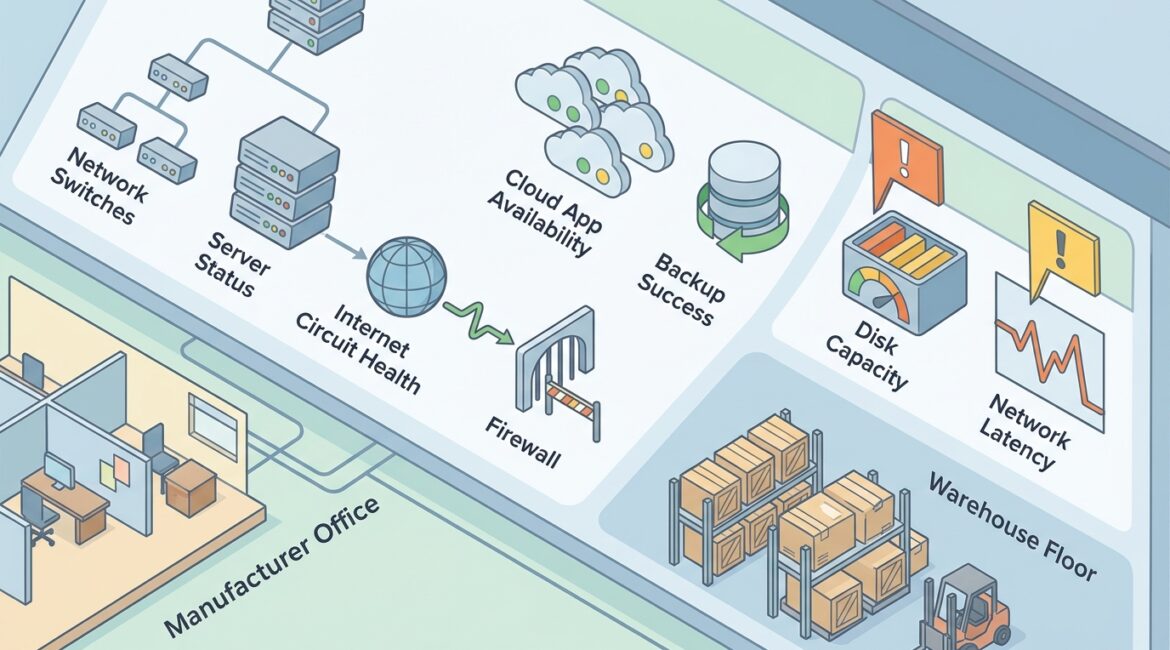
Infrastructure monitoring is the ongoing process of watching the health, performance, and availability of the systems your business depends on, including servers, firewalls, internet connections, cloud services, and critical devices. Business leaders should expect it to do more than generate alerts. Done well, it helps prevent downtime, improve planning, reduce support chaos, and give you a clearer picture of technology risk.
If your team only hears about technology problems after employees cannot work, your organization is operating reactively. Monitoring changes that by identifying warning signs early, before a slow server becomes a full outage or a failing internet connection disrupts a full day of operations.
What infrastructure monitoring means in plain English
Think of infrastructure monitoring as the dashboard and early warning system for your technology environment. It tracks whether important systems are up, whether they are slowing down, and whether something unusual suggests a failure or security issue may be developing.
That can include:
- Servers running line-of-business applications
- Network equipment such as firewalls, switches, and wireless access points
- Internet connections and backup circuits
- Cloud platforms like Microsoft 365 or hosted business applications
- Storage systems and backups
- Workstations or endpoints when they affect business operations
- Environmental factors such as battery backup status or device temperature in some settings
For a business owner, the point is simple. You want to know when a critical system is under stress, offline, misconfigured, or approaching failure, and you want that information before it turns into lost productivity.
What business leaders should expect from infrastructure monitoring
Many organizations assume monitoring means someone will call when something breaks. That is only part of the value. A mature monitoring approach should support daily operations, budgeting, and risk reduction.
1. Early warning, not just after-the-fact alerts
A good monitoring system detects signs of trouble early. For example, a server may still be online, but its disk space could be nearly full, its memory usage could be spiking, or a backup process may have started failing overnight.
Those are fixable issues when caught early. Left alone, they often become outages.
2. Clear visibility into what is actually happening
Leaders should not have to guess whether recurring complaints are caused by internet instability, aging hardware, overloaded systems, or poor configuration. Monitoring provides evidence. It helps answer practical questions about performance, reliability, and recurring operational pain points.
This is closely related to network visibility, which gives organizations a clearer understanding of devices, traffic, and activity across the environment.
3. Faster response when problems occur
Even well-managed systems can still fail. When they do, monitoring should shorten the time between issue detection and corrective action. Instead of waiting for ten employees to report that a shared application is unavailable, support teams can often see the failure immediately and begin troubleshooting sooner.
That time matters. If a 25-person professional services firm loses access to its document system for three hours, the cost is not just an IT ticket. It may mean missed billable time, delayed client work, and internal frustration that ripples through the day.
4. Better planning and budgeting
Monitoring is not only for incidents. Trend data helps identify systems that are consistently overloaded, nearing capacity, or becoming unreliable with age. That gives leadership time to budget and plan upgrades instead of making rushed purchases during an outage.
For example, if storage usage is increasing by 8 percent each month, a manufacturer can plan an expansion before production reporting slows down. If internet failover is triggering repeatedly at a nonprofit with multiple remote staff, it may be time to review connectivity design rather than keep accepting disruptions.
That planning works best when paired with structured reviews such as an IT health check and longer-term capacity planning.
What infrastructure monitoring should cover
The right scope depends on your business, but leaders should expect monitoring to cover systems that affect revenue, operations, communication, security, and customer service.
That often includes:
- Server health, including CPU, memory, disk space, service status, and hardware warnings
- Network performance, including outages, latency, packet loss, and device failures
- Firewall and security appliance status, including connectivity and critical service issues
- Backup success or failure, so recovery problems are found before an emergency
- Cloud service availability, especially for critical business platforms
- Capacity trends, such as storage growth, bandwidth usage, and resource constraints
- Configuration and change anomalies, which may point to instability or risk
In many cases, monitoring should also support broader reliability efforts. If you are reviewing how to improve uptime across the environment, our post on improving the reliability of your business technology covers the bigger picture.
What it should not be
Monitoring is valuable, but only if it is set up and managed properly. Business leaders should be cautious if they are paying for a service that produces noise without action.
You should not expect:
- A flood of technical alerts with no business context
- Monitoring limited to whether a device is simply on or off
- No follow-up on recurring warnings
- Reports that look impressive but do not inform decisions
- Coverage gaps around cloud systems, backups, or remote sites
If your provider says everything is monitored, but outages still surprise everyone, the issue may not be the tool. It may be the process, thresholds, escalation path, or lack of strategic review.
Practical examples by organization type
Manufacturers
A small manufacturer in Southeast Wisconsin may rely on stable connectivity between office staff, production systems, shipping stations, and inventory tools. If a switch begins failing intermittently, monitoring can catch port errors or device instability before production reporting stalls or label printing stops.
Nonprofit organizations
A nonprofit in Kenosha might depend on cloud applications for donor management, finance, and remote collaboration. Monitoring can flag backup failures, internet instability, or unusual system behavior before it affects fundraising events, grant reporting, or day-to-day service delivery.
Professional service firms
An accounting, legal, or engineering firm in Northeast Illinois often depends on document systems, email, secure remote access, and line-of-business applications. Monitoring helps identify slowdowns and outages early, especially during busy periods when even a short disruption can affect deadlines and client commitments.
How infrastructure monitoring supports cybersecurity
Monitoring is not a complete cybersecurity program, but it does support one. Unexpected service failures, unusual traffic patterns, repeated device issues, and backup problems can all be early indicators that something is wrong.
It also helps organizations spot operational risks that often overlap with security concerns, such as outdated systems, failed updates, or configuration drift. Those issues may begin as maintenance problems but can easily become security gaps if ignored.
Questions leaders should ask their IT provider
If you want monitoring that actually helps the business, ask direct questions:
- Which systems are being monitored right now?
- What types of alerts trigger action?
- Who reviews alerts, and how quickly?
- How are recurring issues reported to leadership?
- Are backups, cloud services, and internet connections included?
- How is monitoring data used for budgeting and planning?
- What happens after hours or on weekends?
The answers should be understandable without technical translation. If they are vague, that is usually a sign the service is not tied closely enough to business outcomes.
What good monitoring looks like over time
The real value of infrastructure monitoring shows up over months, not just during a single incident. You should see fewer surprise outages, faster issue resolution, clearer upgrade priorities, and better conversations about risk and investment.
It also supports a more proactive operating model. Instead of constantly reacting to failures, leadership can make informed decisions about replacement timing, redundancy, support coverage, and growth needs.
That is especially important for organizations that want technology to support operations without becoming a constant source of disruption or unplanned cost.
Conclusion
Infrastructure monitoring should help your business see problems sooner, respond faster, and plan smarter. It is not just a technical function. It is part of running a stable, efficient organization with fewer surprises.
If you’re ready to strengthen your technology, reduce risk, and plan for the future, contact Platinum Systems to schedule a technology strategy discussion.