

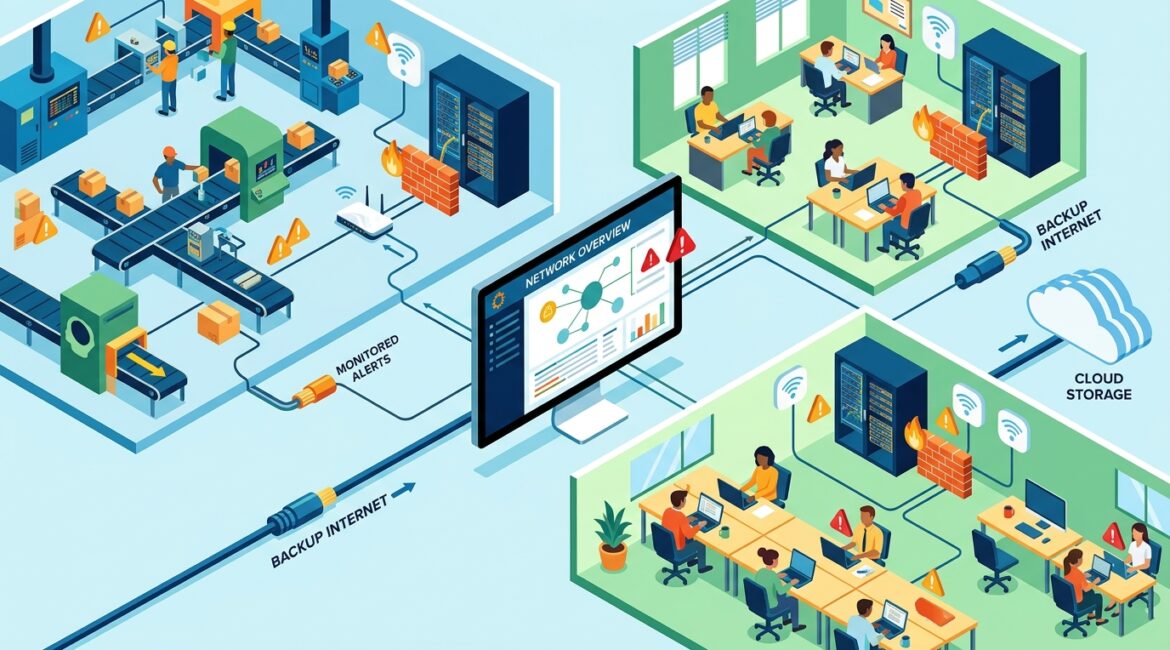
To manage IT well across multiple locations, you need consistency. Standardize your systems, centralize visibility, document how each site is built, and plan support before issues interrupt operations. When every office, clinic, warehouse, or branch runs a little differently, costs rise and downtime gets harder to control.
That challenge shows up quickly for growing organizations in Southeast Wisconsin and Northeast Illinois. A manufacturer with a plant in Kenosha and a sales office in Illinois has different needs at each site, but leadership still needs one clear technology strategy.
Why multi-location IT gets complicated fast
One office is manageable. Three or five offices can turn small inconsistencies into expensive problems. Different internet providers, aging firewalls, mismatched laptops, and separate software choices all create friction.
It also becomes harder to answer basic business questions. Which locations have outdated hardware? Which sites can keep working during an internet outage? Who has access to sensitive files across all locations?
Without a plan, businesses often end up with:
- Different equipment at each location
- Uneven cybersecurity controls
- Inconsistent employee experience
- Higher support costs
- Longer recovery times when something fails
Start with standardization, not more tools
The best way to manage IT for multiple locations is to reduce unnecessary variation. That does not mean every site must be identical. It means core systems should follow the same standards unless there is a real business reason not to.
For example, a professional services firm with offices in Milwaukee, Kenosha, and Lake County may not need the exact same printers or conference room setups in every office. But it should standardize laptops, security settings, Microsoft 365 policies, backup rules, and firewall configurations.
Standardization helps you:
- Support users faster
- Reduce training time for employees
- Lower spare equipment and replacement costs
- Patch systems more consistently
- Spot unusual activity more easily
If your environment feels difficult to support, this often points to a design problem rather than a staffing problem. A related resource is how to build an IT environment that is easier to manage.
Create one technology blueprint for every site
Each location should fit into a shared blueprint. Think of it as a repeatable template for how a branch office, nonprofit satellite office, clinic, or warehouse is set up.
Your blueprint should define:
- Approved internet and backup internet options
- Firewall and Wi-Fi standards
- Device types and replacement schedules
- User access and sign-in requirements
- File storage and backup methods
- Remote support procedures
- Escalation contacts for vendors and facilities
This avoids the common problem where one office was set up by a former employee, another by a local vendor, and a third by whoever was available during a move. Over time, that patchwork creates risk.
Clear documentation matters here. If you do not have current diagrams, device lists, ISP details, warranty status, and admin access records for each site, support becomes slower and more expensive. That is why many growing organizations benefit from reviewing network documentation as part of expansion planning.
Centralize visibility so leadership can make decisions
When a business has multiple locations, local issues can stay hidden until they become company-wide problems. A failing switch in one office, poor patching in another, or weak Wi-Fi in a warehouse may not reach leadership until productivity is already affected.
Centralized visibility gives you one place to monitor devices, internet connections, security alerts, backups, and system health across every site. That matters for both daily support and budgeting.
For example, if five employees at a remote office lose 30 minutes a day due to unstable connectivity, that can quietly cost dozens of labor hours each month. At an average loaded labor cost of $35 per hour, just 25 lost hours in a month is $875 in hidden productivity loss. Spread that over a year and one recurring issue can cost more than fixing the root cause.
Good visibility helps you answer practical questions such as:
- Which locations generate the most support issues?
- Which devices are nearing end of life?
- Which offices need internet redundancy?
- Are backups succeeding everywhere?
- Are security policies applied consistently?
Design for unreliable internet and local outages
Multi-location businesses often assume cloud tools remove location risk. They help, but they do not eliminate the need for local planning. If one office loses internet, that site may still lose access to phones, files, line-of-business apps, and payment systems.
This is especially important for manufacturers, nonprofits serving the public, and firms with client-facing offices. If a site cannot operate for half a day, the cost may include lost production, missed appointments, delayed shipments, or donor communication problems.
Plan for site-level disruptions with:
- Backup internet where downtime would be costly
- Battery backup for network equipment
- Documented failover procedures
- Cloud-managed network gear for remote troubleshooting
- Alternate workflows when a site is offline
A ten-person office that is fully idle for four hours can lose far more than the monthly price of a backup connection. This is one reason many organizations review business continuity as part of location planning rather than after an outage.
Keep security consistent across every office
Security gaps often appear when one location operates outside the standard. Maybe a branch office uses an old firewall, shares accounts, stores files locally, or allows unmanaged devices on the network. Those exceptions create exposure.
Consistency matters more than complexity. Business leaders usually do not need dozens of separate security products. They need a clear baseline that applies everywhere.
That baseline often includes:
- Multi-factor authentication for all users
- Centralized identity and access control
- Managed endpoint protection
- Secure Wi-Fi for staff and guests
- Regular patching for devices and network equipment
- Filtered web and DNS protection
- Tested backup and recovery procedures
For nonprofits and professional service firms, consistent access control is especially important because staff may move between offices, work remotely, and handle sensitive donor, client, or financial information. When access is managed centrally, onboarding and offboarding become much cleaner.
Support the business, not just the devices
Different locations often support different workflows. A warehouse may depend on label printers and handheld scanners. A nonprofit office may rely on donor databases and shared file access. A law or accounting office may care most about secure email, document storage, and predictable remote access.
Good multi-location IT management maps technology to business operations at each site. That means understanding what absolutely must work, what can tolerate short downtime, and what should be replaced before it fails.
Ask questions like:
- What systems stop revenue or service delivery if they go down?
- Which locations need faster support response?
- What local vendors or building constraints affect connectivity?
- Are employees following the same procedures in every office?
This is where proactive planning pays off. If you are adding locations, moving offices, or consolidating systems, build those decisions into an annual roadmap instead of treating them as separate emergencies.
Budget by lifecycle, not by surprise
Multi-location environments become expensive when replacements happen randomly. One office gets new laptops this year, another waits too long, and a third replaces network equipment only after a failure.
A better approach is to budget around lifecycle planning. That means tracking age, warranty, performance, and business importance for devices and infrastructure across all sites. It also helps finance leaders avoid uneven spending.
For example, replacing three aging firewalls in a planned cycle is usually easier on cash flow than dealing with a security incident, emergency shipping, and unplanned labor after one fails. The same principle applies to switches, wireless access points, laptops, and backup appliances.
Organizations that want fewer surprises should also review device lifecycle planning and align it with their annual budget process.
What business leaders should expect from their IT partner
If you work with an MSP or outside advisor, multi-location support should include more than a help desk. You should expect planning, documentation, standardization, risk review, and clear reporting that helps leadership make decisions.
A strong advisor should be able to explain:
- Where your locations are inconsistent
- Which risks deserve attention first
- What upgrades should be phased over 12 to 36 months
- How to reduce downtime and support costs
- How technology choices affect operations, not just IT
That is especially useful for growing businesses in Kenosha, Southeast Wisconsin, and Northeast Illinois that are expanding through new offices, satellite teams, or acquisitions. Growth usually adds complexity long before it adds clarity.
Conclusion
Managing IT across multiple locations comes down to discipline. Standardize what should be standard, document every site, centralize visibility, and plan for outages, security, and replacement cycles before they become urgent.
If you’re ready to strengthen your technology, reduce risk, and plan for the future, contact Platinum Systems to schedule a technology strategy discussion.