

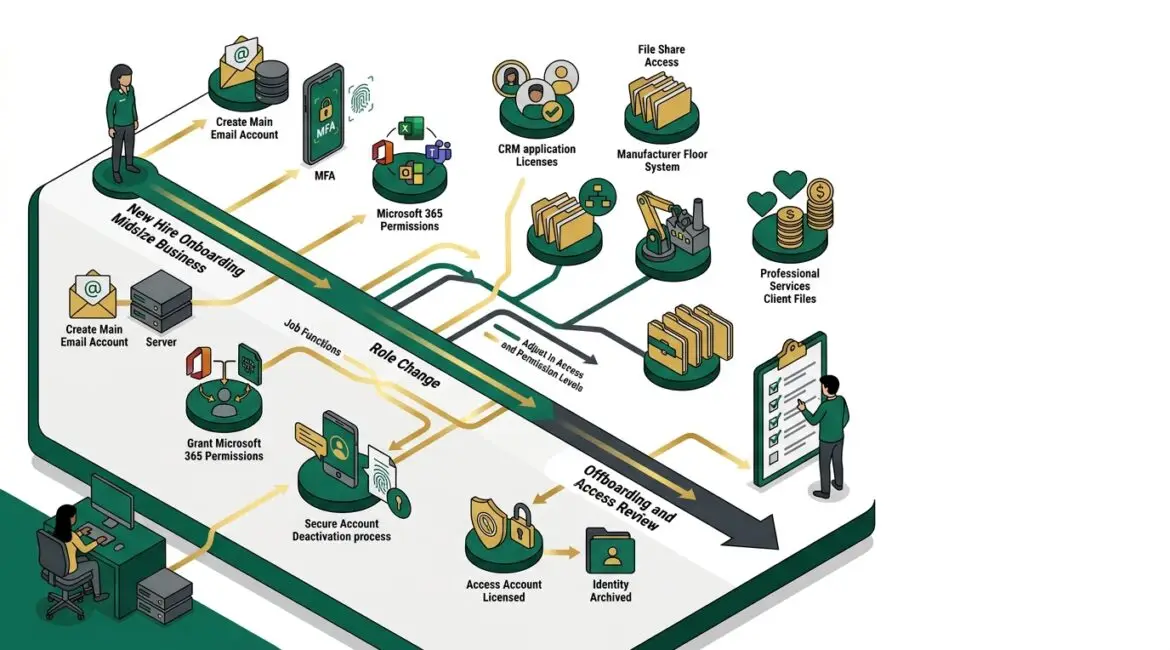
Identity lifecycle management is the process of controlling user access from the day someone joins your organization to the day that access should be removed. It matters because the wrong access, whether too much, too little, or left behind after a role change, creates security risk, slows work, and drives up support costs.
For most businesses, this is not a technical side issue. It affects payroll, file access, email, accounting systems, remote work, vendor portals, and the basic ability for people to do their jobs without unnecessary friction.
What identity lifecycle management means in plain English
Every employee, contractor, volunteer, or vendor who uses your systems has a digital identity. That identity usually includes an email account, login credentials, access to files and applications, and permission to use certain devices or cloud platforms.
Lifecycle management means handling that identity through each stage:
- Joiner: creating accounts and granting the right access when someone starts
- Mover: adjusting access when someone changes roles, departments, or responsibilities
- Leaver: disabling and removing access when someone leaves
- Reviewer: checking regularly to confirm access still makes sense
If any of those steps are handled poorly, problems show up fast. A new hire may sit idle for half a day waiting for access. A former employee may still be able to log in. A manager promoted into finance may get accounting access but keep old permissions they no longer need.
Why business leaders should care
Access management affects security, productivity, compliance, and cost. It is one of the clearest examples of how a small process gap can turn into a business problem.
Consider a 35-person professional service firm in Kenosha. If a new employee cannot access email, shared files, and line-of-business software on day one, you may lose four to six productive hours between the employee, their manager, and IT support. Multiply that by several hires each year and the cost becomes easy to see.
Now consider the opposite problem. A former employee keeps access to Microsoft 365, a CRM platform, or a file-sharing app for two extra weeks because no one submitted an offboarding request. That may mean continued exposure to client data, donor records, financial information, or internal documents long after access should have ended.
For manufacturers in Southeast Wisconsin, access mistakes can also affect production systems, inventory tools, and vendor portals. For nonprofit organizations, they can expose donor databases and grant documentation. For accounting, legal, and consulting firms, they can create confidentiality issues that damage trust quickly.
The biggest risks of poor identity lifecycle management
Former employees keep access
This is one of the most common and avoidable problems. If accounts are not disabled promptly, old credentials may still work across email, cloud storage, remote access tools, and third-party apps.
Employees accumulate too much access over time
When people change roles, they often gain new permissions without losing old ones. Over several years, one person can end up with access to HR files, finance folders, operational systems, and admin tools they no longer need.
New hires start without the right tools
Delays in account setup create frustration and lost productivity. Managers assume IT is handling it, IT assumes the manager submitted a request, and the employee waits.
Shared accounts and manual workarounds spread
When onboarding is inconsistent, teams start sharing passwords or using personal accounts to keep work moving. That creates audit gaps and weakens accountability.
Licenses and support costs increase
Unused accounts and unnecessary software licenses add up. A business may keep paying for cloud subscriptions tied to users who left months ago.
These issues often connect to broader planning gaps. Articles like technology governance for small businesses and SaaS management explain why clear ownership and oversight matter so much.
What good identity lifecycle management looks like
A strong process does not need to be complicated, but it does need to be consistent. The goal is to make access decisions predictable, documented, and tied to business roles.
- Standard onboarding checklists for each job type or department
- Role-based access so users get permissions based on their responsibilities, not one-off decisions
- Approval steps for sensitive systems such as finance, HR, donor management, or production control
- Fast offboarding procedures that disable accounts promptly when employment ends
- Regular access reviews to identify outdated or excessive permissions
- Documentation showing who owns each system and who approves access
In many environments, identity lifecycle management also works hand in hand with tools like Microsoft Entra ID. If you want a practical example of that side of the process, see how to use Microsoft Entra ID to improve business security.
Practical examples from real business environments
Manufacturer with shift supervisors and temporary staff
A manufacturer in Northeast Illinois may bring on seasonal workers, outside maintenance vendors, and supervisors who need different levels of access. Without a defined process, temporary accounts may stay active after a project ends, or supervisors may inherit broad permissions that were meant only for a prior manager.
With lifecycle management, each role has a clear access profile, temporary access has an expiration date, and offboarding happens the same day the assignment ends.
Nonprofit with staff turnover and volunteers
Nonprofits often rely on a mix of employees, board members, and volunteers. That can create confusion around who should access donor systems, fundraising platforms, and shared files. If one volunteer coordinator leaves and another steps in, access may simply be handed over informally.
A better approach is to assign access by role, review it regularly, and remove it promptly when responsibilities end. This protects donor information and reduces the chance of old accounts lingering in multiple systems.
Professional service firm with confidential client data
A CPA firm or law office may need strict separation between departments, client matters, and financial systems. If a staff member moves from operations into client service, their access should change immediately. Otherwise, they may keep permissions to internal HR or billing data that are no longer appropriate.
That is not only a security issue. It can also create confusion, accidental file exposure, and audit headaches.
Where many small and midsize organizations struggle
Most access problems do not happen because leadership ignores security. They happen because the process depends on memory, email threads, and manual steps across several systems.
Common weak points include:
- No single owner for onboarding and offboarding
- Access requests handled differently by each manager
- Cloud applications purchased without IT involvement
- No regular review of user permissions
- Former employee accounts disabled in one system but left active in others
- Little visibility into which apps each person can access
This is also why identity management should be part of routine planning, not just incident response. Businesses that already use a structured annual IT planning calendar are usually in a much better position to review access, licensing, policies, and role changes before issues become expensive.
How to improve identity lifecycle management without overcomplicating it
You do not need enterprise-scale complexity to make meaningful improvements. Start with a few practical controls and build from there.
1. Define who owns the process
HR, operations, department leaders, and IT all play a role. Someone should clearly own the workflow so requests do not fall through the cracks.
2. Create role-based access standards
List the common positions in your organization and define what each one should access. This reduces guesswork and speeds onboarding.
3. Tie onboarding and offboarding to HR events
Account creation and account removal should follow formal hiring and termination steps, not informal emails or verbal requests.
4. Review access on a schedule
Quarterly or semiannual reviews are often enough for many small and midsize organizations. Focus first on email, file storage, finance apps, remote access, and admin accounts.
5. Include cloud apps, not just network logins
Many businesses are better at disabling Windows or Microsoft 365 accounts than third-party software. Make sure your review includes CRM systems, payroll platforms, donor tools, project management apps, and file-sharing services.
6. Document exceptions
If someone needs unusual access for a valid reason, record it. That way the business can revisit it later instead of treating it as permanent.
The long-term value for your business
When identity lifecycle management is handled well, the benefits are practical and measurable. New hires become productive faster. Former employees lose access promptly. Managers spend less time chasing setup issues. IT support deals with fewer emergency requests. Leadership gains better control over risk and software spending.
It also supports broader resilience. Strong access control works alongside secure file storage, collaboration policies, and business continuity planning. If your organization is trying to reduce risk without making daily work harder, this is one of the best places to start.
Conclusion
Identity lifecycle management is really about making sure the right people have the right access at the right time, and no longer than necessary. It protects your business, reduces wasted time, and helps technology support operations instead of getting in the way.
If you’re ready to strengthen your technology, reduce risk, and plan for the future, contact Platinum Systems to schedule a technology strategy discussion. A practical review of your access processes can uncover gaps, reduce avoidable risk, and help your business make smarter long-term technology decisions.