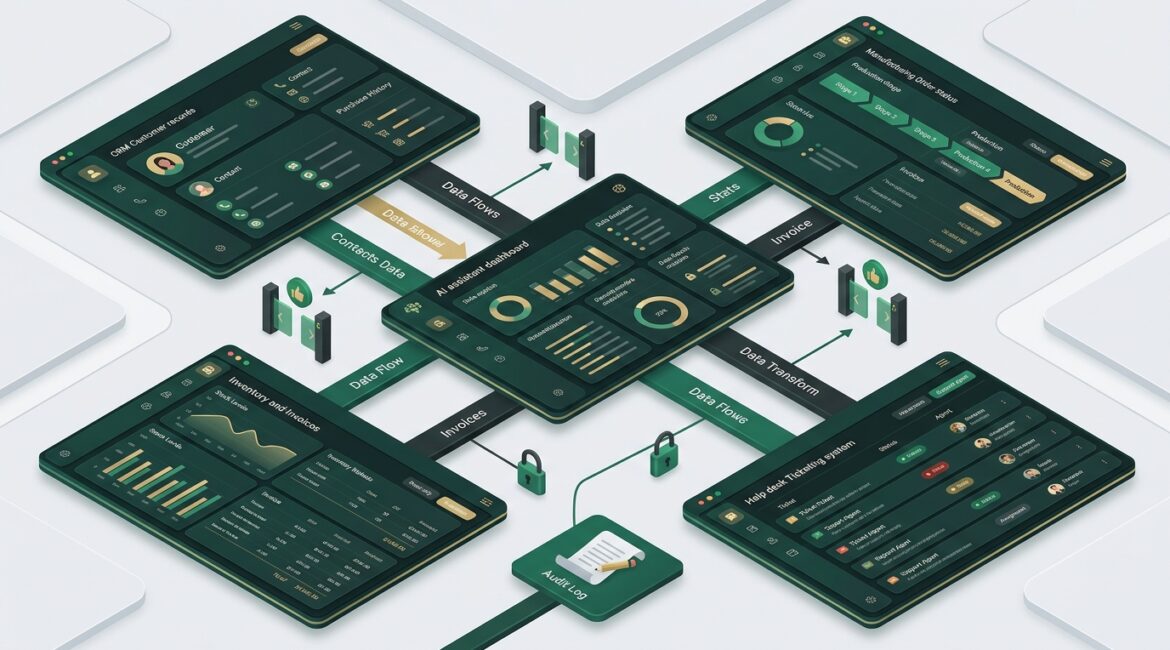
Yes, AI can connect to your CRM, ERP, and help desk through MCP if those systems support the right integrations and your environment is set up carefully. In plain English, MCP gives AI a structured way to request data or perform approved tasks across business systems instead of relying on copy and paste, disconnected bots, or risky one-off scripts.
For business leaders, the real question is not whether this is possible. It is whether it can be done in a way that improves operations without creating new security, compliance, or support problems.
What MCP means in plain English
MCP stands for Model Context Protocol. Think of it as a common set of rules that helps an AI assistant connect to business tools in a predictable way.
Without a standard approach, every AI integration can turn into a custom project. One vendor connects to your CRM one way, another pulls data from your ERP differently, and a third uses a separate method for your help desk. That usually leads to more cost, more troubleshooting, and less control.
With MCP, the goal is simpler. An AI system can ask approved business tools for specific information or actions through a defined interface. That makes it easier to:
- Pull customer account details from a CRM
- Check invoice or inventory status in an ERP
- Read ticket history from a help desk platform
- Create summaries, drafts, reports, or next-step recommendations
- Keep access rules more consistent across systems
How this works in a real business
Imagine a customer calls your team and asks why an order is delayed. Today, an employee might open the CRM for account notes, the ERP for order status, and the help desk system for prior support tickets. That can take 5 to 10 minutes if the information is scattered.
With a properly configured AI assistant using MCP, the employee could ask one question and get a combined answer in seconds. The assistant might return:
- Customer name and account status from the CRM
- Shipment or production status from the ERP
- Open issue history from the help desk
- A suggested reply for the employee to review
That does not replace your staff. It reduces the time spent hunting for information.
Where businesses see practical value
Manufacturers
A manufacturer in Southeast Wisconsin may have customer records in one system, inventory and purchasing in another, and service requests in a third. AI connected through MCP can help staff answer questions like:
- Is a part in stock?
- Has the quote been approved?
- Are there open warranty issues?
- Did we already promise a delivery date?
If a customer service rep saves even 15 minutes per day and you have 12 reps, that is 3 hours per day back to the business. Over a year, that can add up to hundreds of staff hours.
Nonprofit organizations
A nonprofit in Kenosha or Northeast Illinois may use a donor CRM, accounting software, and a help desk or shared support inbox. AI can help staff quickly confirm donor history, event participation, pledge status, and prior requests without bouncing between multiple applications.
That matters when administrative teams are lean. Saving a few minutes on every donor or board-related question can help staff focus more on mission work and less on system navigation.
Professional service firms
Accounting firms, law offices, and consulting groups often need quick access to client details, project status, invoices, and support issues. An MCP-based AI assistant can help assemble that context faster, especially when employees handle many small client interactions each day.
It can also help draft follow-up notes, summarize support trends, or flag missing information before a billing or service issue grows.
What AI should do, and what it should not do
This is where many organizations need a reality check. Just because AI can connect to a system does not mean it should have broad authority inside it.
In most cases, a safer starting point is to let AI:
- Read approved records
- Summarize information
- Draft responses for human review
- Recommend actions
- Create reports from permitted data
Be much more cautious about allowing AI to:
- Change financial records
- Approve refunds or payments
- Delete tickets or customer data
- Alter pricing
- Create vendor accounts
- Modify user permissions
A good rule is simple. Start with visibility and assistance before automation and write access.
The security and governance questions that matter
For most leadership teams, the biggest risk is not the AI itself. It is poor planning around access, data handling, and oversight.
Before connecting AI to core systems, ask:
- What data can the AI access?
- Who approved that access?
- Is sensitive financial, HR, donor, or client data included?
- Are responses logged and reviewable?
- Can the AI perform actions, or only retrieve information?
- How will you remove access if a vendor or tool changes?
This is one reason technology governance matters. If your organization does not already have clear ownership for system access, vendor controls, and change approval, AI integrations can expose that weakness quickly. Our article on technology governance for small businesses is a helpful place to start.
It is also smart to review how data is classified before connecting new tools. Not every record should be available to every assistant. Financial data, donor records, legal files, and employee information often need tighter rules. We covered that in our post on data classification.
Common business mistakes to avoid
Connecting systems before cleaning up access
If users already have too much access in your CRM or ERP, AI will inherit that mess. Bad permissions do not become safer just because a new tool is involved.
Starting with too many systems at once
Trying to connect six platforms in phase one usually creates confusion. Start with one high-value workflow, such as customer account lookup or ticket summarization.
Ignoring support and documentation
If the integration depends on one employee or one vendor and nobody else understands it, support risk goes up. Good documentation matters here just as much as it does anywhere else in IT.
Focusing on novelty instead of measurable value
If the project does not reduce response time, improve accuracy, lower support effort, or help decision making, it may not be worth doing yet.
What does this cost, and where is the return?
Costs vary widely depending on your systems, licensing, security requirements, and whether you need custom integration work. A small pilot may involve limited setup and testing, while a broader rollout across CRM, ERP, and help desk platforms can require more planning, access reviews, vendor coordination, and user training.
What matters most is whether the use case produces real business value. For example:
- If a 20-person service team saves 10 minutes per employee per day, that is over 16 hours per week recovered
- If faster access to order and support history prevents one missed client renewal or one billing error per quarter, the project may pay for itself quickly
- If better visibility reduces duplicate tickets or repeated data entry, support labor drops and customer experience improves
Leaders should evaluate this the same way they would any other technology investment. Measure time saved, errors reduced, downtime avoided, and risk introduced or removed. Our post on making better technology decisions with business metrics offers a practical framework.
How to approach MCP strategically
If you are considering this, do not start by asking, which AI tool should we buy? Start by asking, which business process is slowed down because our systems do not share context well?
A smart rollout usually looks like this:
- Identify one or two high-value workflows
- Review system access and data sensitivity
- Confirm vendor support for secure integration methods
- Limit AI permissions at the start
- Test outputs for accuracy and consistency
- Document ownership, support, and rollback steps
- Measure results before expanding
This proactive approach is usually far less expensive than rushing into a broad deployment and fixing the problems later.
Final thoughts
AI can connect to your CRM, ERP, and help desk through MCP, and for many organizations, that can improve speed, visibility, and staff productivity. The value comes from connecting the right systems in the right order, with clear access controls and a business case that actually holds up.
For businesses and nonprofits across Southeast Wisconsin, Northeast Illinois, and Kenosha, the best results come from treating AI integration as part of a broader technology strategy, not a quick add-on. If you’re ready to strengthen your technology, reduce risk, and plan for the future, contact Platinum Systems to schedule a technology strategy discussion.