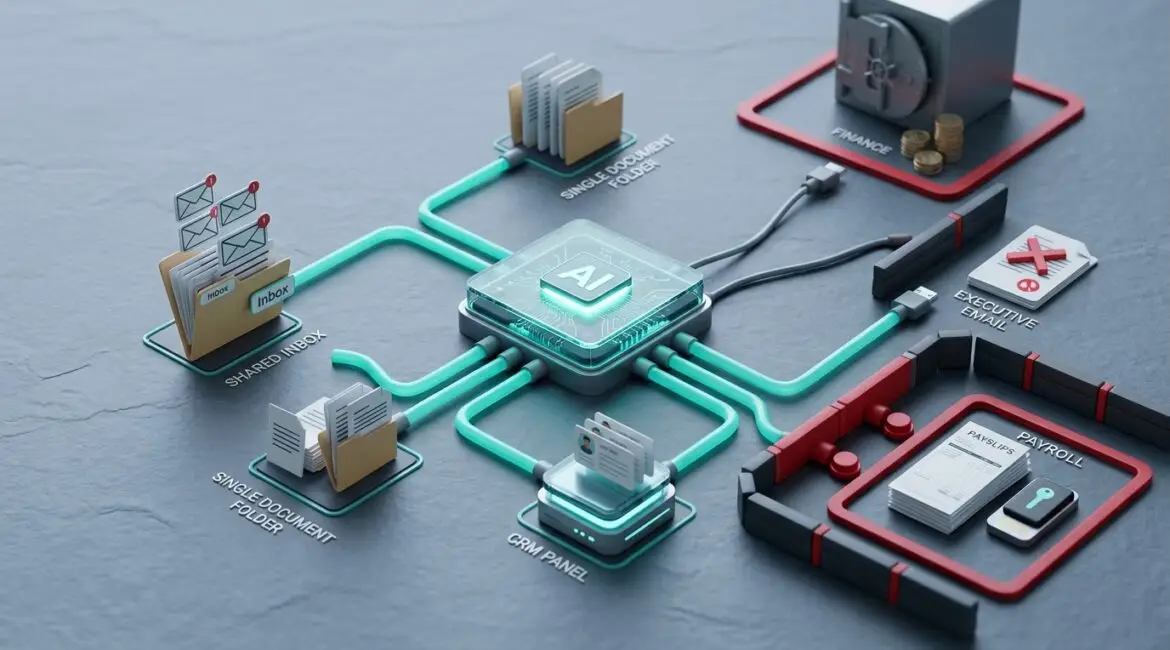
Yes, businesses can use AI agents without giving them too much access, but only if access is planned carefully from the start. The safest approach is to give each agent the minimum permissions needed for one defined job, require human approval for sensitive actions, and monitor what the agent can see, change, and send.
That matters because AI agents are moving beyond simple chat tools. They can now read inboxes, pull files, update records, schedule work, and trigger actions across multiple systems. If that access is too broad, a helpful tool can quickly become a business risk.
What makes AI agents different from basic AI tools?
A basic AI assistant usually answers questions or drafts content after a user asks for help. An AI agent goes a step further. It can take action on its own based on instructions, rules, or workflow triggers.
For example, an agent might:
- Read incoming support emails and create tickets
- Pull contract details from shared folders
- Draft donor follow-up messages for a nonprofit
- Update CRM records after a sales meeting
- Route invoices for approval in an accounting workflow
Those tasks can save time. They also create a new access problem. If the agent can reach everything, it may expose confidential data, make the wrong change, or carry out an action no one intended.
Why too much access becomes a business problem
Many business leaders hear that an AI agent needs to connect to Microsoft 365, a CRM, a file repository, or a finance platform. What often gets missed is the scope of that connection.
There is a big difference between letting an agent read one shared mailbox and letting it access every employee inbox, every SharePoint library, and your accounting system.
Too much access can create problems such as:
- Data exposure if the agent can view HR files, legal records, donor details, or financial reports it does not need
- Accidental changes if it updates records or deletes information based on a bad prompt or incorrect rule
- Fraud risk if it can initiate payments, change vendor details, or approve transactions
- Compliance issues if regulated or confidential data is processed without proper controls
- Operational confusion if nobody can clearly explain what the agent is connected to and why
A 40-person professional services firm in Kenosha might save five hours a week by using an agent to summarize client intake emails. But if that same agent also has access to privileged legal folders or executive mailboxes, the time savings may not justify the added risk.
The best rule: give AI agents the least access possible
The principle is simple. An AI agent should only have access to the systems, data, and actions required for its specific task. Nothing more.
That means you should define the business outcome first, then design access around it. Not the other way around.
Good example
A nonprofit wants an agent to draft thank-you emails after online donations. The agent may need access to donor names, donation amounts, and a template library. It probably does not need access to payroll files, board meeting notes, or grant application folders.
Bad example
The same nonprofit connects the agent to its full Microsoft 365 environment because it is easier to set up quickly. Now the tool can potentially reach executive email, HR documents, shared drives, and sensitive budgeting files.
This is where clear data classification becomes useful. If your business has already identified what information is public, internal, confidential, or restricted, it is much easier to decide what an AI agent should never touch.
How to use AI agents safely in a business setting
You do not need to avoid AI agents completely. You need guardrails. For most small and midsize organizations in Southeast Wisconsin and Northeast Illinois, these are the controls that matter most.
1. Start with one narrow use case
Do not begin with an agent that spans email, file storage, CRM, accounting, and project management all at once. Start with one job that has a clear business benefit and low downside if something goes wrong.
Examples include:
- Summarizing support requests from a shared inbox
- Drafting meeting notes from approved transcripts
- Pulling status updates from a project system
- Organizing routine internal requests
This keeps the test manageable and makes it easier to measure value.
2. Use separate service accounts or identities
Do not connect an AI agent through a shared employee login or an executive account. Give it its own identity so permissions can be limited, monitored, and removed cleanly.
This is one reason identity planning matters. If your organization uses role-based access and strong identity controls, it is much easier to contain what an agent can do. Our article on Microsoft Entra ID explains how businesses can improve control over access across cloud systems.
3. Separate read access from action access
Reading information is one level of risk. Changing records, sending messages, or approving transactions is another.
Whenever possible:
- Let agents read before they can write
- Let them draft before they can send
- Let them recommend before they can approve
For example, a manufacturer might allow an agent to review service ticket trends and draft maintenance summaries, but not close tickets or reorder parts automatically.
4. Require human approval for sensitive tasks
High-impact actions should stay with people. That includes payments, contract changes, vendor banking updates, employee record changes, mass communications, and deletion of important files.
If an AI agent prepares an invoice routing recommendation, a finance employee should still approve the final action. If it drafts a client message, someone should review it before it goes out.
That extra step may add a few minutes, but it can prevent hours of cleanup or expensive mistakes.
5. Limit access by folder, mailbox, app, or dataset
Broad tenant-wide access is rarely necessary. Instead, scope access tightly.
Examples:
- One shared mailbox instead of all mailboxes
- One SharePoint site instead of the full document environment
- A limited CRM view instead of full customer history
- A reporting dataset instead of live finance tables
This approach also helps reduce accidental data deletion and oversharing. If you are reviewing file permissions more broadly, our post on secure file storage offers a practical framework for managing access to business information.
6. Log and review agent activity
You should be able to answer basic questions such as:
- What systems is the agent connected to?
- What data did it access?
- What actions did it take?
- Who approved those actions?
- When was access last reviewed?
If you cannot answer those questions, the setup is probably too loose.
This is also where visibility matters. Businesses that already monitor accounts, cloud apps, and network activity are in a much better position to spot misuse or configuration mistakes early.
7. Review access on a schedule
AI projects tend to expand over time. An agent that began as a simple assistant can quietly accumulate new permissions, connectors, and workflows.
That is the same pattern businesses see with software sprawl and configuration drift. Review every AI agent regularly to confirm:
- It still serves a real business purpose
- Its access is still appropriate
- Its connected apps are still approved
- Its outputs are still accurate enough for the task
Quarterly reviews are a reasonable starting point for many organizations.
Practical examples by industry
Manufacturing
A manufacturer in Southeast Wisconsin uses an agent to summarize machine maintenance logs and flag recurring issues. Safe setup means read-only access to maintenance records and a dashboard, not unrestricted access to ERP purchasing, HR files, or plant network controls.
Nonprofit organizations
A nonprofit in Northeast Illinois uses an agent to draft donor acknowledgments and summarize grant deadlines. Safe setup means access to donor communications and calendar data, but not unrestricted access to board documents, employee records, or full financial statements.
Professional service firms
An accounting or legal office uses an agent to organize intake requests and draft internal summaries. Safe setup means access to a controlled intake folder or shared mailbox, not every client file, every partner inbox, or unrestricted document search across the firm.
What business leaders should ask before approving an AI agent
If a vendor or internal team proposes an AI agent, ask these questions before saying yes:
- What exact business problem does it solve?
- What systems will it connect to?
- What data can it read?
- What actions can it take?
- Which actions require human approval?
- How is access limited and audited?
- How will we remove access if the project changes or ends?
- What is the estimated time savings versus the added risk?
Those questions help move the conversation from excitement to governance. That is where better technology decisions usually happen.
Do the productivity gains justify the controls?
Often, yes. But only when the use case is specific and the controls are practical.
If an operations team saves 10 hours a month with an agent that only reads a shared inbox and drafts routine summaries, that can be a smart improvement. If the same 10 hours of savings requires broad access to sensitive systems and creates audit concerns, the math changes.
The goal is not to block useful automation. It is to make sure the cost of a mistake does not outweigh the value of the convenience.
Conclusion
Businesses can use AI agents safely when access is narrow, approvals are built in, and oversight is ongoing. The organizations that get the most value are usually the ones that treat AI as part of technology governance, not as a quick add-on.
If you’re ready to strengthen your technology, reduce risk, and plan for the future, contact Platinum Systems to schedule a technology strategy discussion.