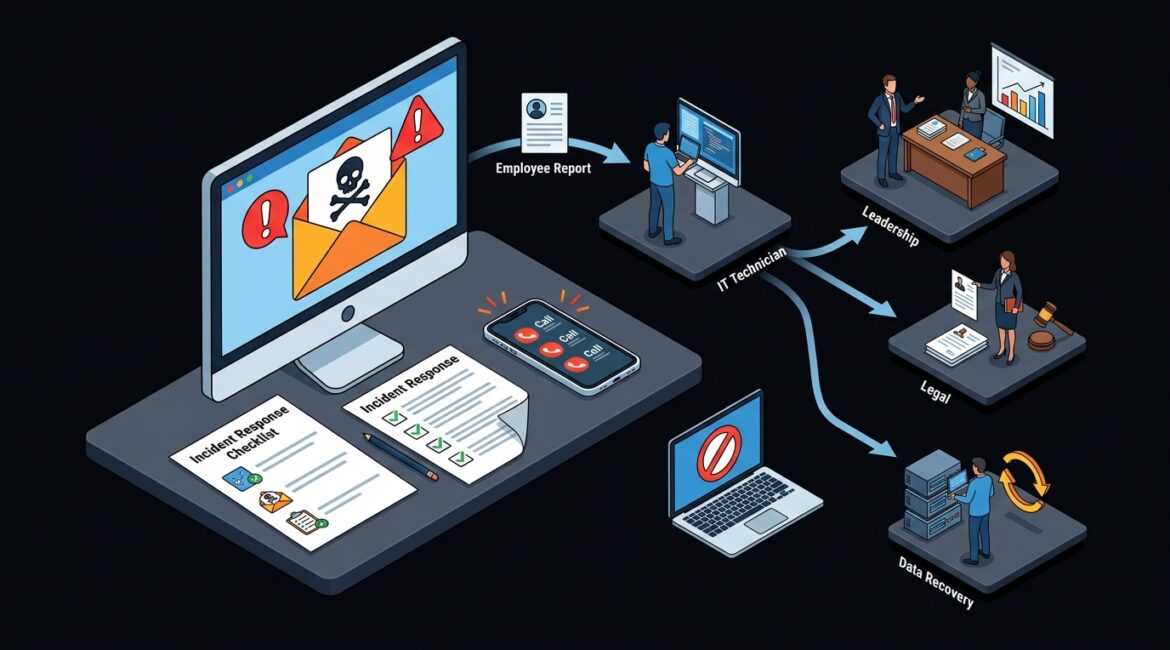
A security incident escalation process is the step-by-step plan your organization follows when a cyber issue needs immediate attention, higher-level decision making, or outside help. You need one because the difference between a minor event and a costly disruption often comes down to how quickly the right people are alerted and what they do next.
Many businesses already have security tools, backups, and IT support. What they often lack is a clear process for deciding when an issue moves from a help desk problem to a business risk. That gap creates delays, confusion, and unnecessary cost.
What a security incident escalation process actually means
In plain English, this process answers five basic questions:
- What happened?
- How serious is it?
- Who needs to know right now?
- Who is responsible for the next step?
- When do we bring in leadership, legal, insurance, or outside experts?
Without those answers, teams waste time debating whether an alert matters, who owns the response, or whether the issue can wait until morning. During a real incident, even a 30-minute delay can expand the scope of damage.
For example, if an employee at a Kenosha manufacturer clicks a malicious email link at 8:15 a.m. and their account starts sending phishing messages internally, the first few minutes matter. If the issue is escalated immediately, IT may be able to disable the account, block sign-ins, and contain the spread before production scheduling or vendor communications are affected. If no one is sure who to call, the problem can ripple across the business before lunch.
Why businesses struggle without a defined process
Most organizations do not fail because they do not care about security. They struggle because response decisions are often informal.
Someone notices something unusual. They send an email. Another person opens a ticket. A manager is copied later. Hours pass before anyone realizes the issue involves customer data, payroll access, or a cloud administrator account.
That kind of delay is expensive. Consider a professional services firm with 25 employees billing an average of $150 per hour. If a security issue locks staff out of email and file access for half a day, the productivity impact alone can exceed $15,000, before recovery costs, client communication, or reputational damage are added.
Nonprofits face the same problem from a different angle. A donor database compromise or fraudulent payment request may not stop operations entirely, but it can create reporting issues, donor trust concerns, and board-level questions that require a fast, coordinated response.
What should trigger escalation?
Not every alert needs executive involvement, but some events should move quickly beyond routine support. A good security incident escalation process defines clear triggers such as:
- Suspected phishing with credential theft
- Unusual login activity, especially from unfamiliar locations
- Ransomware or malware detection
- Unauthorized access to financial, client, patient, or donor data
- Loss or theft of a company device containing sensitive information
- Changes to administrator accounts or security settings
- Business email compromise or fake wire transfer requests
- Critical system outages tied to suspicious activity
The goal is consistency. Your staff should not have to guess whether something is serious enough to report. They should know the threshold in advance.
The core parts of an effective escalation process
1. Incident severity levels
Most businesses benefit from a simple severity model, often three or four levels. For example:
- Low: Suspicious event with limited impact and no confirmed compromise
- Medium: Confirmed issue affecting one user, device, or application
- High: Threat spreading, sensitive data at risk, or key operations affected
- Critical: Widespread outage, major compromise, ransomware, or legal and regulatory exposure
This structure helps teams respond proportionally instead of either underreacting or treating every alert like a crisis.
2. Roles and decision makers
Everyone should know who handles technical containment, who approves business decisions, and who communicates internally or externally. That may include:
- Internal IT or your managed service provider
- Operations leadership
- Executive leadership
- Finance leaders for payment fraud concerns
- HR if employee accounts or conduct are involved
- Legal counsel or cyber insurance contacts
- Outside incident response specialists
This is one reason good documentation matters. If you are missing clear system ownership, vendor contacts, or recovery procedures, start there. Our article on network documentation explains why documented environments reduce confusion when time matters.
3. Communication paths
An escalation process should define how incidents are reported and how updates are shared. Email alone is not enough if email may be compromised or unavailable. Many organizations use a combination of:
- Help desk ticketing for recordkeeping
- Phone calls or text messages for urgent escalation
- Secure messaging tools for response coordination
- Predefined contact lists for leadership and vendors
If communication paths are not planned in advance, people improvise under pressure. That rarely goes well.
4. Containment and recovery actions
Escalation is not just about notifying people. It should also connect to practical response steps such as disabling accounts, isolating devices, blocking malicious domains, restoring files, or shifting to backup workflows.
For example, a Northeast Illinois accounting firm hit by account compromise may need to reset credentials, review mailbox rules, verify recent client communications, and temporarily pause certain financial transactions. A manufacturer may need to isolate a workstation on the plant floor without disrupting an entire production line.
5. Post-incident review
Once the incident is contained, the process should require a review. What was missed? Did the alert reach the right people fast enough? Were backup contacts current? Did the team know their roles?
This review is where organizations turn a bad day into a smarter operating model. It also supports broader planning, similar to the proactive structure described in cybersecurity tabletop exercises, where teams practice decisions before a real event happens.
What a practical escalation workflow looks like
For many small and midsize organizations, the workflow looks something like this:
- An employee reports a suspicious email, login prompt, or device behavior
- IT or the MSP validates whether the event is benign, suspicious, or confirmed malicious
- The incident is assigned a severity level
- Defined contacts are notified based on that severity
- Containment actions begin immediately
- Business leaders decide on communication, downtime tolerance, and outside reporting needs
- Systems are restored and monitored
- The team documents lessons learned and updates procedures
That may sound simple, but simplicity is the point. In a real incident, complexity slows people down.
How this protects the business beyond cybersecurity
A security incident escalation process is really a business continuity tool. It protects revenue, operations, and decision making.
It also helps with:
- Downtime reduction: Faster containment usually means fewer affected users and shorter outages
- Financial control: Quicker response can stop fraudulent transactions or limit recovery costs
- Leadership confidence: Executives know when they will be contacted and what decisions they may need to make
- Compliance support: Organizations handling regulated or sensitive data can respond more consistently
- Vendor coordination: Outside providers know when to step in and what authority they have
It also aligns with broader technology governance. If your business is working to make more consistent decisions around systems, risk, and accountability, our article on technology governance is a useful next read.
Signs your current process needs work
You likely need to improve your escalation process if any of these sound familiar:
- Employees are unsure how to report suspicious activity
- Critical alerts sit in inboxes or ticket queues too long
- Leadership only hears about incidents after users complain
- Your IT provider has no documented severity levels or contact tree
- You have backups and security tools, but no tested response workflow
- No one has reviewed incident procedures in the last year
These are common issues, especially in growing businesses that have added systems, users, and cloud services faster than their internal processes have matured.
How Platinum Systems approaches escalation planning
At Platinum Systems, we view incident escalation as part of practical business risk management, not just a technical checklist. The right process should fit your size, industry, and operating reality.
A nonprofit with a small staff needs a clear plan that works even when people wear multiple hats. A Southeast Wisconsin manufacturer may need faster escalation around production systems and vendor access. A law firm or accounting practice may need tighter communication steps when client data or financial approvals are involved.
The important thing is to decide these things before an incident forces the decision for you.
Conclusion
A security incident escalation process gives your business a clear way to respond when something suspicious becomes something serious. It reduces confusion, shortens downtime, and helps leadership make better decisions under pressure.
If you’re ready to strengthen your technology, reduce risk, and plan for the future, contact Platinum Systems to schedule a technology strategy discussion.