

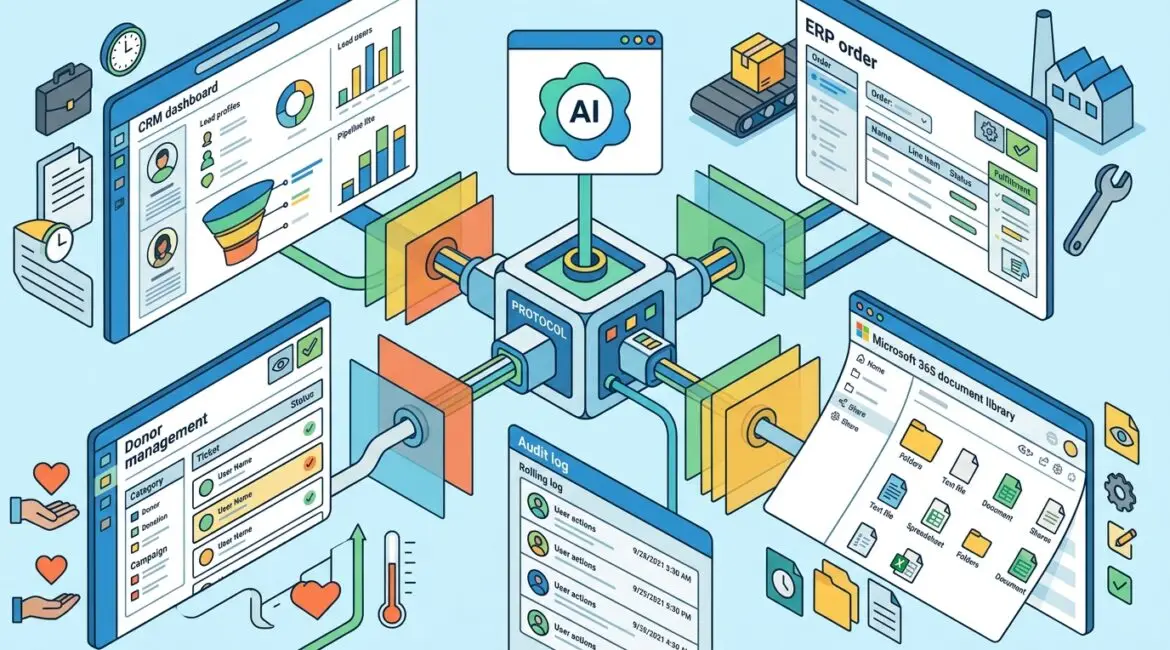
MCP, short for Model Context Protocol, is a standard that helps AI tools connect to business systems in a structured way. In plain English, it gives an AI assistant a safer, more consistent way to access information and take approved actions inside the tools your organization already uses.
For business leaders, the value is simple. Instead of copying data between systems or asking employees to hunt down answers manually, MCP can help AI pull the right information from the right place, with rules around what it can see and do.
What MCP means in practical terms
Think of MCP as a translator and traffic controller between an AI tool and your business applications. Your accounting platform, CRM, document system, help desk, ERP, or donor database all speak their own technical language. MCP provides a common framework so AI can interact with those systems more predictably.
Without a standard approach, every AI integration tends to become a one-off project. That creates extra cost, inconsistent security, and more support headaches later. With MCP, the goal is to make these connections more reusable, easier to govern, and easier to review.
How MCP works without the technical jargon
At a high level, MCP usually involves three parts:
- The AI assistant or application, which receives a question or request from a user
- An MCP-compatible connector or server, which knows how to talk to a specific business system
- The business system itself, such as Microsoft 365, a CRM, an ERP, a ticketing platform, or a file repository
Here is a simple example. A manager asks an AI assistant, “Show me open customer issues for our top five accounts and draft a follow-up summary.” If the assistant is connected through MCP to the CRM and help desk platform, it can retrieve the approved data, organize it, and prepare a response much faster than an employee switching between multiple screens.
The same idea can apply to internal operations. An office administrator could ask for expiring vendor contracts, a nonprofit director could request a donor activity summary, or a manufacturer could ask for delayed purchase orders and open service tickets in one place.
Why businesses are paying attention to MCP
Many organizations in Southeast Wisconsin and Northeast Illinois are interested in AI, but they are running into the same problem. AI is only useful if it can work with real business information, not just public web content or whatever an employee pastes into a chat window.
MCP matters because it can help solve that gap. It supports practical uses such as:
- Pulling answers from approved internal documents
- Summarizing activity across multiple systems
- Drafting emails, reports, or client updates using current business data
- Automating repetitive lookups and status checks
- Reducing manual re-entry between systems
That can save time, but it can also reduce errors. If a staff member spends 20 minutes a day gathering information from three systems, and you have 15 people doing similar work, that can add up to 75 hours a month. At a loaded labor cost of $35 per hour, that is more than $2,600 monthly tied up in repetitive information gathering.
Where MCP can help different types of organizations
Manufacturers
A manufacturer in Kenosha might have information spread across an ERP, quality documentation, shipping systems, and Microsoft 365. With the right controls, an AI assistant connected through MCP could help supervisors check order status, summarize maintenance logs, or find standard operating procedures faster.
That does not replace the ERP or production software. It helps employees get to the right information with less delay.
Nonprofit organizations
Nonprofits often work with lean teams and a patchwork of systems for fundraising, finance, volunteer coordination, and board reporting. MCP can help an AI assistant gather donor history, recent campaign notes, and upcoming grant deadlines into one summary, assuming access is properly limited.
For a small nonprofit, saving even five to ten staff hours per week can make a real difference. That time can go back into programs, donor communication, or event planning.
Professional service firms
Law firms, accounting firms, engineering companies, and consultants often need quick access to client files, emails, project notes, and billing data. MCP can help AI tools surface relevant information or draft internal summaries without requiring staff to search several platforms manually.
In environments where billable time matters, even small efficiency gains can be meaningful. If five professionals each recover 30 minutes a day, that can equal more than 50 hours a month in regained capacity.
What MCP does not solve by itself
MCP is useful, but it is not a shortcut around technology planning. If your systems are disorganized, access permissions are messy, or your data is poorly classified, connecting AI to those systems can create confusion faster.
Before adding AI connections, it helps to know:
- Which systems contain sensitive data
- Who should be allowed to access what
- Which actions should be read-only versus allowed to make changes
- How activity will be logged and reviewed
- What happens if a connection fails or returns bad information
This is one reason strong governance matters. If you have not already defined ownership and decision rules for business technology, our article on technology governance for small businesses is a useful place to start.
The security questions business leaders should ask
Any time AI is connected to business systems, the main question is not just “Can it connect?” It is “Should it connect, to what, and under what rules?”
Business leaders should ask these questions before approving an MCP-related project:
- What data will the AI be able to access?
- Will it be able to only read data, or also change records?
- How is user identity verified?
- Are permissions based on the employee’s role?
- Is activity logged for review and compliance?
- What vendors or third parties are involved?
- How are sensitive files, donor data, financial records, or client information protected?
Those questions are especially important if your organization handles regulated, confidential, or mission-critical information. Good access control and data classification become even more important when AI is introduced. For related reading, see our posts on data classification and secure vendor access.
Common mistakes to avoid
The biggest mistake is treating AI integration like a quick app install. Once AI can reach internal systems, you are dealing with security, workflow design, records access, and business risk.
Other common mistakes include:
- Connecting AI to too many systems at once
- Skipping access reviews
- Assuming old permissions are still appropriate
- Ignoring logging and audit needs
- Using sensitive data without clear retention rules
- Building around messy or duplicate data
A better approach is to start with one or two high-value use cases. For example, a service team might begin with read-only access to knowledge articles and ticket summaries. A finance team might start with invoice status lookups before considering anything more advanced.
How to evaluate whether MCP makes sense for your business
Not every organization needs MCP right away. The real question is whether your business has enough repeated information-handling work to justify a structured AI connection strategy.
MCP may be worth evaluating if:
- Your team spends a lot of time searching across multiple systems
- You want AI to use approved internal data instead of manual copy and paste
- You need more consistency in how AI tools access business information
- You want tighter control than employees using consumer AI tools on their own
- You are already planning process improvement or system integration work
If your environment is still fragmented, it may be smarter to first improve documentation, access controls, and system standardization. Our article on building an IT environment that is easier to manage covers that foundation well.
A practical way to start
For most small and midsize organizations, the right first step is not buying more AI tools. It is identifying a business process where employees lose time gathering information from multiple systems, then reviewing whether the underlying data, permissions, and workflows are ready.
That review should include business leadership, operations, and IT. The goal is to choose a use case that saves measurable time without creating unnecessary risk.
Examples include:
- Client or donor activity summaries
- Internal policy and document lookup
- Project status reporting
- Open ticket and asset visibility
- Order, invoice, or contract status checks
From there, you can decide whether MCP is the right framework, what systems should be connected, and what controls need to be in place before rollout.
Conclusion
MCP is a practical way to help AI connect with the systems your business already depends on, but the real value comes from planning those connections carefully. Done well, it can improve productivity, reduce manual work, and give your team faster access to useful information without losing sight of security and governance.
If you’re ready to strengthen your technology, reduce risk, and plan for the future, contact Platinum Systems to schedule a technology strategy discussion.