
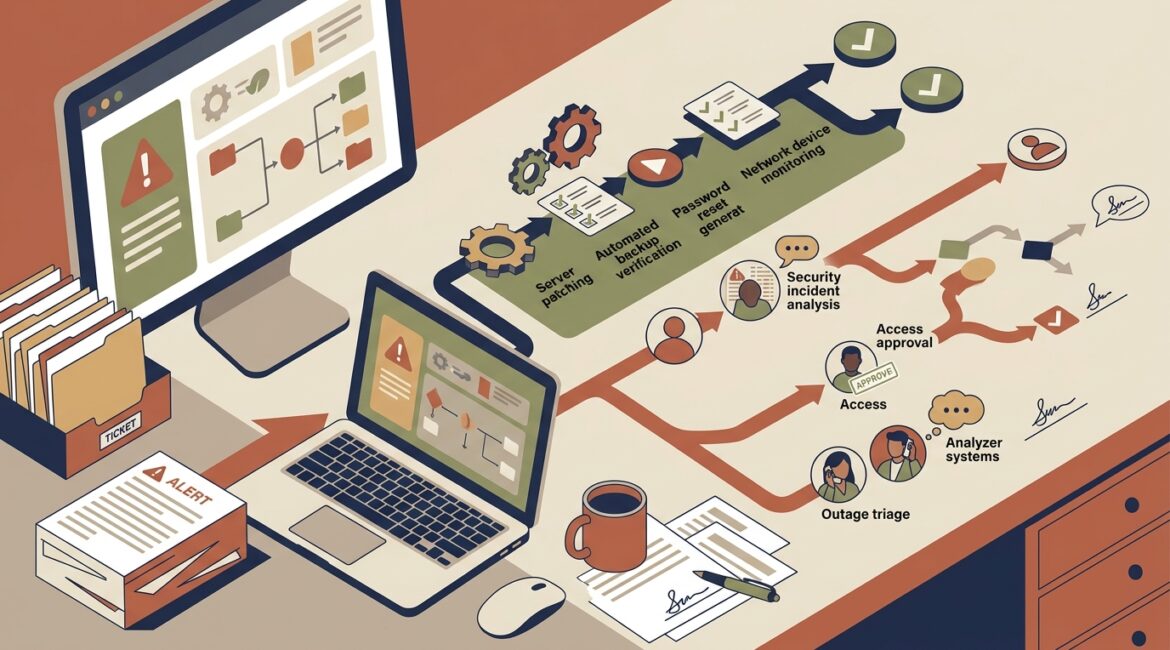
Some IT problems should be automated, especially the ones that are repetitive, predictable, and need a fast response every time. Problems that involve business judgment, unusual exceptions, security context, or employee communication usually still need a human involved.
That distinction matters because automation can save time and reduce mistakes, but only when it is used in the right places. If you automate the wrong task, you can create bigger issues faster, from locking out employees to interrupting production or mishandling sensitive data.
Start with a simple rule
A good rule of thumb is this: automate routine actions, not important decisions.
If a task happens often, follows the same steps every time, and has a clear expected outcome, it is usually a good automation candidate. If the situation changes from case to case or the cost of a wrong decision is high, a person should review it.
Good automation candidates usually have these traits
- Repetitive: The same issue shows up again and again
- Rules-based: The response follows clear logic
- Time-sensitive: Speed matters more than creativity
- Low ambiguity: There is little room for interpretation
- Easy to test: You can confirm whether it worked
Tasks that usually need a human have these traits
- Business impact: The issue affects revenue, operations, clients, donors, or compliance
- Exceptions: The situation does not fit a standard pattern
- Judgment: Someone must weigh tradeoffs
- Communication: Employees, vendors, or leadership need guidance
- Root cause analysis: The visible problem may not be the real one
What should usually be automated
Many of the best automation opportunities are behind-the-scenes IT tasks that employees barely notice when they are working properly. These are often the tasks that reduce downtime, improve consistency, and lower support costs over time.
1. Routine monitoring and alerts
Systems should automatically watch for offline servers, low disk space, failed backups, unusual sign-in attempts, and internet outages. Waiting for an employee to notice these issues wastes time and often turns a minor problem into a work stoppage.
For example, if a file server at a Kenosha manufacturer starts running out of storage at 2:00 a.m., an automated alert can trigger immediate action before the first shift arrives. Without that alert, production paperwork, inventory access, or shipping documents may be delayed for hours.
2. Software patching and updates
Routine operating system and application updates are a strong fit for automation when they are tested, scheduled, and monitored properly. Manual patching often gets delayed, which leaves security gaps and inconsistent systems across the business.
This is also one of the best ways to reduce configuration drift. If you want a deeper look at that problem, see what configuration drift is and why it is a security risk.
3. Account provisioning basics
When a new employee starts, many setup steps can be automated. Creating a standard Microsoft 365 account, assigning a license, adding the user to approved groups, and applying baseline security settings should not require someone to rebuild the same process manually every time.
A law firm, engineering office, or nonprofit can save hours each month by standardizing this work. It also reduces the chance that a new employee gets the wrong access or misses a required security setting.
4. Password resets and simple self-service requests
Not every support ticket needs technician time. Secure self-service password reset tools and automated access requests can reduce interruptions for both employees and IT staff, especially after hours or during busy periods.
If ten employees lose 20 minutes each waiting for simple account help, that is more than three hours of lost productivity in a single morning. Multiply that across a year, and the cost becomes easy to see.
5. Backup checks and recovery verification reminders
Backups themselves can run automatically, and backup failures should generate alerts automatically too. Scheduled reminders for recovery testing are also valuable because many businesses assume backups are working until they need them.
Automation is excellent at consistency. It is less reliable when assumptions need to be challenged, which is why backup review still needs human oversight.
What usually still needs a human
Automation works best when the system already knows what to do. A human is still essential when the right answer depends on context, priorities, or consequences.
1. Security incidents with unclear cause
An automated tool can isolate a device, block a sign-in, or flag suspicious activity. That is helpful. But deciding whether an event is a real breach, a false positive, or part of a larger pattern usually requires a trained person.
For instance, if a nonprofit finance director signs in from an unfamiliar location while traveling, the system may flag it. A human needs to verify whether it is legitimate travel, a compromised account, or a policy issue that should be addressed differently.
2. Access decisions for sensitive systems
Automation can follow role-based rules, but high-risk access decisions should not be fully hands-off. If someone requests access to donor records, payroll files, legal documents, or production control systems, a manager or security lead should approve it.
This is especially true for professional service firms and nonprofits that handle confidential client or donor information. The request may look simple on paper but carry serious privacy or compliance implications.
3. Root cause analysis during outages
When systems go down, automation can collect logs, restart services, and send alerts. What it cannot do reliably is understand the full business context of the outage.
If a manufacturer in Southeast Wisconsin loses access to an ERP system, the right response may depend on whether shipping is active, whether production can continue manually, and whether a vendor change triggered the problem. Those decisions require coordination, not just scripts.
4. Technology planning and prioritization
No automation platform should be deciding your annual technology priorities. Choosing whether to replace aging firewalls, improve remote access, consolidate software, or add internet redundancy is a business decision informed by IT, not an automated one.
That is where planning matters most. Businesses that want fewer surprises should review how to build an annual IT planning calendar for your business and align technology work with budgeting, operations, and risk.
5. Employee support when the issue is not technical
Many support requests are partly technical and partly human. A user may say, “the system is broken,” when the real issue is a workflow change, unclear training, or a process that no longer fits the business.
A script cannot coach a frustrated employee, clarify expectations, or spot that a repeated support problem is really an operations problem. Good IT support includes listening, not just fixing.
How to decide before you automate
Before automating any IT task, ask a few practical questions.
Questions leaders should ask
- How often does this happen? High-frequency tasks are stronger candidates
- Is the process standardized? If every technician handles it differently, automate later
- What happens if the automation is wrong? A bad automated action can spread fast
- Can we test it safely? Good automation should be piloted and measured
- Who owns exceptions? Every automated process needs a human fallback
- Does this improve the business, or just reduce clicks? Focus on outcomes, not novelty
This last point is important. Saving five technician minutes is nice. Preventing two hours of staff downtime during payroll processing is much more valuable.
Think in terms of risk, cost, and interruption
Business leaders do not need to evaluate automation at the code level. They need to evaluate it at the business level.
For example:
- Low-risk, high-volume task: Automate laptop patching across 60 devices
- High-risk, low-frequency task: Require human approval before changing firewall rules
- Moderate-risk, time-sensitive task: Automate suspicious login alerts, but route investigation to a person
A useful way to frame the decision is to ask whether the task is primarily about speed or judgment. Automation is usually better at speed. Humans are usually better at judgment.
The best results come from a blended approach
The goal is not to replace people with tools. The goal is to let automation handle the repetitive work so skilled people can focus on higher-value decisions, problem-solving, and planning.
That often leads to better service and lower cost at the same time. It also supports a more manageable environment overall. If your systems feel overly complex, our article on how to build an IT environment that is easier to manage offers a practical framework.
For many organizations in Northeast Illinois and Southeast Wisconsin, the real opportunity is not buying more tools. It is choosing where automation will reduce friction without creating blind spots.
Conclusion
The right IT tasks to automate are the ones that are repetitive, predictable, and easy to standardize. The tasks that still need a human are the ones tied to judgment, exceptions, business priorities, and meaningful risk.
If you are not sure whether your current IT processes are saving time or quietly creating new problems, it may be time for a closer review. If you’re ready to strengthen your technology, reduce risk, and plan for the future, contact Platinum Systems to schedule a technology strategy discussion.