

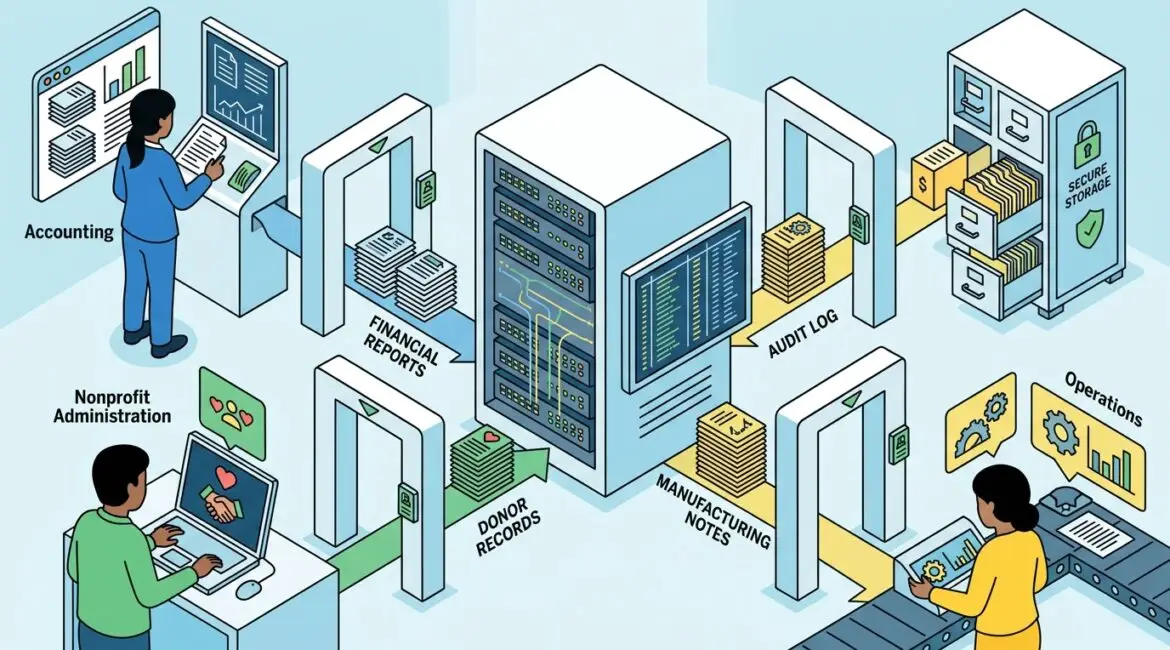
Private AI can protect sensitive business data by keeping your prompts, files, and results inside a controlled environment instead of sending them into public AI tools with unclear data handling. For many businesses, that means better control over who can access information, where it is stored, how it is logged, and whether it is used to train outside systems.
If your team wants the productivity benefits of AI but you are concerned about client confidentiality, financial records, donor data, or internal documents, private AI is often the more practical path.
What private AI means in plain English
Private AI is an AI system set up for your organization’s use with tighter control over data, users, and integrations. It may run in a private cloud, a dedicated tenant, or another managed environment where your business has clear rules around storage, retention, access, and monitoring.
That is different from a public AI tool where employees may paste sensitive information into a chatbot without knowing exactly where that data goes, how long it stays there, or whether it could be used to improve a broader model.
In practice, private AI usually includes:
- Restricted access so only approved users can use the system
- Identity controls tied to business accounts instead of personal logins
- Data handling rules for what can be uploaded, stored, or shared
- Logging and auditing so leadership can review usage if needed
- Approved integrations with business systems instead of random third-party apps
For a manufacturer in Southeast Wisconsin, that could mean engineers using AI to summarize maintenance records or production notes without exposing proprietary process information. For a nonprofit in Kenosha, it could mean drafting grant language or donor communications without placing donor records into an open consumer tool.
Why public AI tools create business risk
Public AI platforms are easy to access, which is exactly why they can become a problem. Employees often start using them before leadership has set any rules. The result is convenience first, governance later.
The main issue is not that every public AI tool is unsafe. The issue is that many businesses do not know what data is being entered, who is entering it, or whether the tool meets their legal, contractual, or client confidentiality obligations.
Common risks include:
- Employees pasting customer lists, contracts, HR notes, or financial reports into public chat tools
- Unapproved browser extensions or AI apps connecting to company accounts
- Loss of control over confidential intellectual property
- Weak audit trails when questions come up later
- Difficulty enforcing retention and deletion policies
A law office, accounting firm, or architecture firm may not discover the problem until a client asks where their information was processed. By then, the business is already reacting instead of planning.
How private AI protects sensitive information
Private AI reduces risk by putting boundaries around how AI is used. It does not remove all risk, but it gives your organization a much better chance of using AI responsibly.
1. It limits where sensitive data goes
When AI use is routed through an approved environment, your team is less likely to paste business data into unknown tools. That helps protect client records, pricing information, employee files, donor details, and internal documents.
Think of a professional services firm preparing a proposal with confidential client background information. In a private AI setup, that work can stay within a managed environment tied to company security policies.
2. It improves access control
Not every employee should be able to use every dataset with AI. A private AI environment can be tied to role-based access, so finance staff can work with financial information while HR data stays limited to authorized users.
This is where identity planning matters. Businesses already working on access control and account security often have an easier time rolling out private AI safely. Our article on Microsoft Entra ID for business security covers part of that foundation.
3. It creates a record of usage
Logging matters. If a business leader needs to review who accessed a tool, what system it connected to, or whether a file was uploaded, a private AI environment is far more likely to provide that visibility.
That is especially useful for organizations with board oversight, compliance expectations, or cyber insurance requirements. It also supports internal accountability without making daily work harder than it needs to be.
4. It supports data classification rules
Private AI works best when your business has already decided what data is public, internal, confidential, or restricted. If your team does not know which information is sensitive, it is hard to protect it in any system, including AI.
That is why data governance should come before broad AI adoption. If you need a starting point, see our post on data classification for businesses.
5. It reduces shadow IT
When employees do not have an approved AI option, they often find their own. That can lead to software sprawl, inconsistent results, duplicate subscriptions, and hidden security gaps.
Providing a managed private AI option gives staff a safer way to get help with drafting, summarizing, research, or workflow support without creating a patchwork of unapproved tools.
What this looks like in real businesses
Manufacturer
A manufacturer in Northeast Illinois wants supervisors to summarize machine maintenance logs and shift reports. Public AI might save time, but those records could contain production details, vendor references, or quality issues. A private AI environment allows the company to automate summaries while keeping operational data inside approved systems.
Nonprofit organization
A nonprofit uses AI to draft donor thank-you letters, event recaps, and grant outlines. With private AI, staff can work faster while reducing the chance that donor names, giving history, or internal funding strategy ends up in a public platform.
Professional services firm
A CPA firm wants AI help organizing meeting notes and preparing first-draft client communications. A private setup can limit access to tax-related content, log activity, and keep client information under stronger control.
Private AI is not only about security
Security is the main reason many leaders start this conversation, but it is not the only benefit. A well-planned private AI environment can also improve consistency, reduce rework, and save time.
For example, if five managers each spend 30 minutes a day summarizing notes, emails, or reports, that adds up quickly. Across a small team, even a modest time savings can return dozens of hours per month. The value becomes even clearer when those efficiency gains happen without creating new data exposure problems.
That said, private AI should be evaluated like any other business system. Consider cost, risk, oversight, support requirements, and long-term fit. We encourage clients to make these decisions with measurable business metrics, not hype. Our post on making better technology decisions with business metrics is a helpful framework.
Questions to ask before adopting private AI
If you are evaluating private AI, start with business questions before technical ones.
- What data do we want employees to use with AI?
- What data should never be entered into AI tools?
- Who needs access, and at what level?
- Do we need audit logs or reporting?
- How will AI connect to file storage, email, or business applications?
- What policies and training need to come first?
- What would a mistake cost us in downtime, client trust, or cleanup time?
Even a single data handling mistake can become expensive. If an employee uploads confidential files into the wrong tool and you need legal review, incident response, internal investigation, and client communication, the cost can easily exceed the price of setting up safer controls in the first place.
Where businesses often go wrong
The most common mistake is letting AI adoption happen informally. One department starts using it, then another, and before long no one has a clear picture of what tools are in use or what data is being shared.
Another mistake is treating private AI like a stand-alone purchase. It should be part of a broader technology strategy that includes identity management, secure file storage, acceptable use policies, and ongoing governance. If your environment is already hard to manage, AI can add another layer of complexity unless it is planned carefully.
A practical way to move forward
For most organizations, the right next step is not a company-wide AI rollout. It is a structured review of where sensitive data lives, how employees already use AI, and what controls need to be in place first.
That may include:
- Reviewing current AI usage across departments
- Identifying high-risk data types
- Defining approved and prohibited use cases
- Choosing a managed private AI approach
- Setting access, logging, and retention rules
- Training staff on safe use
Private AI can be a smart move for businesses that want the benefits of AI without giving up control of sensitive information. The key is to treat it as a business decision, not just a software feature.
If you’re ready to strengthen your technology, reduce risk, and plan for the future, contact Platinum Systems to schedule a technology strategy discussion.
Platinum Systems helps organizations across Southeast Wisconsin and Northeast Illinois make practical technology decisions that support security, productivity, and long-term stability. If you would like guidance on whether private AI fits your environment, we are happy to help you evaluate the next step.