

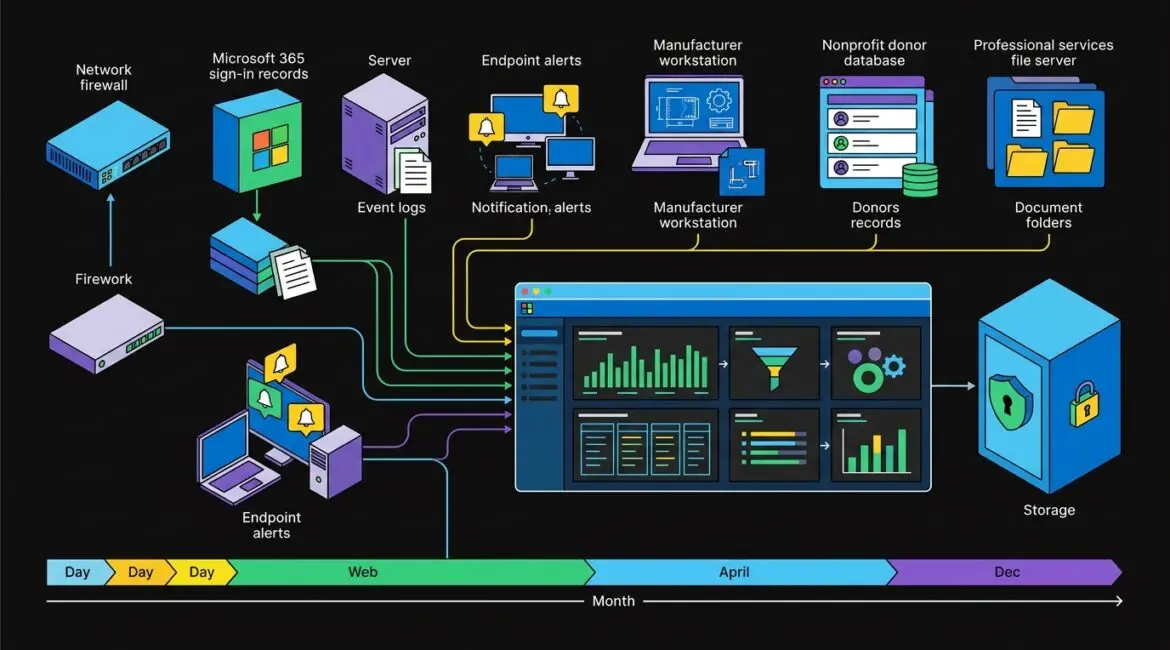
Security logging is the practice of recording important activity across your computers, servers, cloud apps, firewalls, and user accounts so you can see what happened, when it happened, and who was involved. Most businesses should keep at least some security logs for 90 days to one year, but the right answer depends on compliance rules, cyber risk, investigation needs, and storage costs.
If that sounds technical, think of logs as the security camera footage of your IT environment. When something goes wrong, logs help answer basic business questions fast instead of leaving your team guessing.
What security logs actually track
A log is simply a record of an event. That event might be a successful login, a failed password attempt, a file being deleted, a firewall blocking suspicious traffic, or an employee gaining access to a new system.
Good logging helps your business reconstruct events after a problem. It also helps your IT team spot warning signs before a small issue turns into downtime, data loss, or a compliance problem.
Common examples of logged activity
- User sign-ins and sign-out activity
- Failed login attempts
- Administrative changes to systems or settings
- File access, deletion, and permission changes
- Firewall, antivirus, and endpoint security alerts
- Email security events such as blocked attachments or suspicious senders
- Remote access sessions by employees, vendors, or IT support
- Cloud application activity in Microsoft 365 and other SaaS platforms
For many organizations, the value is not in one isolated log entry. It is in seeing the full sequence of events across multiple systems.
Why security logging matters to business leaders
Security logging is not just an IT housekeeping task. It supports decision-making, incident response, insurance claims, audits, and day-to-day operations.
Without useful logs, a business may know that something happened but not know how it happened, how far it spread, or whether it is still happening. That uncertainty costs time and money.
What logs help you do
- Investigate security incidents faster
- Reduce downtime by narrowing the source of a problem
- Support compliance and audit requests
- Verify whether a policy or control is working
- Document activity for legal, HR, or insurance needs
- Spot unusual behavior before it becomes a larger incident
Consider a professional services firm in Kenosha that discovers a suspicious login to Microsoft 365 on Monday morning. If the business has no retained sign-in logs, it may not know whether the login came from a real employee, a stolen password, or a risky third-party app. If the firm does have logs, IT can often trace the source, scope, and timing much faster and decide whether it is an isolated event or part of a broader compromise.
The same applies to a manufacturer in Southeast Wisconsin. If a server suddenly slows down on the plant floor, logs may show whether the issue came from a software update, a failed disk, unauthorized access, or a flood of network traffic. That can be the difference between a short interruption and a half day of lost production.
How long should businesses keep logs?
There is no single retention period that fits every business. A small office with basic cybersecurity needs will not keep the same volume of logs as a regulated healthcare provider, financial firm, or nonprofit handling donor and payment data.
That said, a practical starting point for many small and midsize organizations is:
- 30 to 90 days for high-volume logs that support short-term troubleshooting
- 90 days to 1 year for core security logs such as sign-ins, firewall events, endpoint alerts, and administrative changes
- 1 year or longer when compliance, cyber insurance, legal obligations, or internal policy require longer retention
Many businesses discover problems weeks or months after they begin. If logs are deleted too quickly, the evidence disappears before anyone starts investigating.
Factors that should drive retention decisions
- Compliance requirements such as HIPAA, PCI, or contractual obligations
- Cyber insurance expectations
- Industry risk level
- How long it typically takes to detect issues
- Storage costs and log management tools
- Legal or HR documentation needs
- The importance of the systems being logged
If your organization has never defined retention rules, that is a governance gap. It often makes sense to address it as part of broader planning, similar to the approach outlined in technology governance for small businesses.
What happens when retention is too short
Short retention saves storage space, but it can create expensive blind spots. A business may not realize an attacker had access for 45 days until day 46. If the logs only go back 30 days, the most useful evidence is already gone.
That can lead to:
- Longer investigations
- Higher incident response costs
- More downtime
- Incomplete insurance or audit documentation
- Uncertainty about what data was affected
Imagine a 25-person accounting firm billing an average of $175 per hour per employee. If a cyber incident leaves key staff partially idle for just one day while outside experts piece together incomplete evidence, the productivity hit alone can quickly reach several thousand dollars, before legal review, client communication, or recovery work are added.
What happens when retention is too long
Keeping everything forever is not automatically better. Long retention can increase storage costs, create clutter, and make it harder to find useful information. It can also preserve sensitive records longer than necessary.
The goal is not maximum data hoarding. The goal is keeping the right logs, in the right place, for the right amount of time.
A balanced approach usually includes
- Prioritizing critical systems first
- Separating high-value security logs from low-value noise
- Using summarized or archived storage for older data
- Reviewing retention rules annually
This is one reason visibility matters. If your business cannot see what systems generate logs or which logs are actually useful, retention decisions become guesswork. Our article on network visibility covers that challenge from a broader operational perspective.
Which logs matter most for small and midsize businesses
Not every log source deserves the same attention. For most organizations, start with the systems that affect access, security, and business continuity.
High-priority log sources
- Identity and access systems such as Microsoft 365, Entra ID, VPN, and remote access tools
- Firewalls and network security appliances
- Endpoint protection on laptops, desktops, and servers
- Backup and recovery platforms
- Critical file storage and collaboration systems
- Line-of-business applications with sensitive data
For nonprofits, donor systems and finance platforms often belong on that list. For manufacturers, production-supporting servers and remote vendor access are especially important. For law firms and other professional service firms, email, file access, and identity logs are usually top priorities.
Security logging works best when it is part of a plan
Logging by itself does not reduce risk unless someone has decided what to collect, where to store it, how long to keep it, and who reviews alerts. This is where many businesses struggle. They may have logging turned on in several tools, but no clear policy behind it.
A practical logging strategy should answer a few basic questions:
- Which systems are critical to operations?
- Which events need to be logged?
- How long should each log type be retained?
- Who reviews alerts and exceptions?
- How are logs protected from tampering or accidental deletion?
- How will logs be used during an incident?
This kind of planning fits naturally into annual IT reviews and budgeting. If you are formalizing that process, an annual IT planning calendar can help make sure retention, monitoring, and security reviews do not get postponed until after a problem.
How Platinum Systems helps businesses think about logging
At Platinum Systems, we view security logging as a business control, not just a technical setting. The right approach should match your operational risk, compliance needs, and budget. It should also support faster troubleshooting and clearer decision-making when something unexpected happens.
For organizations across Southeast Wisconsin and Northeast Illinois, that often means simplifying what gets collected, improving visibility into critical systems, and setting retention policies that are realistic to manage over time.
Conclusion
Security logging gives your business a reliable record of what is happening across your technology environment. The right retention period depends on your industry, risk level, and obligations, but keeping useful logs for too short a time can make incidents far more expensive to investigate and recover from.
If you’re ready to strengthen your technology, reduce risk, and plan for the future, contact Platinum Systems to schedule a technology strategy discussion.